

Journée des solutions Synology 2026 : Feuille de route pour la surveillance, le cloud hybride et la recherche par IA
Récapitulatif du Solution Day 2026 : liaison cloud hybride de Synology, recherche IA sur DVA, contrôle d’accès, commutateurs PoE et nouveaux dômes, et ce qui est déjà disponible par rapport à ce qui le sera prochainement.

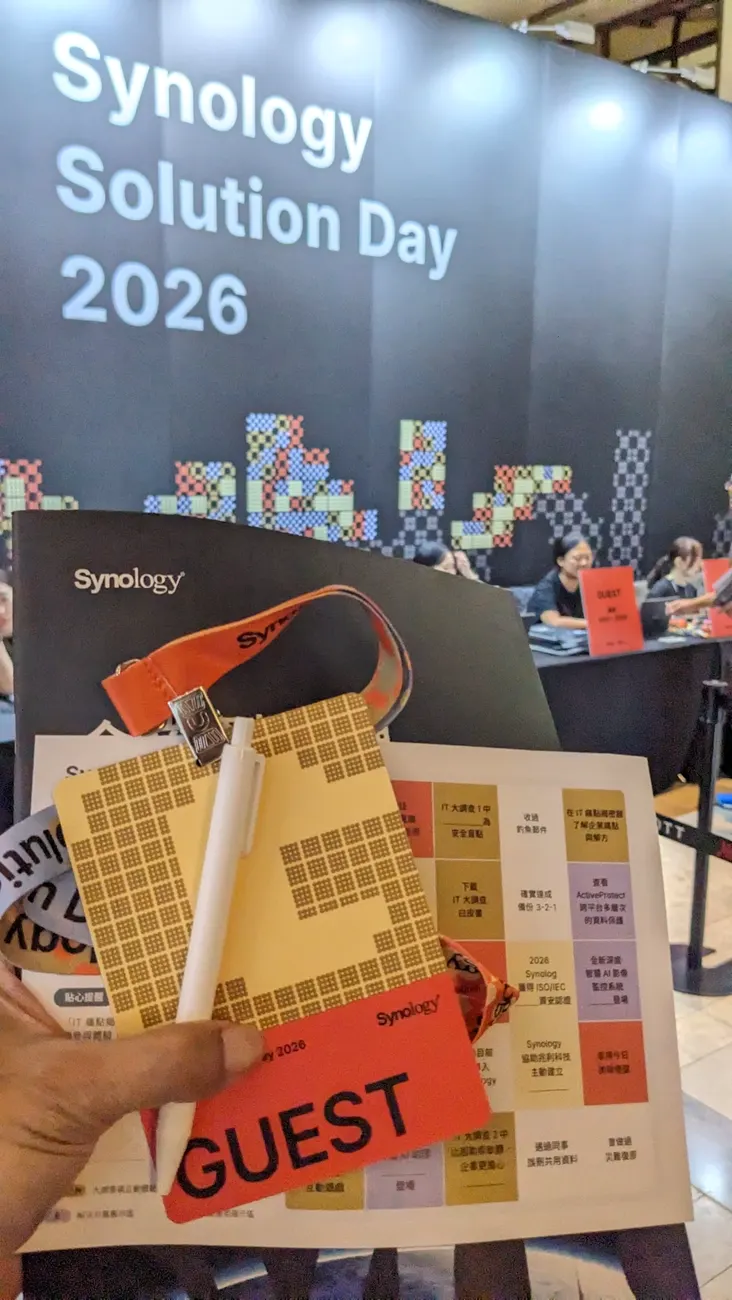
Synology Solution Day 2026 took place in Taipei on 23 September, and its surveillance session was the clearest statement yet of where Synology is taking Surveillance Station. Product manager Nini Hsieh spent 31 minutes on three problems — deployment, management and search — and answered each with something new: a hybrid link between Surveillance Station and the Surveillance365 cloud, a one-vendor hardware line that now includes access control and PoE switches, and AI search that finds a person across every camera in minutes. I was in the room for the whole Solution Day session. This recap separates what you can buy today from what is still marked coming soon, with photos and clips I took during the live demos.
Point SynoPower Club : I spent years on the support side of Synology, and the tickets that hurt most were never about missing features. They were the camera in the corner that had been dead for a month before anyone needed its footage, and the customer running two systems who could not see both on one screen. What struck me at Solution Day is that the two coming-soon features I would rank highest — proactive health monitoring and the hybrid cloud link — go straight at those two tickets. The AI search got the applause, but those two are the ones that stop footage from going missing.
Table des matières
What Synology Announced at Solution Day 2026
The session was titled “Expanding the smart surveillance ecosystem: cloud and on-premises, protecting enterprise sites together”. Synology opened with its credentials: 18 years in video surveillance, a largest single customer running more than 2,000 sites and 25,000 cameras, and a customer list it says includes more than half of the Fortune 500. Everything that followed fell into two groups.
Available now
- Surveillance365, the cloud VSaaS platform, officially launched in July 2026.
- Five Synology cameras: CC410W Wi-Fi (4MP), BC510 bullet and TC510 turret (5MP), FC600 360-degree fisheye (6MP) and the BC800Z varifocal bullet (8MP, 4K). The first four connect to Surveillance365 directly.
- Synology microSD cards in three capacities, with health monitoring so a worn card does not quietly stop recording.
- DVA1622 and DVA7400 deep-learning NVRs, and the PS500, Synology’s first PoE switch.
- Semantic and attribute search on DVA models, which arrived with Surveillance Station 9.3.
Announced as coming soon
- Hybrid cloud: Surveillance Station servers managed and viewed from Surveillance365.
- Access control: the AC100 door controller and the AR300 and AR100 readers.
- Managed PoE switches: PS1000+ and PS2600+.
- Three dome cameras: DC500Z, DC800 and DC400.
- DVA3000, a mid-range deep-learning NVR.
- Proactive system health monitoring, an embedded browser in the monitoring view, ONVIF Profile T and Profile M by the end of the year, and retail analytics such as customer paths and dwell-time heat maps.
No dates or prices were given for any coming-soon item, which matters later in this article.
Surveillance Station or Surveillance365 After Solution Day?
The most useful thing said on stage was an admission: Surveillance Station is not the right answer everywhere. Some sites simply have no place for a server. Synology’s answer at Solution Day is two platforms that now join up, rather than one product stretched to fit both cases.
| Poste de surveillance | Surveillance365 | |
|---|---|---|
| Là où ça court | On a Synology NAS or DVA, on your premises | Synology cloud, viewed in a browser or the mobile app |
| Appareils photo | 20,000+ models from 200+ brands via ONVIF | Synology cameras only (CC410W, BC510, TC510, FC600) |
| Enregistrement | NAS disks, with long retention at low cost | microSD in the camera, optional C2 cloud backup |
| Licence | 2 free, then one device license per camera | No license with Synology cameras on the Standard plan |
| Idéal pour | Headquarters, warehouses, mixed-brand fleets | Fast-growing branches with no IT on site |
The retail example at Solution Day made the split concrete. A chain keeps 180 days of footage at headquarters and in its warehouse, so those sites run Surveillance Station for the lower long-term storage cost. Its shops open too fast for anyone to install servers, so their cameras go straight to Surveillance365. The hybrid link then shows all three on one screen. If you are weighing Surveillance365 on its own, our walkthrough covers it in depth: Tutoriel Synology Surveillance365.
How the Hybrid Cloud Link Works
The Solution Day demo used two cameras pointed at the audience. One, called “cloud friend”, was paired straight to Surveillance365. The other sat on a DS925+ running Surveillance Station. The goal was to see both halves of the room in one place.
The linking happens inside the CMS application of Surveillance Station, under cloud management, by signing in to a Surveillance365 account. Once the NAS is paired it appears under NAS management in Surveillance365, and from there the demo showed three things I did not expect from a cloud console: updating the Surveillance Station package on the NAS remotely, listing its cameras, and pushing any of those cameras up to the cloud view with cloud backup switched on. A minute later both cameras sat side by side in the Surveillance365 monitor centre.
One caveat. Surveillance Station 9.3 already added Surveillance365 as its cloud backup target, which our release breakdown covers: Surveillance Station 9.3 update guide. The full two-way management shown at Solution Day was presented as upcoming, so check the Surveillance Station release notes for the version that adds it before you plan around it.
Setting Up the Solution Day Hybrid Link in 4 Steps
These are the steps exactly as demonstrated on stage. Menu names may shift slightly once the feature ships.
Prepare both sides
Update Surveillance Station on the NAS to the version that includes hybrid cloud management, and make sure you have a Surveillance365 account. A Synology camera already paired to Surveillance365 is useful for testing but not required.
Sign in from CMS
In Surveillance Station, open the CMS application, go to cloud management and sign in with the Surveillance365 account. Wait for the pairing to complete before leaving the page.
Choose which cameras go to the cloud
In Surveillance365, open NAS management and select the paired NAS. Its camera list appears there. Add the cameras you want visible in the cloud, and enable cloud backup for them if you need an off-site copy.
Check the combined view
Open the monitor centre in Surveillance365 and confirm that cloud cameras and NAS cameras now appear together. Test playback on one camera from each side before relying on it.
AI Search: Minutes Instead of Hours
Anyone who has pulled footage after a break-in knows the routine: hours of scrubbing, one camera at a time, then stitching the timeline together by hand. Synology’s answer is three search tools that work together.
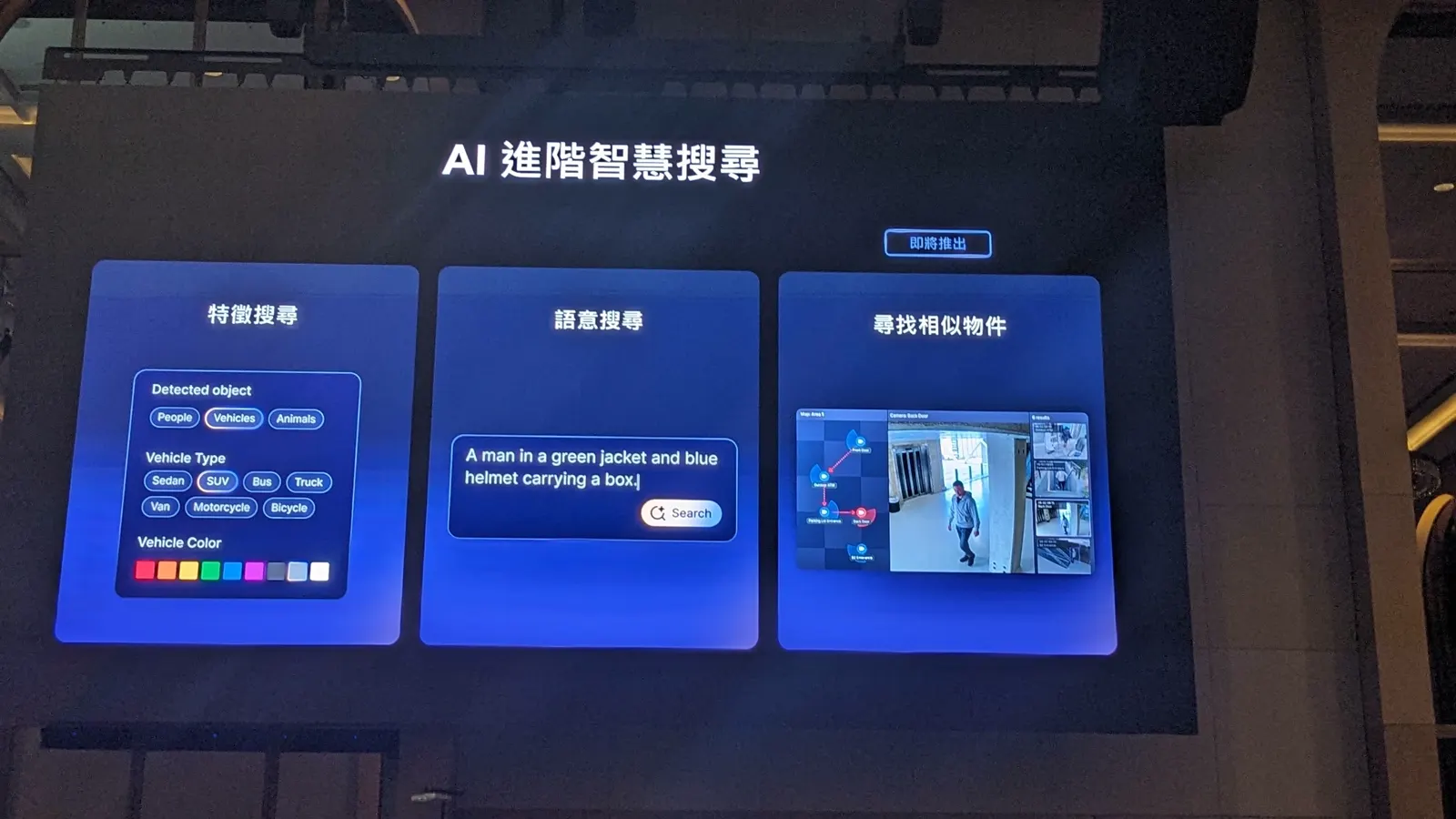
- Attribute search narrows results by what the AI detected: people, vehicles or animals, vehicle type such as sedan, SUV, bus or truck, and colours of clothing or vehicles.
- Semantic search takes a plain sentence. The slide example was “a man in a green jacket and blue helmet carrying a box”.
- Find similar objects takes one person you have already found, searches every camera for them and draws their route on a map.
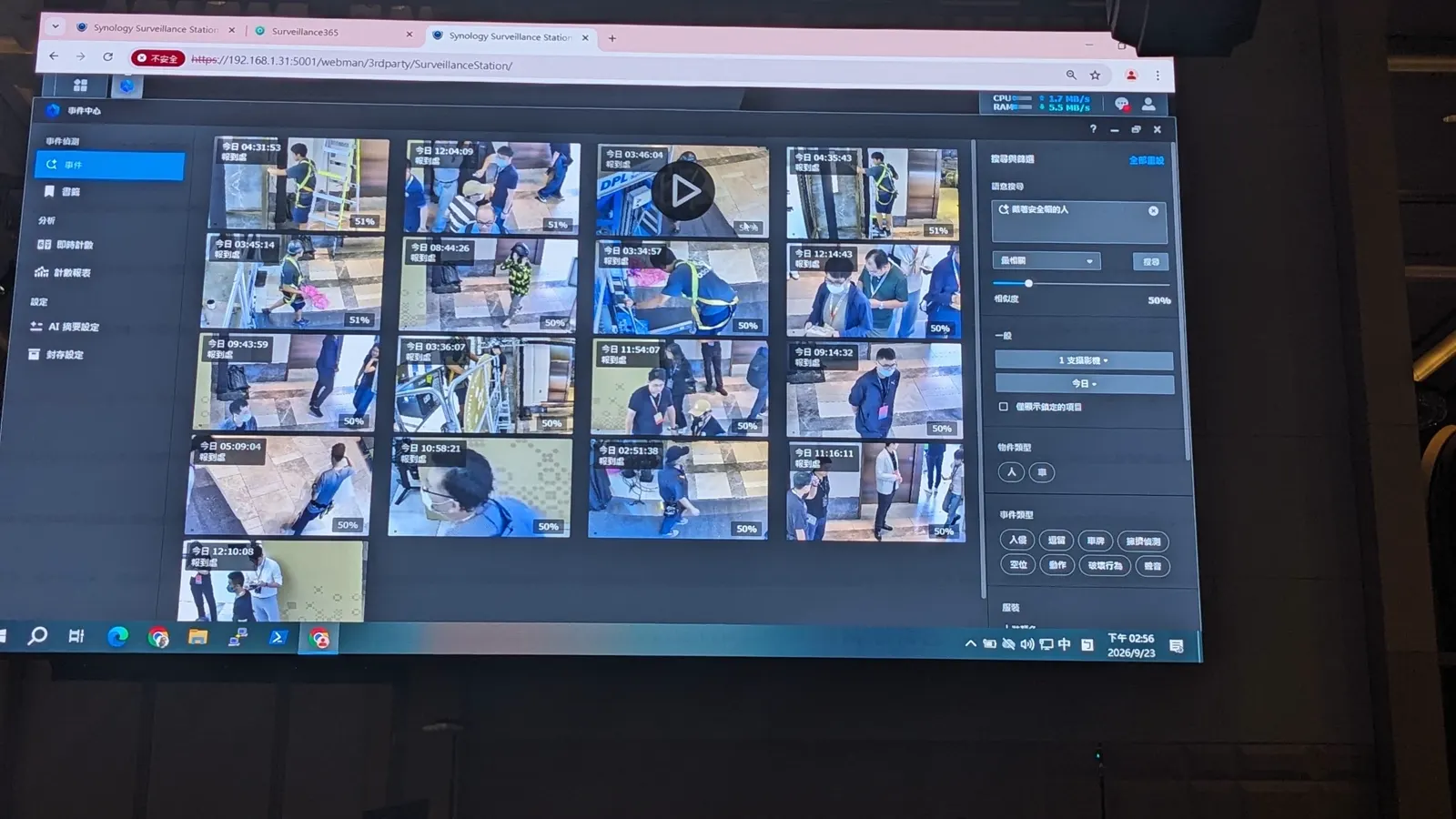
The Solution Day search demo was staged, but it was a good one. Colleagues had reported someone in a safety helmet wandering past the registration desk that morning. Nini filtered Event Center to the registration camera and today’s date, typed a description of a person wearing a helmet, and the suspect appeared among the results. One click on find similar objects traced him from registration, down the corridor and into the seating area, where he picked up a box of hard drives and walked off with it. The results were bookmarked, locked against rotation and downloaded as evidence in a few more clicks.
DVA Lineup and Which Model Does What
Upgrading to AI does not mean replacing cameras. Synology’s two routes are either swapping cameras for Synology AI cameras where analysis is needed, or keeping the existing cameras and replacing the NAS behind them with a DVA. The DVA range grows to three models:
| Modèle | Appareils photo | AI tasks | Attribute search | Semantic search | Find similar |
|---|---|---|---|---|---|
| DVA1622 | 16 | 2 | Non répertorié | Non répertorié | Non répertorié |
| DVA3000 (coming) | 60 | 16 | Oui | — | Oui |
| DVA7400 | 100 | 40 | Oui | Oui | Oui |
| DC500Z / DC800 / DC400 (coming) | — | On camera | Oui | — | — |
The search support comes from the comparison slide shown at Solution Day after the demo. The DVA7400 is the only model with all three tools; the new domes run attribute analysis on the camera itself. Beyond search, the DVA platform covers person and vehicle detection, intrusion, crowding and smoke detection, auto tracking, instant search, license plate and face recognition, and people and vehicle counting.
The case study for this section came from Japan. A Chiba taxi association installed a DVA1622 at JR Maihama, the station for Tokyo Disneyland, to count passengers against taxi demand and schedule cars accordingly. Average taxi waiting time per passenger fell by 50%. That is the kind of number that turns an AI line item into an easy approval.
New Hardware: Domes, Access Control and PoE Switches
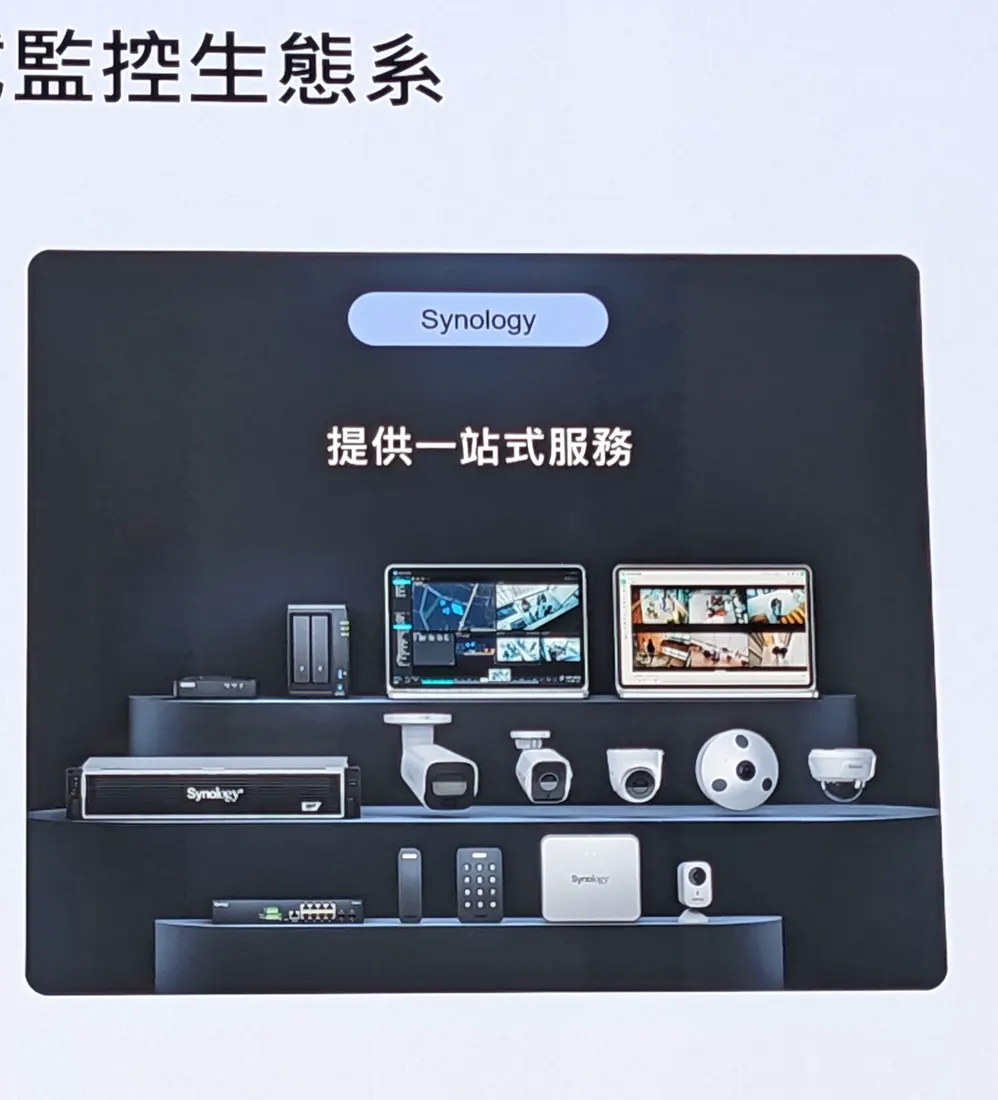
The Solution Day pitch for all of this hardware was one vendor instead of five. When cameras, switches, readers and the recording server come from different companies, a fault means several support calls. Synology wants to be the single number you ring.
Access control
The AC100 single-door controller is the brain of the system. It supports OSDP and Wiegand, so it works with third-party card readers as well as Synology’s own. The AR300 adds a PIN keypad, the AR100 is the slim version, and both support phone-based credentials for touch-free entry. Cards, key fobs and electric locks complete the kit, and everything is configured inside Surveillance Station rather than in a separate access control product.
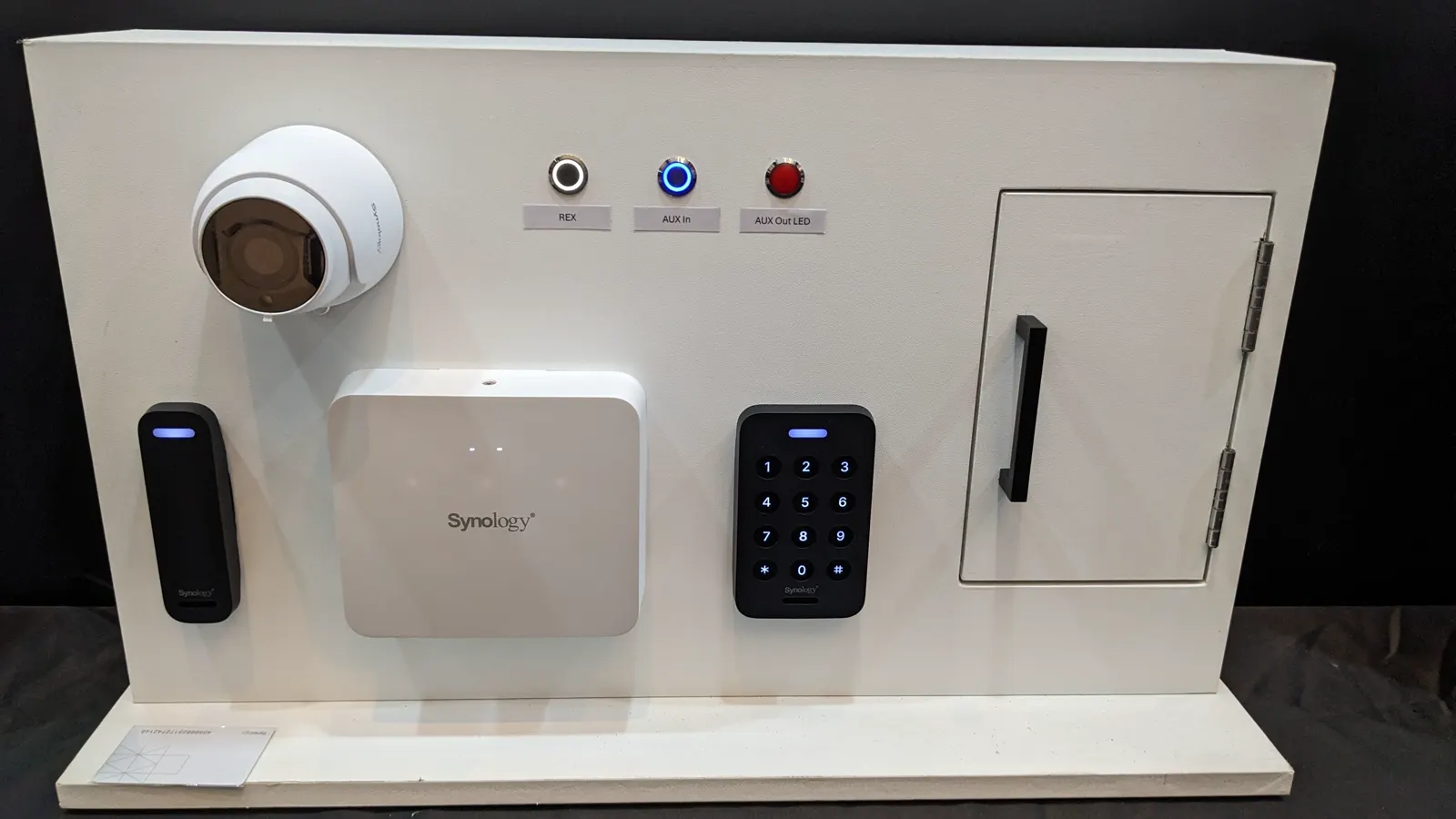
PoE switches and domes
The PS500 is a small plug-and-play PoE switch for compact installations, available now. The managed PS1000+ and PS2600+ are coming, with features such as VLANs. On the camera side, three domes are on the way for sites that want a less obvious camera: the DC500Z and DC800 carry IK10 vandal resistance, and all three will work with Surveillance365 from launch.
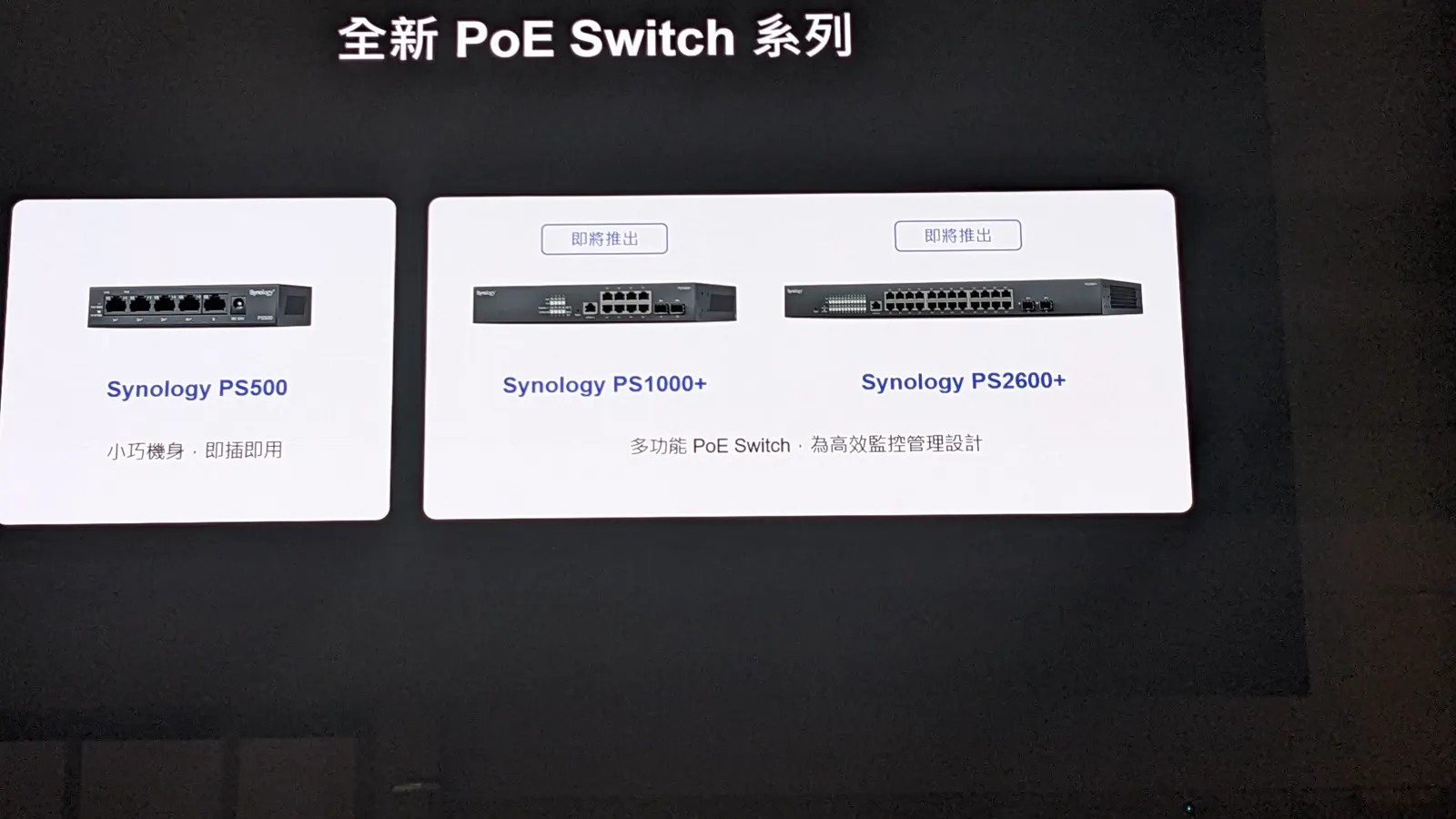
Management and Reliability Features
Scale was the quiet theme of the Solution Day session. The central management system (CMS) handles up to 5,000 servers and 50,000 cameras. Surveillance Station supports more than 20,000 camera models from over 200 brands through ONVIF Profile S, with Profile T and Profile M promised by the end of the year. Our guide covers how that compatibility works in practice: Compatibilité avec la caméra Synology.
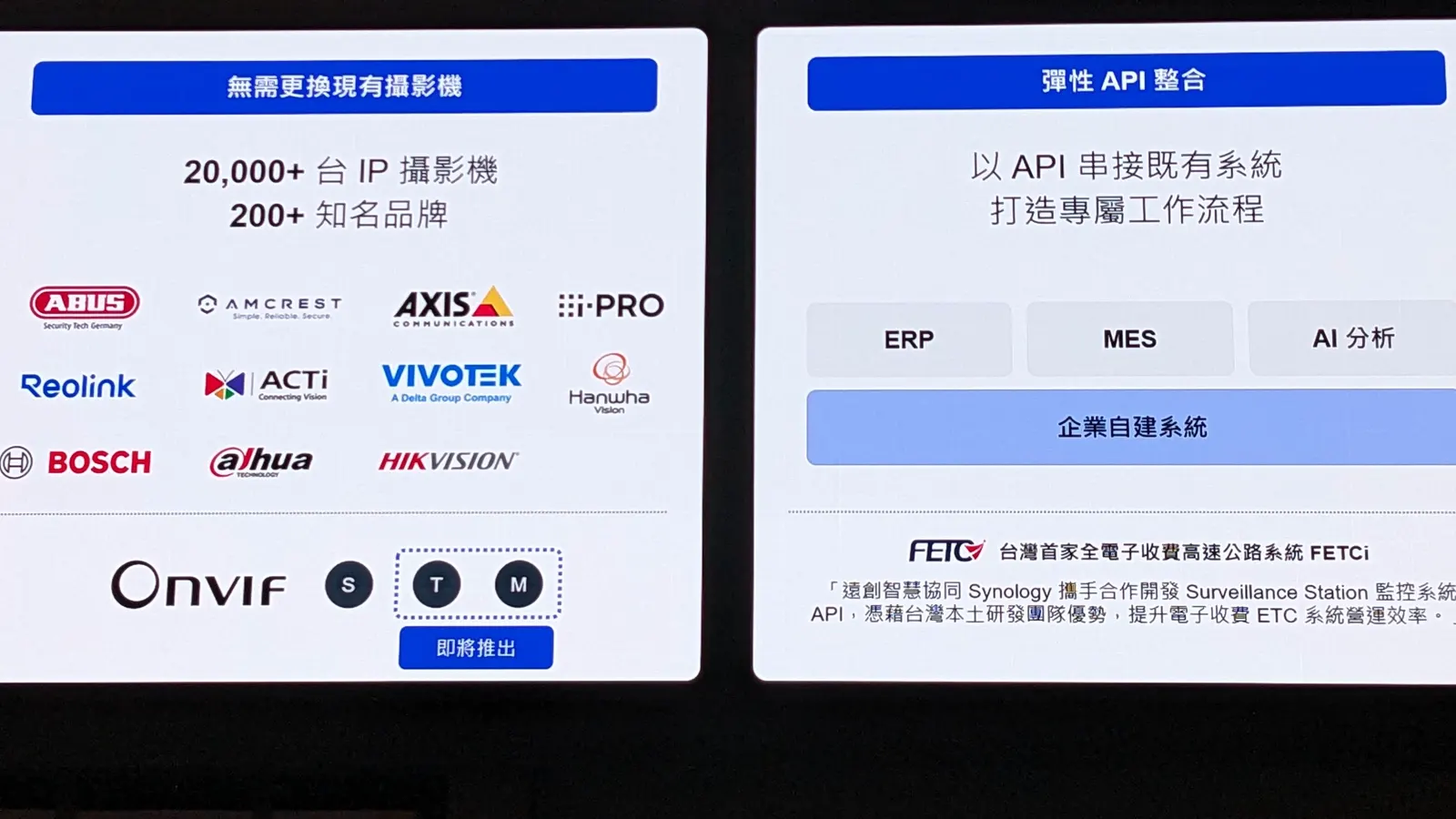
The API works in both directions. FETC, the operator behind Taiwan’s all-electronic highway tolling, embedded Surveillance Station video into its own traffic management software, so staff look up plate numbers and pull the matching footage without leaving a system they already know. The opposite case, bringing another system into Surveillance Station, is the job of the coming embedded browser: drag a browser panel into the monitoring layout, open the factory MES and watch machines and cameras on one screen.
The feature I would put first is proactive health monitoring. A dashboard shows camera status, storage use and whether each camera is actually meeting its retention target, so the dead camera in the corner is flagged before anyone needs its footage.
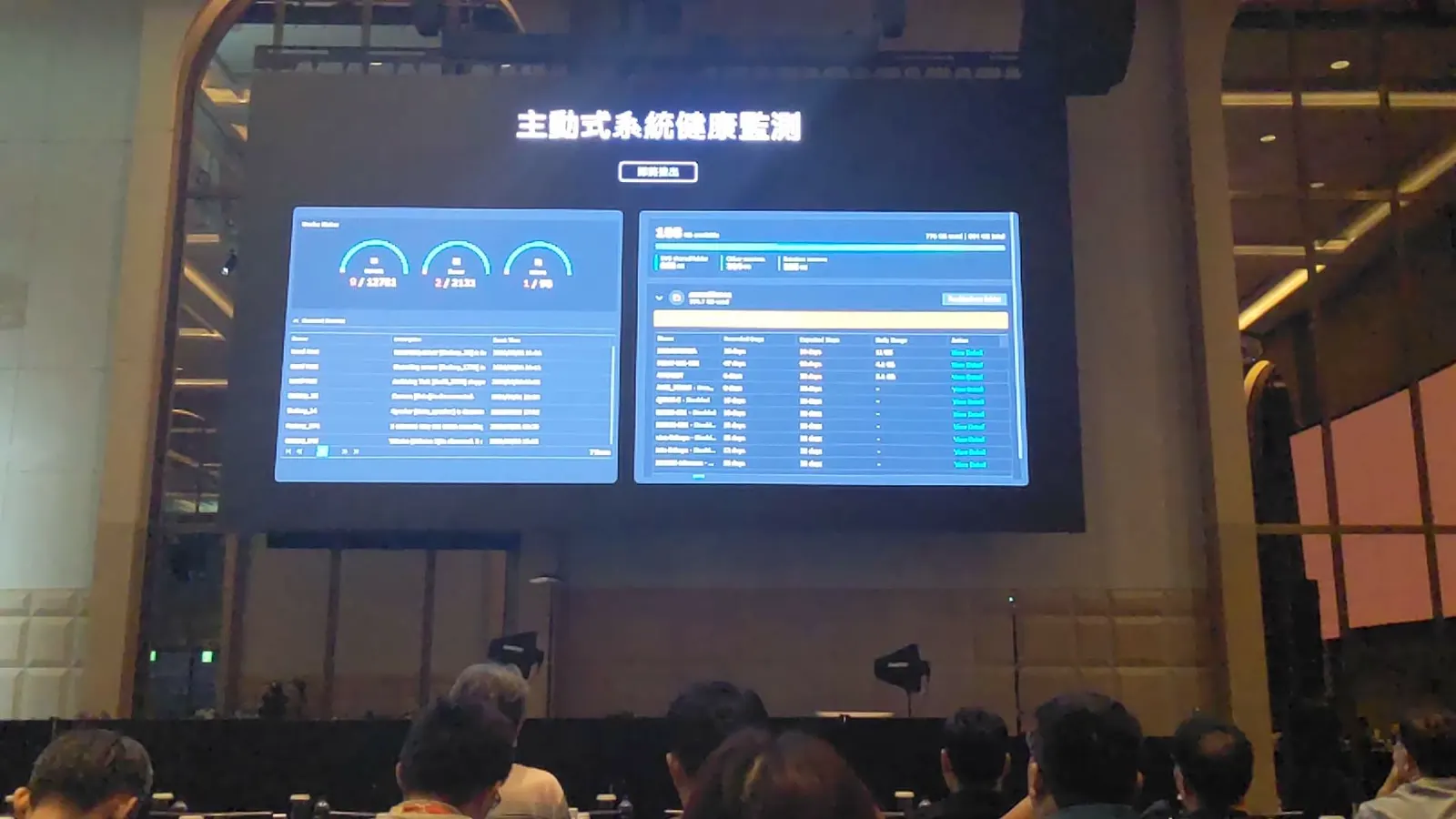
For redundancy, Synology High Availability pairs two servers that stay in sync, N+M failover lets any spare server take over from any failed recorder, and Hyper Backup copies recordings and settings to another NAS or the cloud. The Porsche-Arena case used all of it: paired servers, encrypted recordings and fine-grained permissions to meet GDPR, while keeping the 100 cameras it already owned.
What Solution Day Means for Licensing
One line from the stage deserves repeating: CMS, failover and the rest of the features above do not need an enterprise or advanced edition. Many VMS vendors lock them behind an expensive tier. In Surveillance Station, the standard device license unlocks everything, with no hidden fees.
The licensing picture after Solution Day is simple once you separate the two platforms. Every NAS includes two free camera licenses; each camera beyond that on Surveillance Station needs one device license, bought once, not by subscription. Synology cameras used through Surveillance365 on the Standard plan need no license at all. The same BC510 can go either way, which is why a blanket statement like “this camera needs a license” is wrong. Our full breakdown of prices and pack sizes is here: coût de la licence Surveillance Station.
If you are planning more cameras on a NAS than the two free licenses cover, official license keys are delivered instantly from our store.
Solution Day Caveats Before You Plan a Purchase
A Solution Day announcement is a roadmap, not a price list. Keep these points in mind:
- Coming soon has no date. Access control, the managed switches, the domes, the DVA3000, hybrid management, health monitoring and the embedded browser were all shown without a release date or price.
- Semantic search is DVA7400-only. On the DVA3000 and the new domes you get attribute search, not the plain-sentence search that drew the applause.
- Surveillance365 has limits. It supports Synology cameras only, and the free Standard plan caps remote relay viewing, which matters for sites you watch often.
- Demos are staged. The search demo used good lighting, a short time window and one clear subject. Real footage at night or at low resolution will return fewer and weaker matches.
- Privacy law still applies. Face recognition and person tracking fall under GDPR and local privacy rules; Synology gives you encryption and permissions, but compliance is your job.
- Always verify the evidence. AI search narrows the haystack. A person should still review the footage before it goes to the police or HR.
Questions fréquemment posées
What is Synology Solution Day?
Synology Solution Day is Synology’s event for business partners and enterprise customers. The 2026 edition was held in Taipei on 23 September 2026 and included a surveillance session on Surveillance Station, Surveillance365, AI search and new hardware.
What did Synology announce for surveillance at Solution Day 2026?
Hybrid management between Surveillance Station and Surveillance365, AC100 access control with AR300 and AR100 readers, PS1000+ and PS2600+ managed PoE switches, DC500Z, DC800 and DC400 dome cameras, the DVA3000, proactive health monitoring and advanced AI search.
When will the Solution Day products be available?
Synology did not give dates or prices. Everything marked coming soon at the event should be treated as a roadmap until it appears on Synology’s product pages or release notes.
Do I need a license for Surveillance365?
Not with Synology cameras on the Standard plan. Licenses apply when a camera records to a NAS through Surveillance Station, beyond the two free licenses every NAS includes.
Which DVA model supports semantic search?
Only the DVA7400. The upcoming DVA3000 supports attribute search and find similar objects, and the new dome cameras run attribute analysis on the camera.
Can I keep my third-party cameras?
Yes, on Surveillance Station. It supports more than 20,000 camera models from over 200 brands through ONVIF. Surveillance365 works with Synology cameras only.
Is the Solution Day access control system separate software?
No. The AC100 controller and the readers are configured and managed inside Surveillance Station, next to your cameras.
Where can I watch the Solution Day surveillance session?
Check Synology’s official channels for any replay. This article summarises the talk and the live demos from the audience.
Références et visites guidées vidéo
- Synology surveillance solutions, the official overview of Surveillance Station and Synology cameras.
- Notes de version de Surveillance Station, where each coming-soon feature will appear when it ships.
- Synology DVA7400, the only model with all three AI search tools.
- Abonnements et tarifs de Surveillance365, including the limits of the Standard plan.
- ONVIF profiles, explaining Profile S, T and M.
These videos show cameras that featured at Solution Day. The first two are Synology’s own, the third is our walkthrough of Surveillance365 in use.
Want to see the cameras from the stage in real use? I have tested them hands-on: Avis sur l'appareil photo Synology.