

PHP2Shell on Synology: How We Patched Six Sites in One Day
PHP2Shell is the name the industry settled on for CVE-2026-109618 and CVE-2026-109619, a pair of critical flaws in the PHP engine itself that allow unauthenticated remote code execution. Details leaked on 20 October 2026, a day before the coordinated disclosure, and the PHP project shipped emergency releases on 21 October. Because the bug lives in the interpreter and not in any application, patching WordPress, Joomla or MediaWiki does nothing at all. The only real fix is a new PHP build. We run six public WordPress sites on Synology hardware, and PHP2Shell meant every one of them had to be rebuilt the same week. This guide covers what the bug actually is, how to patch it on DSM through Package Center, how to handle it when your site runs in a container instead, and the uncomfortable comparison between what Synology shipped and what the other NAS vendors have managed so far.
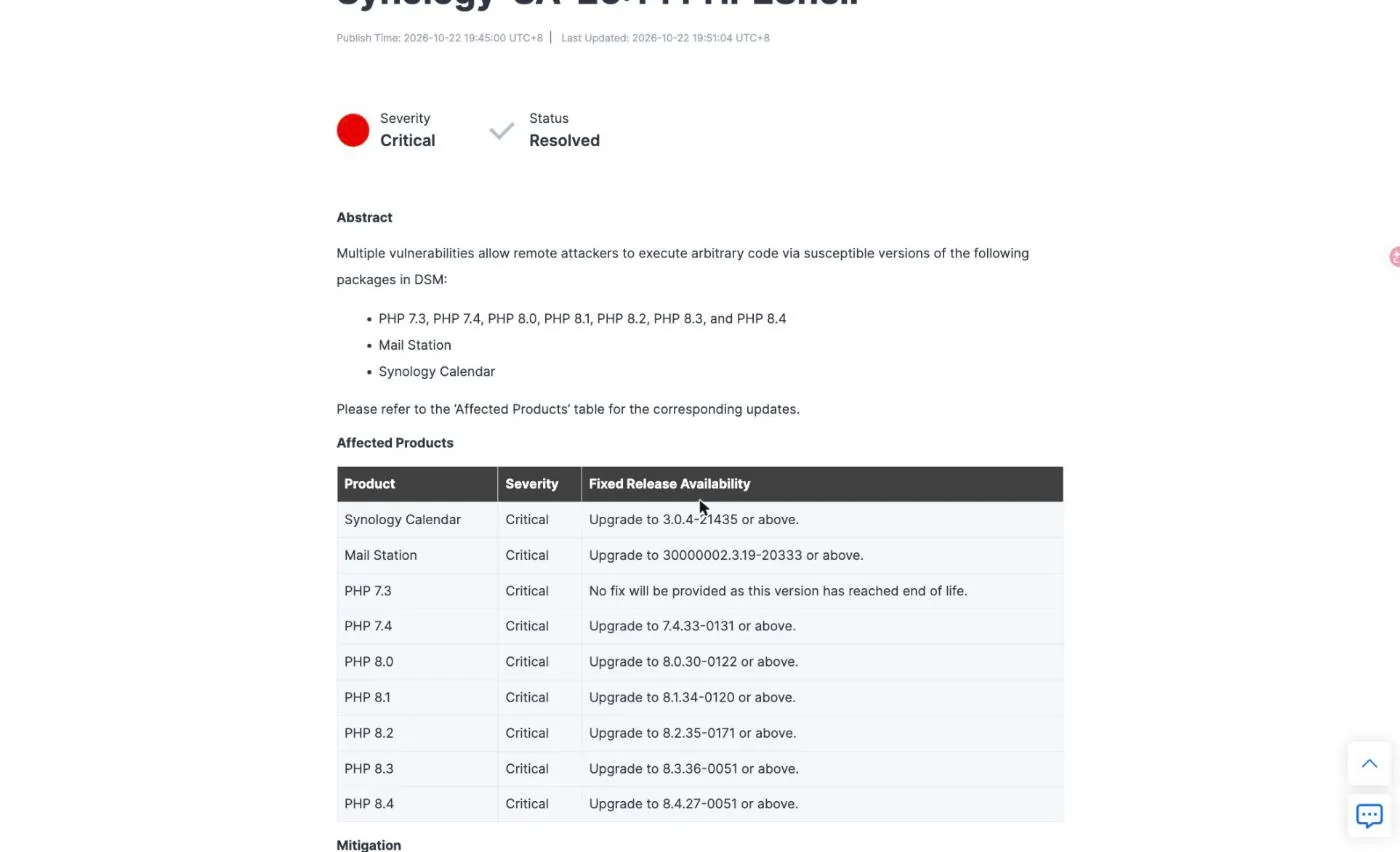
SynoPower Club Point:Our six sites were patched inside one working day of the PHP2Shell advisory landing, and the part that made that possible was not heroics, it was Synology publishing fixed packages on the same date as the advisory. Synology-SA-26:14 went out on 22 October with status Resolved and a complete table of fixed versions down to PHP 7.4. On the same day QNAP published QSA-26-18 with status Fixing and the words To be announced in every single fixed-version cell, and ASUSTOR answered by deleting legacy PHP from App Central rather than patching it. If you self-host a public website on a NAS, that gap is not a marketing detail. It is the difference between updating a package and taking your site off the internet while you wait.
What Is PHP2Shell and Why It Is Different
PHP2Shell is not one bug but a cluster of related memory-safety failures in how PHP cleans up after a request that ran out of memory. PHP uses longjmp() to escape from fatal errors, out-of-memory included, and that jump skips over cleanup code that would normally put the engine back into a known state. Some of that state is global and survives into the next request handled by the same worker process.
CVE-2026-109618 is the out-of-memory side. A crafted HTTP request exhausts the memory limit while request data is only partly initialised, so the cleanup routine walks structures that were never finished. CVE-2026-109619 is the use-after-free side: global state left pointing at freed request memory can be read by a later request on the same worker, which is how the bug turns into code execution or memory disclosure.
Two properties make PHP2Shell worse than the usual PHP advisory. First, it is pre-auth. Both flaws trigger before any application-level authentication runs, so a login wall, a membership plugin or an admin password protects nothing. Second, the memory-disclosure variant leaks worker process memory, and a PHP worker on a WordPress site is holding database credentials, API tokens and payment keys. A successful read does not need to reach code execution to ruin your week.
The two PHP2Shell CVEs were scored at CVSS v4.0 9.2 by the PHP security team. Synology scored them 9.8 on CVSS v3.1 in its own advisory. Different scales, same conclusion. Exploitation reports are mixed: watchTowr says it has seen attempts against its honeypot network, while Bitdefender reported nothing in its telemetry at the time of writing, and QNAP states it has received no reports of exploitation targeting QNAP products specifically.
PHP2Shell vs a Normal WordPress Exploit
Most of what hits a public WordPress site is a plugin vulnerability. The pattern is familiar: a plugin ships a broken REST endpoint, a scanner finds it, you update the plugin and the hole closes. PHP2Shell breaks that habit completely, and the reflex of auditing plugins is wasted effort here.
| Aspect | Typical plugin CVE | PHP2Shell |
|---|---|---|
| Where the bug lives | Application code (plugin or theme) | The PHP interpreter itself |
| Who can trigger it | Often needs a subscriber or admin role | Nobody. Pre-auth, before app logic runs |
| Does updating WordPress help | Usually yes | No. Core and plugin updates are irrelevant |
| Does a WAF stop it | Usually, once a rule exists | Partly. Request-shape rules miss the OOM path |
| What actually fixes it | Plugin update | A new PHP build, nothing else |
| Blast radius | One site, one feature | Every PHP site on the box, all at once |
That last row is why PHP2Shell turned into a full day of work rather than an afternoon. A single shared PHP package on a NAS can be behind a dozen Web Station virtual hosts, and a single container image can be the base for several sites. Patching is not per-site, it is per-runtime, and you have to enumerate the runtimes before you can claim anything is done.
How to Tell If Your NAS Is Exposed
Working out your PHP2Shell exposure starts by separating two different questions. Does the box contain a vulnerable PHP build, and is that build reachable from the internet? Synology makes this distinction explicitly: DSM ships an internal PHP component used by the operating system, and Synology states it has no externally accessible modules and therefore no exposed attack surface. The risk it assigns to that component is minimal, and the patch is scheduled for a later DSM release so that vulnerability scans stop flagging it.
The packages that matter for PHP2Shell are the ones that serve PHP to the web. Synology lists Calendar, IDrive, Joomla, KodExplorer, MailStation, MediaWiki, phpMyAdmin, vtigerCRM, Web Station and WordPress. If you have any of those installed and reachable, you are in scope.
Check versions directly rather than trusting a dashboard. In Package Center the installed PHP packages show their version on the tile, and the update notice names the target build. From a shell, ask the runtime itself:
# Synology PHP package (adjust the path to the version you run)
/volume1/@appstore/PHP8.2/usr/local/bin/php -v

# A containerised site
docker exec <container> php -v
The reason to insist on php -v when you audit for PHP2Shell is that every other signal lies. Build output can report success while reusing a cached layer, a dashboard can show a package as current when the running worker is not, and an HTTP response header can be stripped by a CDN before you ever see it. Two of our six sites were reported as healthy by their admin screens while still running an unpatched interpreter.
Patching PHP2Shell on Synology in 4 Steps
For a Web Station site on DSM the whole PHP2Shell fix is a Package Center update. Synology publishes PHP security updates for DSM 7.4, 7.3 and 7.2, and after the PHP package updates the dependent packages restart themselves, which is what resolves the issue. Mail Station is the documented exception and needs a manual update of its own.
Check the advisory
Open Synology-SA-26:14 and note the fixed version for every PHP branch you have installed. The targets are 7.4.33-0131, 8.0.30-0122, 8.1.34-0120, 8.2.35-0171, 8.3.36-0051 and 8.4.27-0051. PHP 7.3 has no fix because it is end of life.
Update through Package Center
In DSM open Package Center and look at Installed. Each vulnerable PHP package shows Update Available with the new online version. Click Update on every PHP branch listed, and update Synology Calendar and Mail Station if you have them.
Let the dependents restart
Packages that depend on PHP restart automatically once the PHP package finishes updating, and that restart is what puts the fix into effect. Mail Station is the exception and must be updated manually from Package Center.
Verify the running interpreter
Do not trust the dashboard. Run php -v against the package path or inside the container and confirm the build number matches the advisory. Then check that every Web Station virtual host is bound to a profile you actually updated.
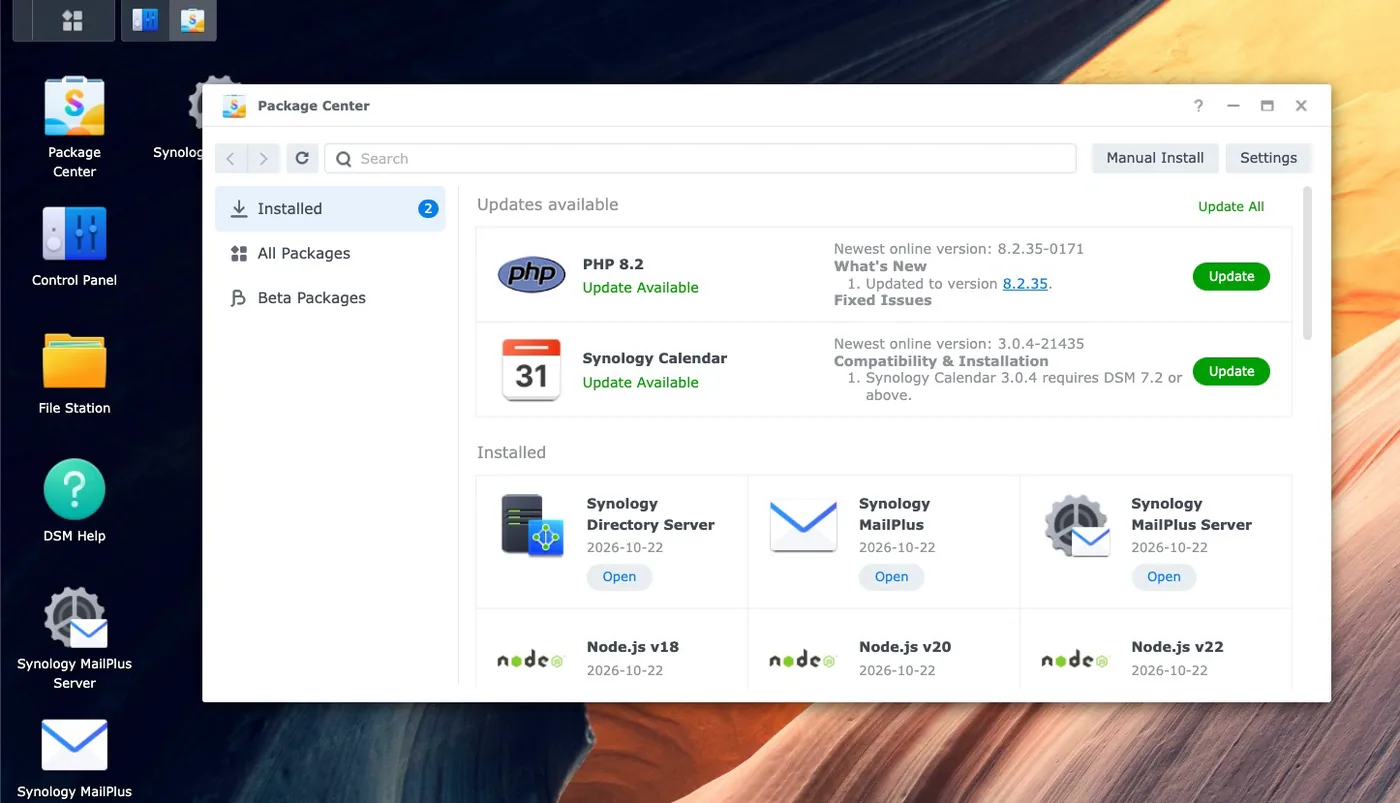
The screenshot above is from one of our own machines the morning after the PHP2Shell advisory. Note that the What is New panel names the upstream version directly, so you can match the Synology build suffix against the PHP release without guessing. Synology Calendar appears in the same update list at 3.0.4-21435, which is exactly the version the advisory calls for.
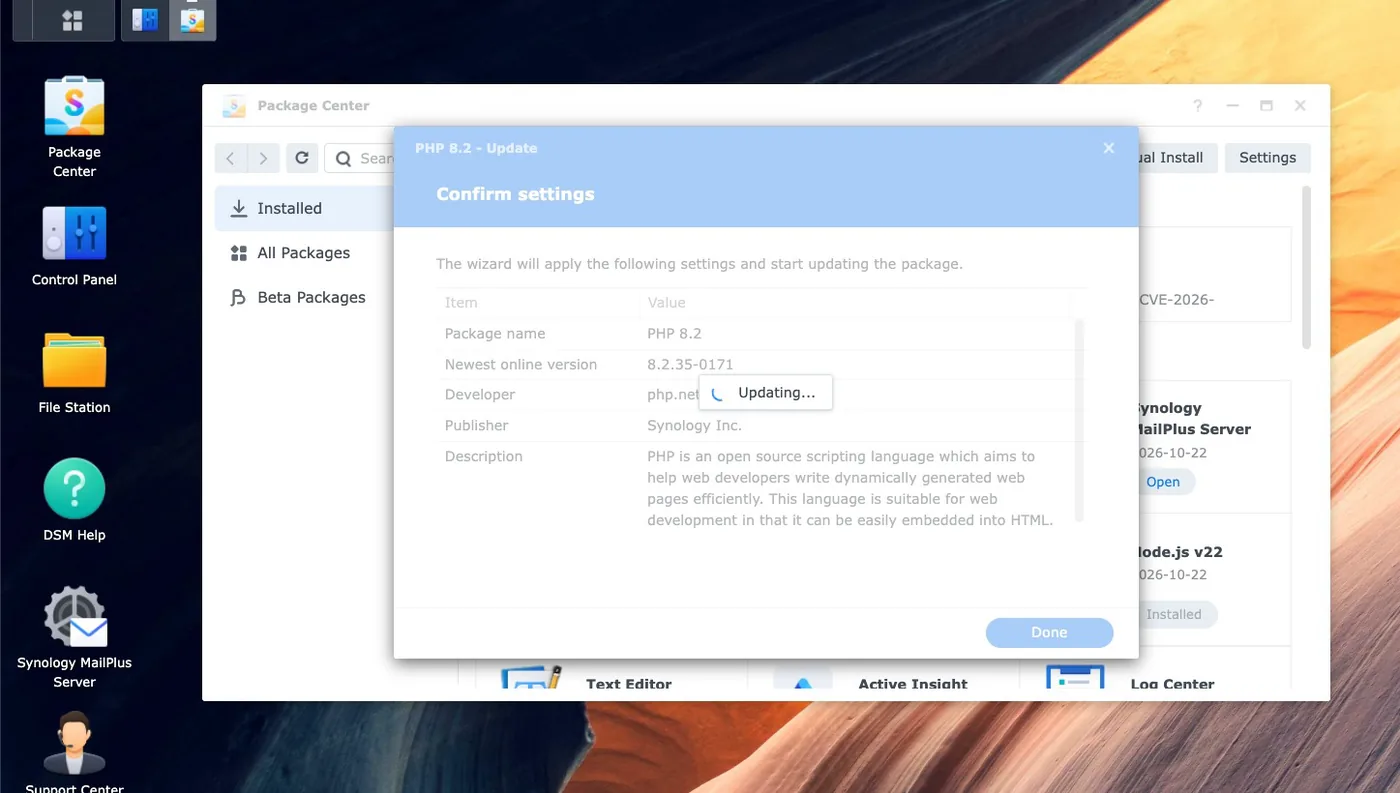
One PHP2Shell trap worth naming for Web Station users: a DSM machine can have several PHP branches installed at once, and each virtual host is bound to one profile. Updating the default profile does not help a site pinned to a different branch. Enumerate the profiles first, update all of them, then check the binding of every site under Web Service.
Which DSM Packages Are Affected
The Synology statement on PHP2Shell is narrower than the panic suggested. Only systems running certain PHP-dependent packages are affected, and Synology Drive is explicitly not one of them. IDrive is on the list but is third-party software.
- Web-facing and highest priority. Web Station, WordPress, Joomla, MediaWiki, vtigerCRM, KodExplorer and phpMyAdmin. These serve PHP to whoever can reach them.
- Mail and calendar. Mail Station needs a manual update after the PHP package. Synology Calendar has its own fixed build at 3.0.4-21435.
- The DSM internal component. Present but not externally reachable, patch deferred to a later DSM release, risk rated minimal by Synology.
- Containers are not covered. A PHP runtime inside Container Manager is yours to patch. No package update will touch it, which is the single most common reason a NAS owner thinks they are done when they are not.
If you are still on a DSM release earlier than 7.2, Synology recommends temporarily disabling the affected packages until a patched version is available. DSM 7.2 itself is flagged as end of life in the statement even though it did receive these PHP updates.
The hard PHP2Shell case is PHP 7.3 and older. Synology will not fix 7.3 because the branch is end of life, and upstream published nothing at all for 7.3 and earlier. Linux distributions shipped backports for some old streams, but a Synology PHP package is not a distribution package. If a site needs 7.3 or 5.6 to run, no patch is coming and the honest options are to move the site to a supported branch, put it behind a WAF, or take it off the public internet.
How Container Site Owners Handle PHP2Shell
Five of our six sites run WordPress in Docker rather than Web Station, and that is where PHP2Shell gets interesting, because Package Center cannot help you. The runtime is whatever the image contains, and rebuilding an image is not the same as updating it.
The PHP2Shell failure we hit first, and the one most likely to catch other people, is that a rebuild of a custom image reuses the cached base layer. An unpinned FROM tag does not mean fresh. One of our images had been rebuilt four days earlier and still contained a PHP build from July 2025, more than a year of security fixes behind, because nothing had forced Docker to re-pull the base.
# Wrong: silently reuses whatever base layer is cached locally
docker build -t mysite .

# Right: always re-pull the base image
docker build --pull -t mysite .

# Then bring up only the service you mean, without starting dormant siblings
docker compose up -d --no-deps wordpress

# And verify the thing that actually matters
docker exec wordpress php -v
The second PHP2Shell failure is nastier because it reports success. Piping build output through tail hides a build failure, since the exit code of a pipeline belongs to the last command in it and set -e never fires. The compose step then recreates the container from the old image, prints Started, and you walk away from an unpatched site that looks freshly deployed. Check the build result on its own, and verify with php -v afterwards.
Two smaller notes. Tag the old image before you rebuild, because an image keeps its tag and gives you a free rollback point that is far cheaper than a snapshot. And do not expect an image bump to upgrade the application: the official WordPress image entrypoint copies core files only when the document root is empty, so recreating a container on a newer image leaves an existing install exactly where it was. We confirmed this on a staging copy before touching production, and the WordPress version did not move.
Why Disabling session.upload_progress Only Covers Half
The PHP2Shell mitigation circulating for machines that cannot be patched is to set session.upload_progress.enabled = 0, and on DSM that lives in Web Station under Script Language Settings, in the Core tab of the PHP profile. It is worth doing. It is not a fix, and the gap matters.
The session upload-progress path is only one of the ways in. The memory-disclosure variant is reached through ordinary multipart request handling and does not require the session feature at all, so turning the feature off leaves that path open. The PHP project has said directly that there are no complete mitigations and that updating is the only safe solution. Imunify360 reports that no rule currently blocks the out-of-memory path of CVE-2026-109618, and Elastic notes that the upload-progress setting closes the confirmed session paths but not every variant.
You will also see memory_limit = -1 suggested, on the logic that the bug is reached through an out-of-memory condition. Treat that as a trade, not a win. Removing the limit on a public web server changes one failure mode for another, and on a NAS with a shared memory budget it invites the worker pool to exhaust the whole machine instead.
Edge filtering is the PHP2Shell layer that genuinely adds something, because it sees decrypted traffic and your router does not. Cloudflare has deployed managed-rule protection for PHP2Shell, AWS added CVE-2026-109619 coverage in version 2.3 of its PHP managed rule group, and Azure Front Door shipped rule 99006001, which is disabled by default. Community Snort and Suricata rules exist on GitHub, but the official Snort and Emerging Threats rule sets had published nothing at the time of writing, so a NAS intrusion-prevention feature is not going to save you here. It cannot read inside TLS anyway.
Which NAS Vendor Actually Shipped a Fix
This is the part of the PHP2Shell story that should influence what you buy. Upstream PHP released on 21 October. Here is where the four main consumer and prosumer NAS vendors stood the following day, taken from their own advisory pages rather than from coverage.
| Vendor | Advisory | Status | Fixed versions published |
|---|---|---|---|
| Synology | Synology-SA-26:14, 22 Oct 2026 | Resolved | Yes. Every branch from PHP 7.4 to 8.4, plus Calendar and Mail Station |
| QNAP | QSA-26-18, 22 Oct 2026 | Fixing | No. Every row reads To be announced |
| ASUSTOR | Legacy PHP Retirement, 22 Oct 2026 | Retirement, not a patch | No. PHP 7, 7.3, 7.4 and 8.1 removed from App Central |
| UGREEN | None found | Unknown | No advisory located for UGOS Pro |
Synology published a complete PHP2Shell version table on the same day as the advisory, and marked the advisory Resolved. A DSM owner reading it had an action to take that afternoon: open Package Center, click Update, verify. That is the entire remediation path, and it is why our Web Station machines were finished in minutes rather than days.
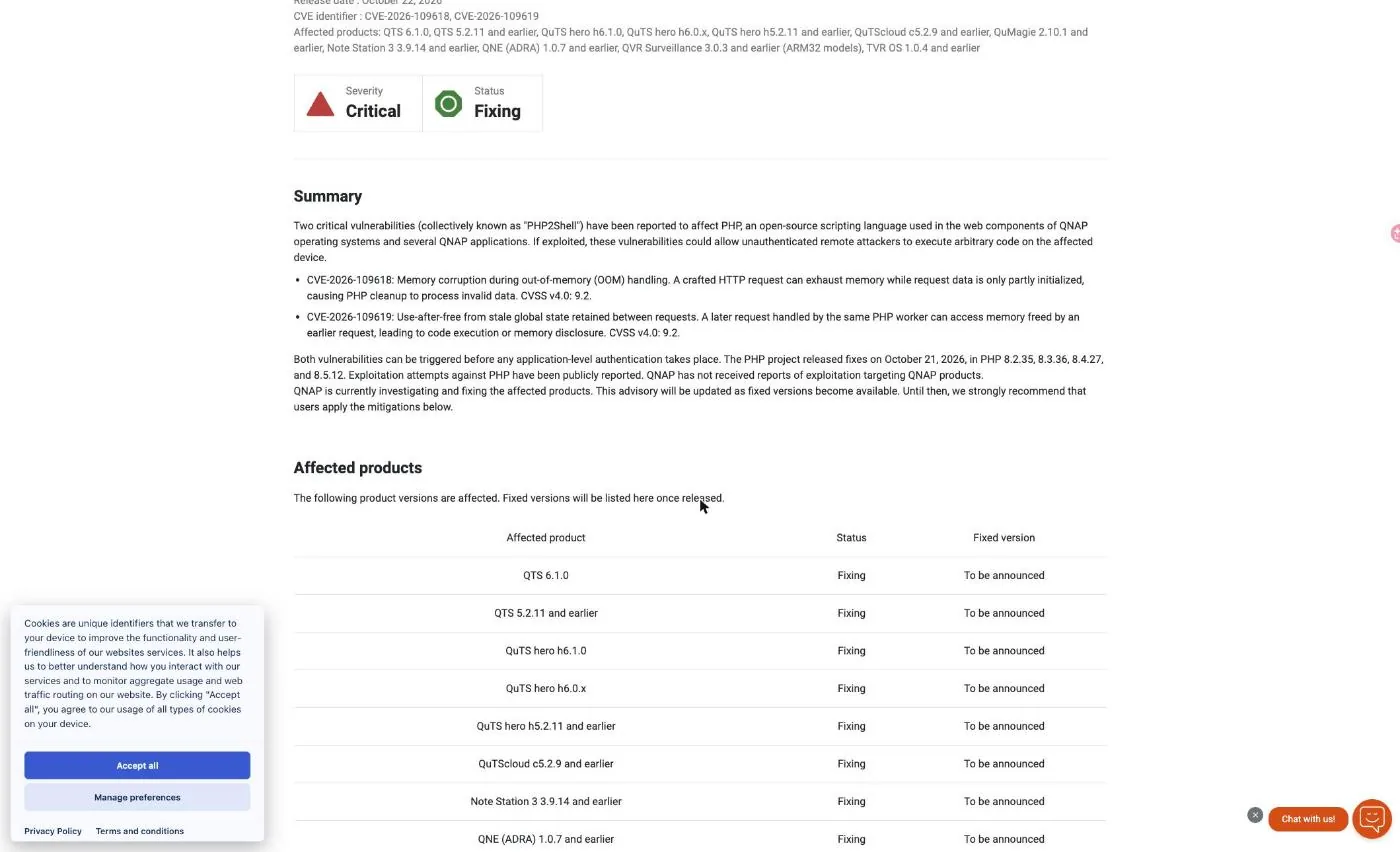
QNAP published on the same date and listed a long affected-product set, including QTS 6.1.0, QTS 5.2.11 and earlier, QuTS hero h6.1.0, h6.0.x and h5.2.11 and earlier, QuTScloud c5.2.9 and earlier, Note Station 3, QNE ADRA, QVR Surveillance on ARM32 models and TVR OS. Every one of them shows status Fixing with no fixed version. Because the PHP runtime is part of the QTS web components, there is no package to update, so the remediation has to come as firmware.
What QNAP offers PHP2Shell victims in the meantime is a list of mitigations, and it is worth reading closely because of what it asks of you: disable router port forwarding and UPnP, unpublish myQNAPcloud services, move remote access behind a VPN, restrict the management ports to trusted subnets, stop PHP-based applications you do not need, disable the built-in web server if unused, and audit QuLog Center for signs of compromise. That is sound advice for an unpatched box. It is also, for anyone hosting a public website, a request to turn the website off.
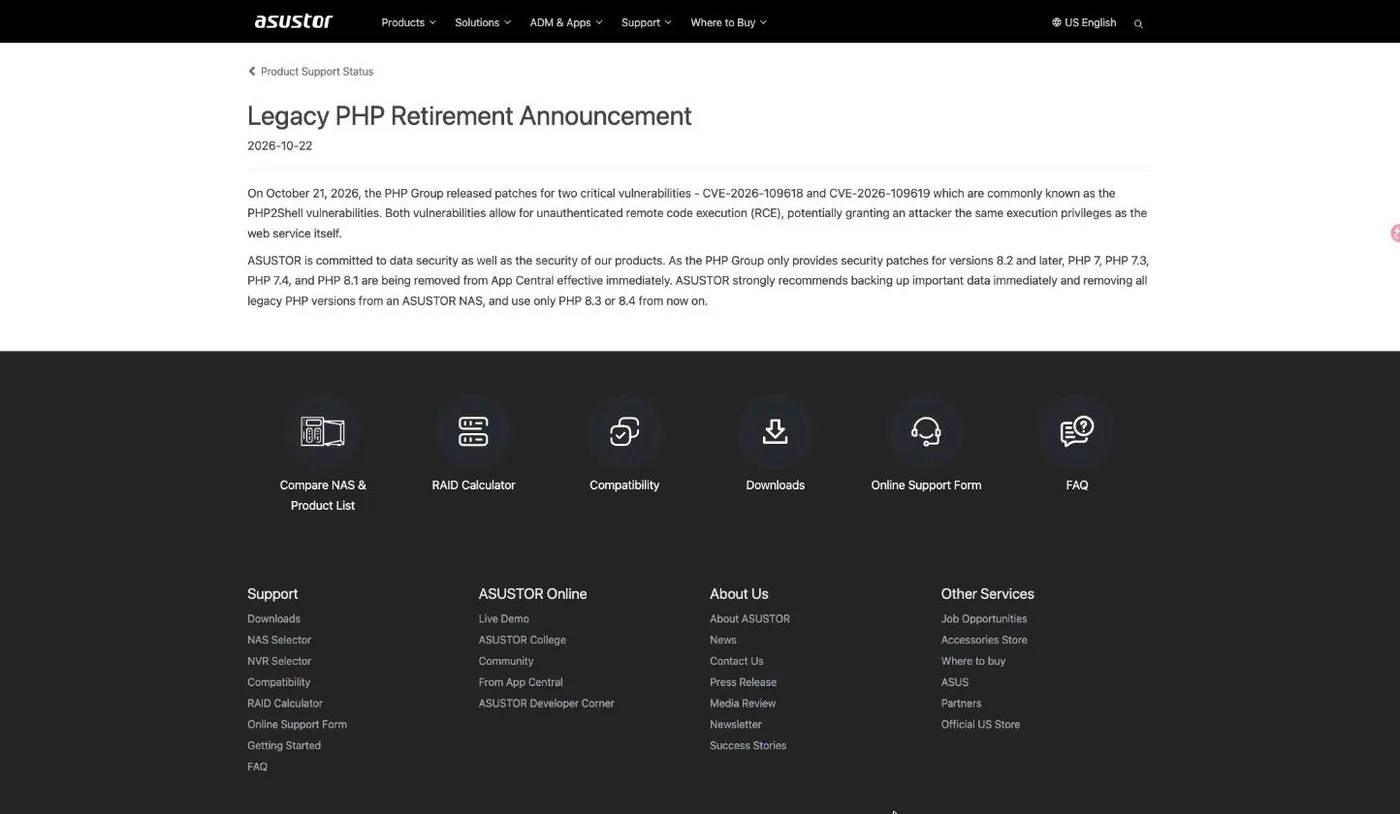
ASUSTOR took a third route. Its notice, dated 22 October and titled Legacy PHP Retirement Announcement, removes PHP 7, PHP 7.3, PHP 7.4 and PHP 8.1 from App Central effective immediately, recommends backing up important data, and tells owners to use only PHP 8.3 or 8.4 from now on. The reasoning is defensible, since upstream only patches 8.2 and later. The effect on an owner running an old PHP application is that the runtime disappears from the store rather than getting fixed, and ASUSTOR does not state that a patched build of 8.3 or 8.4 has shipped. Note the contrast with Synology here, which did publish a fixed 7.4 build at 7.4.33-0131 for exactly the users ASUSTOR is asking to migrate.
For UGREEN we could not locate any PHP2Shell advisory for UGOS Pro at all. Absence of a public statement is not proof that a product is vulnerable, and UGOS Pro may simply not ship a web-facing PHP runtime. But if you are the owner, silence is not an answer you can act on, and that is its own kind of exposure.
None of this makes Synology perfect. It will not fix PHP 7.3, it flags DSM 7.2 as end of life, and its own internal PHP component is still scheduled rather than patched. The point is narrower and more useful than a brand argument: on the day a pre-auth remote code execution bug landed in the PHP engine, one vendor turned remediation into a button in Package Center and the others turned it into a waiting game.
Where to Find More Official Resources
PHP2Shell is two days old at the time of writing and the situation is still moving, so go to primary sources rather than summaries. There is no official video coverage yet from any of the vendors, so the list below is documentation rather than walkthroughs.
- Synology-SA-26:14 is the authoritative version table. Check it again before you patch, because advisories get revised.
- The Synology PSIRT statement lists the affected packages and explains the DSM internal component and the Mail Station exception.
- The upstream GitHub advisories GHSA-w8hw-w9fx-j79w and GHSA-6wmf-4rv5-p3rp are linked from the Synology advisory and describe the engine behaviour rather than the vendor packaging.
- QNAP QSA-26-18 is where a fixed firmware version will appear if you run QTS or QuTS hero. It is the page to watch, not a news article.
- Your own Package Center is the last word on what is installed. The advisory tells you the target build, the tile tells you what you actually have, and only
php -vtells you what is running.
For background on running public sites on Synology virtual machines, our walkthrough on moving a Docker stack between VDSM guests covers the snapshot and rollback habits that made this emergency survivable.
PHP2Shell Limits and Security Notes
Patching PHP2Shell is straightforward on DSM and deceptive everywhere else, so a few limits are worth stating plainly before you declare the job finished.
A PHP2Shell package update is not a site audit. Updating PHP closes the hole from that moment on, but if the box was reachable from the internet between 20 and 22 October it was reachable while a working exploit was public. Check logs for unexpected POST volume, look for files that appeared in writable directories, and rotate any credential that a PHP worker could have been holding. The memory-disclosure variant makes credential rotation a reasonable precaution rather than paranoia.
PHP2Shell verification has to target the running interpreter. Dashboards, build logs and response headers all failed us at least once during this round. A CDN can strip the header that would have told you the version, a build can report success while reusing a cached layer, and a package tile can show current while an old worker is still serving. Only php -v inside the thing that serves requests settles it.
Containers are not covered by any vendor PHP2Shell advisory. This bears repeating because it is the most common false sense of security on a NAS. If your site runs in Container Manager, Package Center reporting everything up to date tells you nothing about your site. The same applies to any third-party application bundling its own runtime.
Configuration mitigations are partial by design. Disabling session upload progress helps, removing the memory limit trades one risk for another, and a router intrusion-prevention feature cannot inspect TLS traffic that terminates elsewhere. Treat all of it as time bought while you arrange a real patch, not as a substitute for one.
End-of-life runtimes have no PHP2Shell path at all. PHP 7.3 and earlier received nothing from upstream and nothing from Synology. If a site genuinely requires an unsupported branch, the decision in front of you is migration, isolation or withdrawal from the public internet. There is no fourth option, and pretending otherwise is how a legacy site becomes the way into everything else on the same box.
Finally, keep an eye on the advisory rather than the news cycle. Synology marked SA-26:14 Resolved and revised it once within six minutes of publication. QNAP has said QSA-26-18 will be updated as fixed versions become available. Both of those pages will change, and the version numbers in this article are the ones that were published on 22 October 2026.
References
- Synology-SA-26:14 PHP2Shell security advisory, published 22 October 2026, status Resolved, with fixed versions for PHP 7.4 through 8.4.
- Synology Statement on PHP2Shell Vulnerabilities, the PSIRT note listing affected packages and DSM coverage.
- QNAP QSA-26-18, status Fixing, affected products listed with fixed versions To be announced.
- ASUSTOR Legacy PHP Retirement Announcement, removing PHP 7, 7.3, 7.4 and 8.1 from App Central.
- Help Net Security on the upstream PHP2Shell releases, covering PHP 8.5.12, 8.4.27, 8.3.36 and 8.2.35 and the source-only backports for older branches.
Frequently Asked Questions
Is my Synology NAS vulnerable to PHP2Shell?
Only if it runs a PHP-dependent package that is reachable. Synology lists Calendar, IDrive, Joomla, KodExplorer, MailStation, MediaWiki, phpMyAdmin, vtigerCRM, Web Station and WordPress. The internal PHP component in DSM is present but Synology states it has no exposed attack surface and rates the risk as minimal.
How do I patch PHP2Shell on DSM?
Open Package Center, go to Installed, and update every PHP package that shows Update Available. The target builds are 7.4.33-0131, 8.0.30-0122, 8.1.34-0120, 8.2.35-0171, 8.3.36-0051 and 8.4.27-0051. Dependent packages restart themselves afterwards, except Mail Station which needs a manual update.
Does updating WordPress fix it?
No. The bug is in the PHP engine, not in WordPress, so core, theme and plugin updates change nothing. The only fix is a new PHP build. This is the single most common misunderstanding about this advisory.
Is PHP 7.4 really patched on Synology?
Yes. Synology published 7.4.33-0131 even though upstream PHP issued only a source backport with no numbered release for that branch. PHP 7.3 is different: Synology states no fix will be provided because the version has reached end of life.
Does PHP2Shell affect my site running in Container Manager?
No package update touches it. You have to rebuild the image with docker build –pull so the base layer is re-pulled, bring the service up with up -d –no-deps, and then confirm with php -v inside the container. Build output that says success is not evidence.
Does disabling session.upload_progress make me safe?
It closes one path, not all of them. The memory-disclosure variant goes through ordinary multipart handling and does not need the session feature. The PHP project has said there are no complete mitigations and that updating is the only safe solution.
Can Threat Prevention on my router block PHP2Shell?
Not meaningfully. It is a signature engine that cannot read inside TLS, the traffic between a reverse proxy and an origin on the same subnet never reaches it, and the official Snort and Emerging Threats rule sets had published nothing for these CVEs at the time of writing.
Have QNAP and ASUSTOR fixed PHP2Shell yet?
Not as of 22 October 2026. QNAP advisory QSA-26-18 has status Fixing with every fixed version listed as To be announced, and ASUSTOR responded by removing legacy PHP from App Central rather than publishing a patched build. Synology-SA-26:14 was marked Resolved on the same day with a complete version table.