

Recensione della Synology BC800Z: 4K, zoom ottico e riconoscimento della targa integrato (2026)

Tutte le altre telecamere della gamma Synology richiedono l'utilizzo di un obiettivo fisso. La Synology BC800Z no. Si tratta di una telecamera bullet 4K con obiettivo varifocale motorizzato, un sistema ibrido a infrarossi e luce bianca con portata fino a 38 metri, riconoscimento targhe integrato, rilevamento fumo e una garanzia di cinque anni, la più lunga della gamma. Pesa inoltre 1,3 chilogrammi di metallo e necessita di un supporto in grado di sostenerla. Questa recensione della Synology BC800Z illustra cosa si ottiene effettivamente spendendo di più, perché metà di internet afferma che non necessita di licenza per telecamere quando la stessa scheda tecnica di Synology ora afferma il contrario, e l'unica cosa che non può fare a differenza delle telecamere più economiche.
Punto SynoPower Club:Quando un cliente chiede "quello buono", di solito intende proprio quello, ma il vero motivo per acquistarlo non è quasi mai la risoluzione 4K. Piuttosto, è lo zoom e il riconoscimento delle targhe. Un obiettivo fisso da 110° puntato su un cancello permette di vedere un'auto; il modello Synology BC800Z con zoom a 47° permette di leggere la targa. Se nessuno nel vostro sito avrà mai bisogno di leggere una targa o di identificare un volto a distanza, state pagando per una funzionalità che non utilizzerete, e in tal caso un BC510 rappresenta un acquisto migliore.
Cos'è il Synology BC800Z?
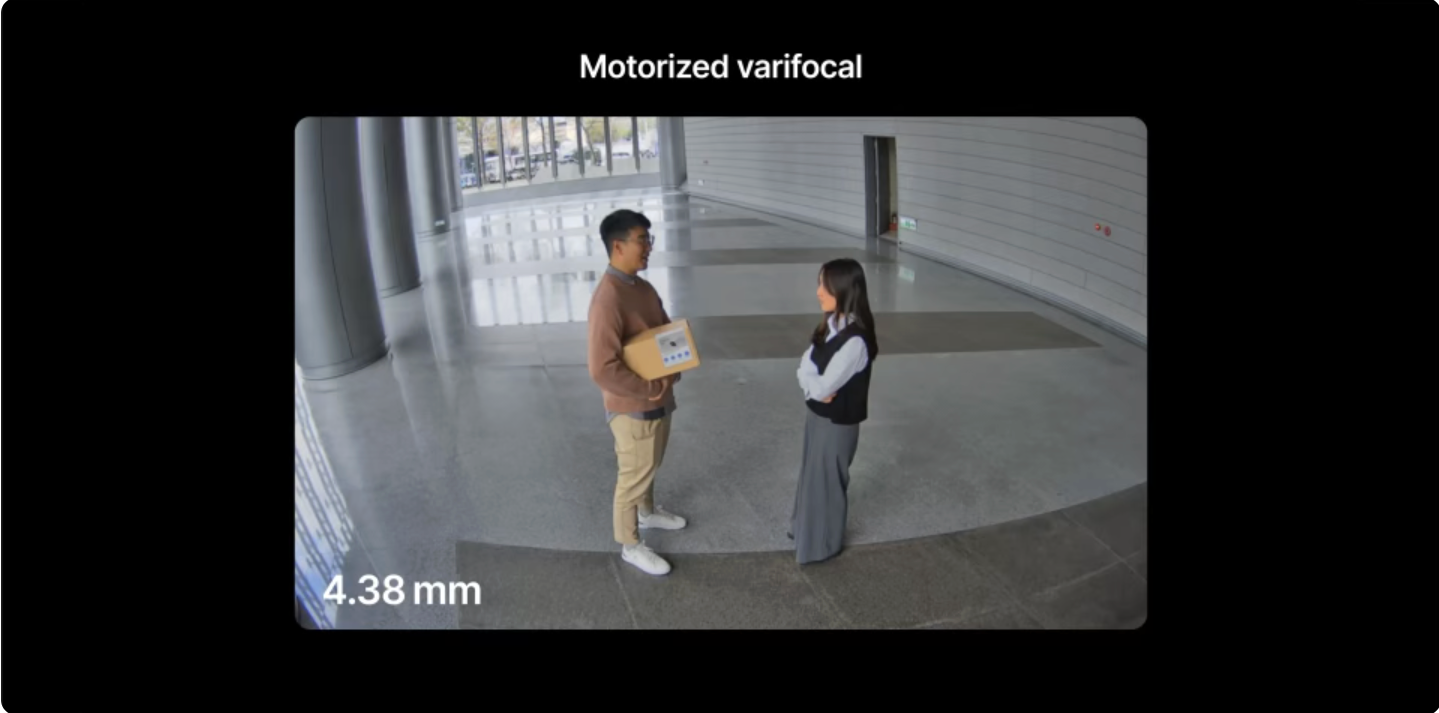
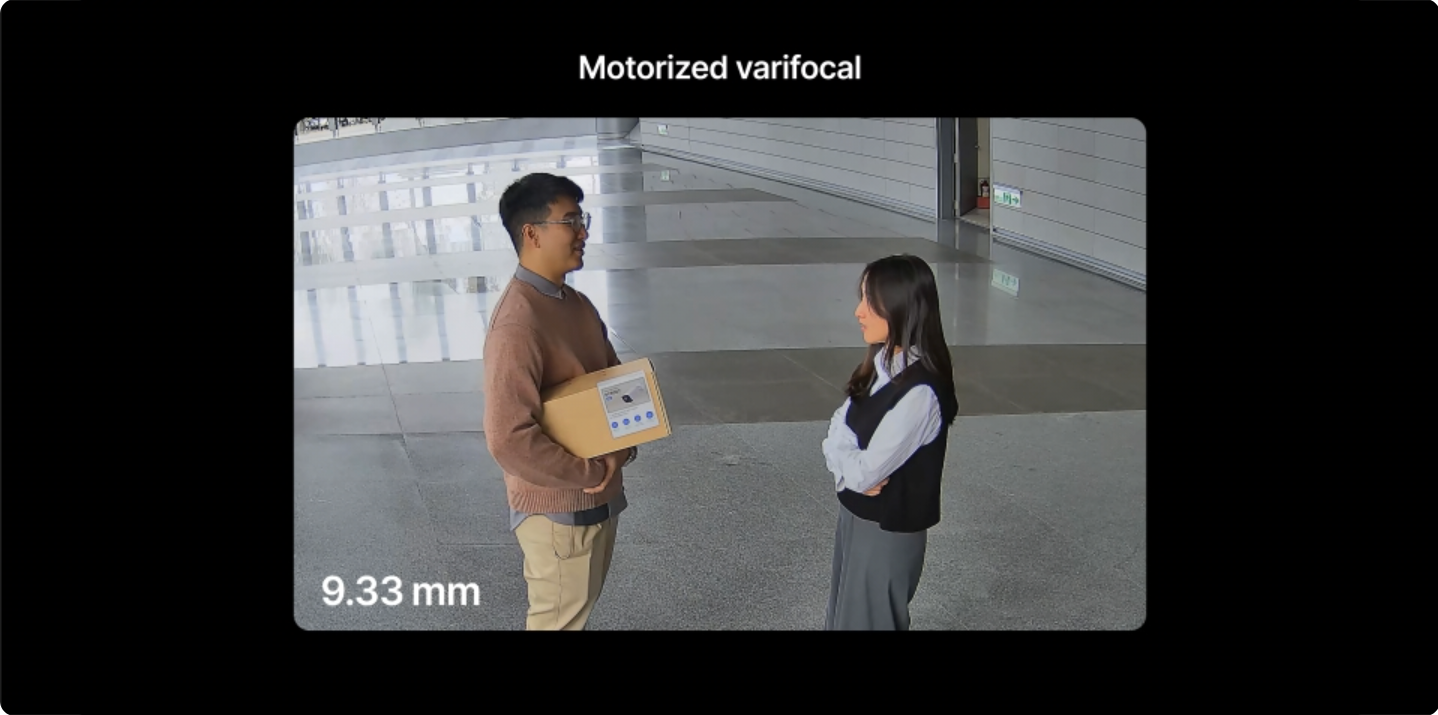
La Synology BC800Z è una videocamera bullet da esterno da 8 megapixel basata su un sensore Starlight da 1/1,8". La Synology BC800Z registra video a 3840×2160 pixel fino a 30 fps, offrendo una vera risoluzione 4K, a differenza dei 5 MP della BC510 e dei 4 MP della CC410W. La caratteristica principale è l'obiettivo: un varifocale motorizzato da 4,38–9,33 mm con apertura da F1.3 a F2.15, che offre uno zoom ottico di circa 2,1x.
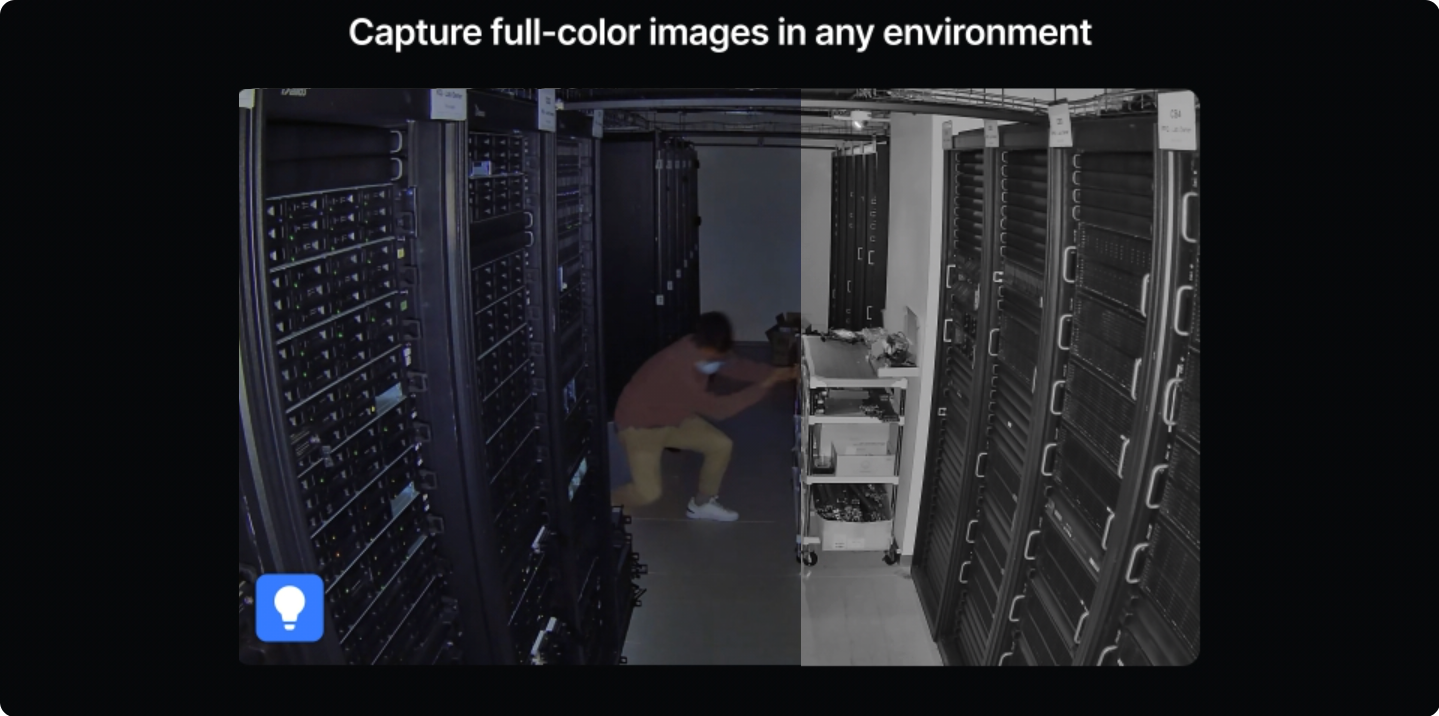
Questo intervallo di zoom porta il campo visivo orizzontale da 112,1° in grandangolo a 47,5° in teleobiettivo. In pratica, lo si imposta una sola volta durante la messa in servizio per inquadrare esattamente ciò che conta, invece di montare la telecamera più vicino o accettare ciò che offre un obiettivo fisso. La visione notturna è ibrida: i LED a infrarossi raggiungono i 38 m e i LED bianchi i 31 m per le riprese a colori al buio.
Synology BC800Z vs BC510: dove vanno a finire i soldi extra
I modelli Synology BC800Z e BC510 non appartengono alla stessa categoria di prodotto e la differenza tra i due è maggiore di quanto suggeriscano i numeri di modello.
| Synology BC800Z | BC510 | |
|---|---|---|
| Risoluzione | 3840×2160 (4K, 8MP) | 2880×1620 (5MP) |
| Lente | Lenti a contatto varifocali motorizzate da 4,38–9,33 mm | Fisso 2,8 mm |
| Campo visivo | Da 112,1° a 47,5° H | 110° H fisso |
| Apertura | F1.3–F2.15 | F1.8 |
| visione notturna | 38 m IR + 31 m luce bianca | 30 m IR |
| Riconoscimento delle targhe automobilistiche | Sì, davanti alla telecamera | NO |
| Rilevamento fumo | SÌ | NO |
| Valutazione dell'impatto | IK10 | Non classificato |
| Campo operativo | da -30°C a 60°C | da -30°C a 50°C |
| Garanzia | 5 anni | 3 anni |
| Peso | 1310 g | 353 g |
Il BC510 vince su una sola cosa: è piccolo, leggero ed economico, quindi può essere impiegato in grandi quantità. Il nostro Recensione del BC510 copre i casi in cui questa è la scelta giusta. Se invece hai bisogno di un'installazione senza cavi, CC410W è l'opzione Wi-Fi. Il Synology BC800Z è quello che si acquista per le due o tre posizioni in un sito che necessitano effettivamente di identificare anziché semplicemente osservare.
Specifiche tecniche complete
| Specifiche | Synology BC800Z |
|---|---|
| Sensore | 1/1,8″ starlight |
| Risoluzione | 3840×2160 a 30 FPS (8MP) |
| Lente | Lente varifocale motorizzata 4,38–9,33 mm, F1.3–F2.15 |
| Campo visivo (ampio) | 112,1° H, 58,0° V, 137,5° D |
| Campo visivo (tele) | 47,5° H, 26,6° V, 54,6° D |
| visione notturna | LED IR 38 m; LED bianchi 31 m |
| Compressione | H.264, H.265 |
| Audio | Microfono, G.711, riduzione del rumore audio (senza altoparlante) |
| Archiviazione locale | microSD, exFAT |
| Energia | PoE IEEE 802.3af Tipo 1 Classe 0, o 12 V CC; PoE+ supportato |
| Disegno misurato | 4,5–5,5 W a 4K30 con HDR |
| Protezione dagli agenti atmosferici | IP66, IP67, IK10 |
| Temperatura di esercizio | Da -30 °C a 60 °C (IR spento) / Da -30 °C a 55 °C (IR acceso) |
| Dimensioni e peso | Ø105 x 272 mm, 1310 g |
| Garanzia | 5 anni |
| Licenza del dispositivo | Obbligatorio (vedere la sezione relativa alle licenze di seguito) |
Due righe della scheda tecnica sono facili da trascurare. L'intervallo di temperatura da -30 °C a 60 °C è il più ampio della linea di telecamere ed è davvero importante per i locali tecnici e le pareti esposte a sud e non ombreggiate. Inoltre, la garanzia di cinque anni è due anni più lunga rispetto alla BC510 e tre anni più lunga rispetto alla CC410W: per una telecamera che si intende lasciare installata per un decennio, questo è un fattore da considerare nel calcolo del prezzo.
Configurazione del Synology BC800Z in 4 passaggi
La messa in servizio della Synology BC800Z si differenzia dalle telecamere a obiettivo fisso per un aspetto importante: l'inquadratura è una fase software, non un passaggio manuale. Prima di tutto, assicuratevi che la montatura sia stabile, poi procedete all'inquadratura dalla vostra scrivania.
Montalo su qualcosa che possa sostenere 1,3 kg
Si tratta di una telecamera interamente in metallo, lunga circa 27 cm e pesante 1310 g. Fissatela a una parete in muratura o in legno strutturale, non a cartongesso o a una sottile fascia di rivestimento. Tre punti di regolazione con chiave a brugola consentono di impostare l'orientamento; assicuratevi che sia approssimativamente corretto prima di stringere, perché lo zoom non può compensare un eventuale puntamento errato sulla parete.
Collega il PoE e aggiungi la telecamera
L'alimentazione tramite IEEE 802.3af funziona e PoE+ è supportato; è disponibile un ingresso a 12 V CC se PoE non è supportato. Il consumo misurato è di soli 4,5-5,5 W anche a 4K30 con HDR, quindi un interruttore di potenza modesta è sufficiente. Aggiungere la telecamera in Surveillance Station nella sezione Telecamera IP, quindi Aggiungi e impostare la password di amministratore quando richiesto.
Applicare una licenza per il dispositivo
Il tuo NAS Synology include due licenze per dispositivo. Se entrambe sono in uso, aggiungi un pacchetto di licenze per la telecamera prima che questa possa registrare. Tieni presente che le recensioni più vecchie descrivono questo modello come esente da licenza, il che era vero al momento del lancio, ma non corrisponde alle specifiche attuali del Synology.
Imposta lo zoom, quindi abilita gli eventi AI.
Regolate l'obiettivo varifocale motorizzato dall'interfaccia Surveillance Station fino a inquadrare esattamente ciò che vi serve: è in questa fase che la telecamera dimostra il suo valore, quindi prendetevi il tempo necessario. Dopodiché, attivate le funzioni di rilevamento desiderate: riconoscimento targhe, rilevamento fumo, rilevamento persone e veicoli, intrusione, stazionamento o conteggio.
Cosa rileva l'IA integrata nella telecamera
La Synology BC800Z vanta l'elenco di analisi più lungo di qualsiasi altra fotocamera prodotta da Synology, e due di queste voci non sono presenti in nessun altro modello:
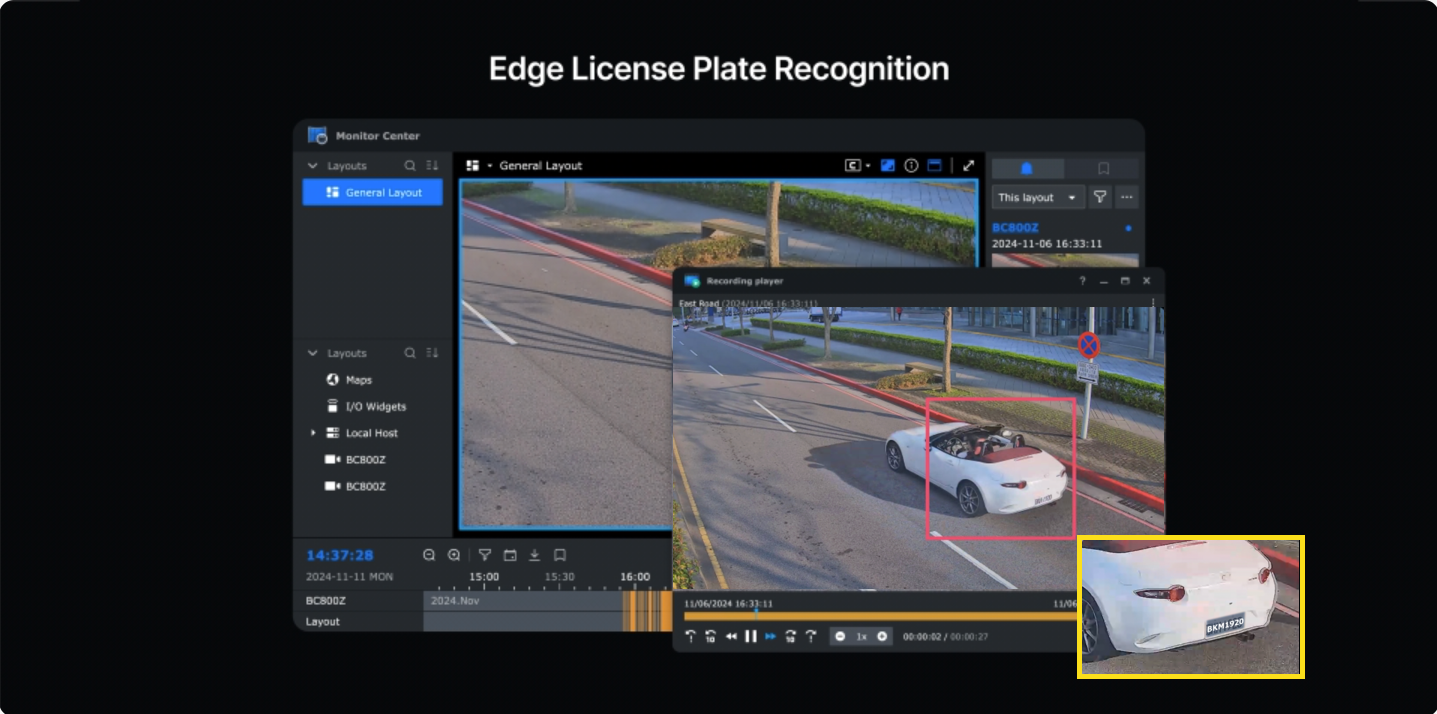
- Riconoscimento delle targhe automobilistiche — funziona direttamente sulla fotocamera, senza NAS della serie DVA e senza licenza AI separata. Test indipendenti hanno riportato una precisione di 99% a 7 m sia di giorno che di notte.
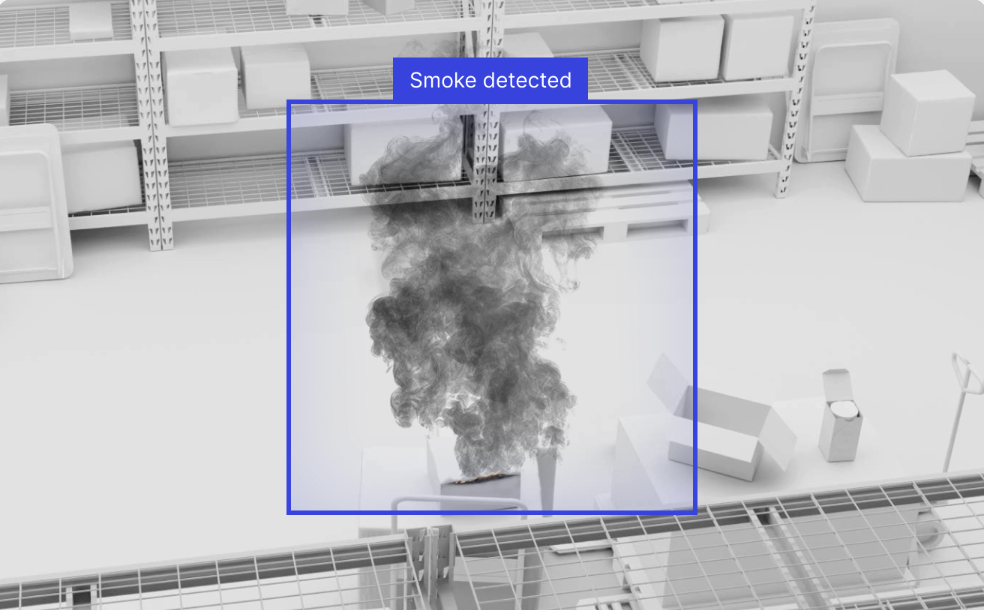
- Rilevamento fumo — caratteristica esclusiva di questo modello nella gamma, ed è il motivo per cui si trova in locali tecnici e magazzini.
- Rilevamento di persone e veicoli — il valore di riferimento che elimina la maggior parte dei falsi allarmi
- Rilevamento di intrusioni, sosta e assembramenti — basato su zone anziché sull'intero fotogramma
- Conteggio di persone e veicoli — conteggi degli attraversamenti di linea
- Rilevamento audio e di manomissione
- Tracciamento automatico — segue una persona rilevata per mantenerla nell'inquadratura
- Ricerca immediata — filtra le registrazioni per persona, veicolo o movimento
Un chiarimento sulla funzione di tracciamento automatico, perché l'obiettivo varifocale può trarre in inganno. L'unica parte motorizzata del Synology BC800Z è lo zoom. C'è NO Testa motorizzata per panoramica o inclinazione: il corpo non ruota. La funzione Auto Tracking segue digitalmente un soggetto all'interno dell'inquadratura. È una funzione utile e non si tratta di una telecamera PTZ.
Dove la Synology BC800Z giustifica il suo prezzo
Cancelli e ingressi rappresentano l'esempio più lampante per la Synology BC800Z. Il riconoscimento delle targhe, integrato nella telecamera con l'obiettivo zoomato per inquadrare la targa anziché l'intera area antistante, trasforma una telecamera che registra un incidente in una che identifica un veicolo. Questa è una categoria di prova completamente diversa.
Il secondo vantaggio riguarda le lunghe distanze. Un vialetto o un cortile che un obiettivo fisso da 110° trasformerebbe in una macchia ampia e inutilizzabile, può essere ingrandito fino a 47° in modo da rendere riconoscibile una persona a 30 metri di distanza. Grazie anche alla tecnologia a infrarossi con portata di 38 metri, la Synology BC800Z ha una portata utile superiore a qualsiasi altro modello della gamma.
Locali tecnici, magazzini e officine sono luoghi in cui la rilevazione del fumo è fondamentale. Non sostituisce un allarme antincendio e non dovrebbe mai essere venduta come tale, ma un allarme visivo tempestivo in uno spazio che nessuno frequenta di notte ha un valore innegabile.
Non è adatta alla copertura generale. Posizionarne una in ogni angolo di un piccolo negozio è uno spreco: ne servono una o due nei punti che necessitano di identificazione, e telecamere fisse più economiche in tutti gli altri punti, come la BC510 o la torretta. TC510, a seconda di dove devono essere montati.
Confusione sulla licenza Synology BC800Z, spiegata
Cerca il Synology BC800Z e troverai risposte sicure ma contraddittorie. Le recensioni dicono che è senza licenza. La pagina delle specifiche attuali del Synology dice che la licenza del dispositivo è Necessario. Entrambe le verezze erano presenti in momenti diversi.
La fotocamera è stata lanciata come modello senza licenza, come descritto dalle recensioni pratiche dell'epoca. Successivamente è stata inclusa nello stesso cambiamento di licenza del 2026 che ha portato alla rimozione delle licenze incluse per i modelli BC510 e TC510. Gli articoli relativi a tale cambiamento menzionano esplicitamente questo modello insieme alla serie 510. Tutto ciò che è stato scritto prima della modifica è ora obsoleto, e ce n'è parecchio.
La regola che si applica oggi è la stessa del resto della gamma: La licenza viene addebitata per la registrazione su Surveillance Station su un NAS, non per il possesso della telecamera. Il tuo NAS include due licenze per dispositivo; ogni telecamera aggiuntiva ne richiede una. Le licenze sono perpetue, si registrano sul NAS anziché sulla telecamera e possono essere riassegnate in caso di sostituzione di un'unità.
Un'avvertenza specifica per questo modello, ed è un'avvertenza importante. Il modello Synology BC800Z non supporta Surveillance365. La tabella di compatibilità della piattaforma della Synology lo conferma, ed è l'unica fotocamera della gamma attuale ad essere esclusa anche da BeeCamera:
| Piattaforma | BC510 / TC510 | CC410W | BC800Z |
|---|---|---|---|
| Surveillance Station (NAS) | SÌ | SÌ | SÌ |
| Surveillance365 (cloud) | SÌ | SÌ | NO |
| BeeCamera (BeeStation Plus) | SÌ | SÌ | NO |
| VMS di terze parti tramite ONVIF | SÌ | SÌ | SÌ |
Quindi questa telecamera è un dispositivo Surveillance Station, o un dispositivo ONVIF su un VMS di qualcun altro. Non esiste un percorso cloud senza licenza come per il resto della gamma: se si desidera una distribuzione senza NAS, è necessaria una telecamera diversa e la nostra Guida Surveillance365 spiega quali sono i requisiti.
Synology BC800Z Dimensioni e montaggio: Piano per 1,3 chilogrammi
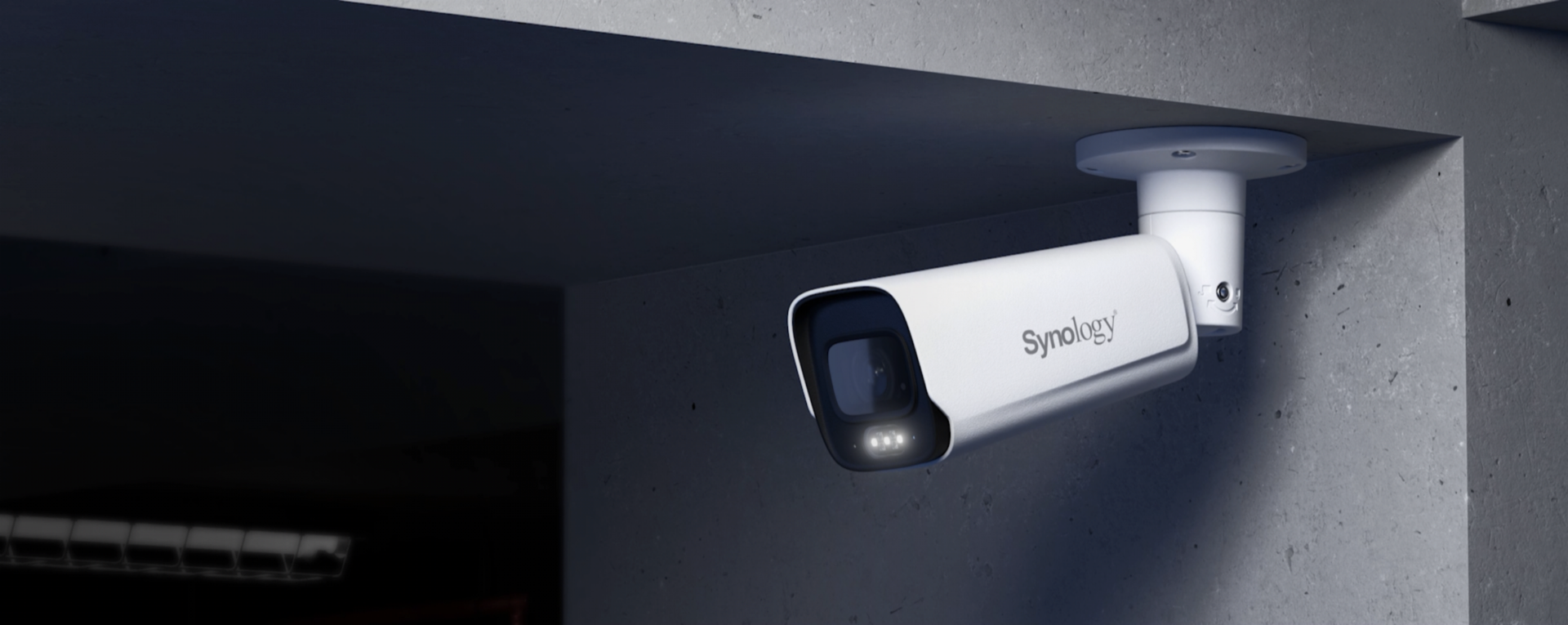
La scheda tecnica riporta Ø105 × 272 mm e 1310 g. Questi valori si rivelano reali solo al momento della consegna del prodotto. Si tratta di una telecamera di livello professionale con un alloggiamento interamente in metallo, e pesa circa quattro volte di più di una BC510.
In pratica, ciò significa che la superficie di montaggio è più importante del solito. Muratura o legno strutturale vanno bene. Cartongesso, sottili rivestimenti in PVC e rivestimenti decorativi no. Tre punti di regolazione con chiave a brugola consentono un orientamento preciso e, una volta serrato, il gruppo risulta davvero rigido, il che è esattamente ciò che si desidera per una telecamera che verrà zoomata, perché a 47° qualsiasi vibrazione viene amplificata.
La gestione dell'alimentazione è la parte più semplice. Nonostante le dimensioni, il consumo misurato è di 4,5-5,5 W a 4K30 fps con HDR attivo, ben al di sotto dei limiti dello standard 802.3af. Il PoE+ è supportato ma non necessario per il normale funzionamento.
Dove trovare ulteriori risorse ufficiali
Synology pubblica tre video ufficiali per il Synology BC800Z: un'introduzione, l'installazione hardware e l'aggiunta al Surveillance Station.
Limiti da conoscere prima di acquistare il Synology BC800Z
Le dimensioni rappresentano il primo limite pratico per la Synology BC800Z. Con un peso di 1310 g e una lunghezza di 272 mm, non si tratta di una telecamera discreta e non può essere installata dove una piccola telecamera a proiettile potrebbe passare. Su alcune facciate, tale visibilità è un deterrente e un pregio; su altre, invece, costituisce un ostacolo in fase di progettazione.
In secondo luogo, manca l'altoparlante. Il microfono è presente con codec G.711 e riduzione del rumore audio, ma questa telecamera non può riprodurre l'audio in diretta. Se l'audio bidirezionale è importante in quella posizione, la CC410W è l'unica telecamera della gamma a offrirlo.
In terzo luogo, il tracciamento automatico è digitale. Lo zoom è motorizzato, la testa no. Non acquistate questo prodotto aspettandovi una telecamera che segua fisicamente un soggetto in giardino: per quello serve una telecamera PTZ, e questa non lo è.
In quarto luogo, la registrazione in 4K a 30 FPS consuma rapidamente spazio di archiviazione. Una fotocamera di questo tipo genera una quantità di dati notevolmente superiore rispetto a un'unità da 5 MP, e la registrazione continua su più fotocamere contemporaneamente inciderà notevolmente sullo spazio di archiviazione disponibile. Utilizzate la registrazione attivata da eventi quando possibile e valutate onestamente, anziché in modo ottimistico, le dimensioni dei file da conservare.
In quinto luogo, il riconoscimento delle targhe è una capacità, non una garanzia. Test indipendenti hanno raggiunto il valore 99% a 7 metri, ma la lettura delle targhe è sensibile all'angolo, alla velocità, all'illuminazione e alle condizioni della targa stessa. È consigliabile testare il sistema sui veicoli effettivamente presenti all'ingresso, anziché presumere che il numero venga trasferito al vostro sito.
Infine, prima di ordinare, verificate la situazione relativa alle licenze per la vostra specifica implementazione. Le specifiche indicano che è necessaria una licenza per il dispositivo, ma la documentazione più datata afferma il contrario, e una telecamera senza una licenza valida mostrerà un'anteprima in diretta senza registrare nulla.
Riferimenti
- Synology — Specifiche del prodotto BC800Z, la fonte di ogni dato in questa recensione del Synology BC800Z
- Synology — Scheda tecnica ufficiale del BC800Z (PDF)
- Centro informazioni Synology — tabella di supporto per la piattaforma della fotocamera, la fonte autorevole su cui i modelli lavorano con Surveillance365 e BeeCamera
- BlackVoid — Recensione pratica del BC800Z, compreso il test di riconoscimento della targa 99% e la posizione di licenza pre-modifica
- Synology C2 — Piani e prezzi di Surveillance365
Domande frequenti
La fotocamera Synology BC800Z necessita di una licenza?
Nella pagina delle specifiche attuali del modello Synology, la licenza del dispositivo è indicata come obbligatoria. La telecamera è stata lanciata senza licenza, motivo per cui le recensioni più vecchie riportano informazioni diverse, ed è stata successivamente inclusa nello stesso cambiamento di licenza che ha interessato i modelli BC510 e TC510. Come per il resto della gamma, la licenza è valida per la registrazione su Surveillance Station su un NAS, e il NAS include due licenze per dispositivo.
Il modello Synology BC800Z è fisicamente in grado di ruotare su se stesso e inclinarsi?
No. L'unica parte motorizzata è l'obiettivo zoom varifocale. Non c'è una testa motorizzata per panoramica o inclinazione, quindi il corpo non ruota. La funzione Auto Tracking segue digitalmente il soggetto all'interno dell'inquadratura. Non si tratta di una telecamera PTZ.
Il riconoscimento delle targhe richiede un NAS DVA o una licenza aggiuntiva?
No. Il riconoscimento delle targhe avviene direttamente sulla telecamera, ed è questo che distingue questo modello dal resto della gamma. Test indipendenti hanno riportato una precisione del 99% a 7 metri sia di giorno che di notte.
Come si confronta il modello Synology BC800Z con il BC510?
È di una categoria superiore. 4K invece di 5MP, zoom motorizzato 2.1x invece di obiettivo fisso, infrarossi fino a 38 m più luce bianca fino a 31 m invece di infrarossi fino a 30 m, certificazione IK10, un intervallo di temperatura più ampio e una garanzia di 5 anni invece di 3. È anche quasi quattro volte più pesante e considerevolmente più costosa.
La videocamera Synology BC800Z è in grado di registrare a colori di notte?
Sì. Oltre ai LED a infrarossi da 38 m, dispone di LED bianchi che raggiungono i 31 m, quindi è possibile scegliere tra illuminazione a infrarossi monocromatica o a colori a seconda delle esigenze del luogo di installazione.
Il modello Synology BC800Z dispone di audio bidirezionale?
No. Ha un microfono con G.711 e riduzione del rumore audio, ma non un altoparlante, quindi non può rispondere a voce. La CC410W è l'unica telecamera della gamma attuale con audio bidirezionale.
Di quale PoE ha bisogno?
Lo standard IEEE 802.3af Tipo 1 Classe 0 è sufficiente e supporta PoE+. In alternativa, è disponibile un ingresso a 12 V CC. Il consumo misurato è di soli 4,5-5,5 W anche a 4K30 con HDR attivo.
È compatibile con Surveillance365?
La tabella ufficiale di compatibilità della piattaforma Synology elenca Surveillance365 per i modelli BC510, TC510 e CC410W, ma non per questo modello, che è escluso anche da BeeCamera. Il modello BC800Z funziona solo su Surveillance Station o su un VMS ONVIF di terze parti, quindi non esiste una soluzione cloud senza licenza.