

Synology Data Center Storage: Which Models Belong in the Rack (2026)

Someone asked us a simple question last week: which Synology machines can you actually put in a data center? Not a server closet, not a branch office rack, but a real computing center with raised floors, redundant power and workloads that are not allowed to stop. The honest answer is shorter than the Synology catalogue suggests. Most of the range is built for offices. A handful of rackmount lines are built for data center duty, and only one of them is designed so that a controller can fail in the middle of the working day without anyone noticing. This guide sorts the Synology data center options into tiers, explains what separates them, and walks through two public deployments in Taiwan: a quantitative trading firm on the PAS7700 and the national supercomputing center on FlashStation.
Punto SynoPower Club:People tend to judge a storage box by its drive count and its IOPS number. In a data center the question that matters is different: what happens at 2 pm on a Tuesday when one controller dies? For most Synology systems the answer is a short failover or a pair of separate boxes taking over from each other. For the PAS7700 the answer is that both controllers were already serving traffic, so nothing stops. That is why we put it alone at the top. FlashStation sits one step below and has earned its place the slow way: the national supercomputing center in Taiwan has run Synology all-flash storage under its render farm since 2019. Pick the tier by how much an outage costs you, not by the spec sheet.
What Makes a Synology System Data Center Grade?
A data center does not care whether a box is called a NAS. It cares about four things: how the system survives a component failure, how predictable its latency is under load, how it plugs into the network fabric, and whether it can be serviced without a maintenance window. Every Synology data center candidate should be judged on those four points before anyone looks at price.
- Redundancy inside the chassis. Dual controllers, redundant power supplies and dual-port drives mean a single part can fail without taking the volume offline. Single-controller units need a second, identical unit to reach the same result.
- Flash for latency-sensitive work. Virtual machine datastores, databases and render scratch space live on SSD or NVMe. Spinning disks belong in the capacity tier.
- Fabric connectivity. 25GbE, 100GbE, Fibre Channel or NVMe over Fabrics, not just the two RJ-45 ports on the back.
- Out-of-band management. A dedicated management port so the operations team can reach a controller even when the data network is down.
Measured against that list, the Synology range splits cleanly. Desktop DiskStation models and small RackStation units are excellent office storage but are not data center equipment. The lines that remain are PAS, FlashStation, the UC and SA dual-controller units, and the HD high-density series.
PAS7700 vs FlashStation: Which Synology Data Center Tier Fits?
Here is how we tier the current Synology data center lineup. The tiers describe availability design first and performance second, because that is the order in which a data center team should decide.
| Tier | Models | Controller design | Typical role |
|---|---|---|---|
| Tier 1 | PAS7700 | Dual controller, active-active, all NVMe | Mission-critical databases, virtualisation clusters, primary storage |
| Tier 2 | FlashStation FS6420, FS6400, FS3600, FS3420, FS3410 | Single controller, all-flash; pair two units for high availability | VM datastores, render and analytics scratch, VDI |
| Tier 2 (block) | UC3400, UC3200 | Dual controller, active-active, iSCSI and Fibre Channel only | SAN for hypervisor hosts |
| Tier 3 (capacity) | HD6500, SA3400D, SA3200D | Single or active-passive dual controller, mostly HDD | Backup targets, archives, media libraries, surveillance |
The split between Tier 1 and Tier 2 is not about raw speed. A well-built FlashStation is very fast. The split is about what a failure looks like. On the PAS7700 both controllers serve I/O all the time, so losing one is a non-event. On FlashStation, high availability means two separate boxes and a cluster heartbeat, which works well but involves a brief takeover.
Why the PAS7700 Sits Alone in Tier 1
Synology announced the PAS7700 at Computex in May 2025 and began shipping it in May 2026. It is the first Synology system designed from the start for primary storage in an enterprise data center, and it shows in the specification:
- 48 U.3 NVMe SSD bays and two controllers in a single 4U chassis
- Up to 2,048 GB of memory across both controllers, 1,024 GB per node
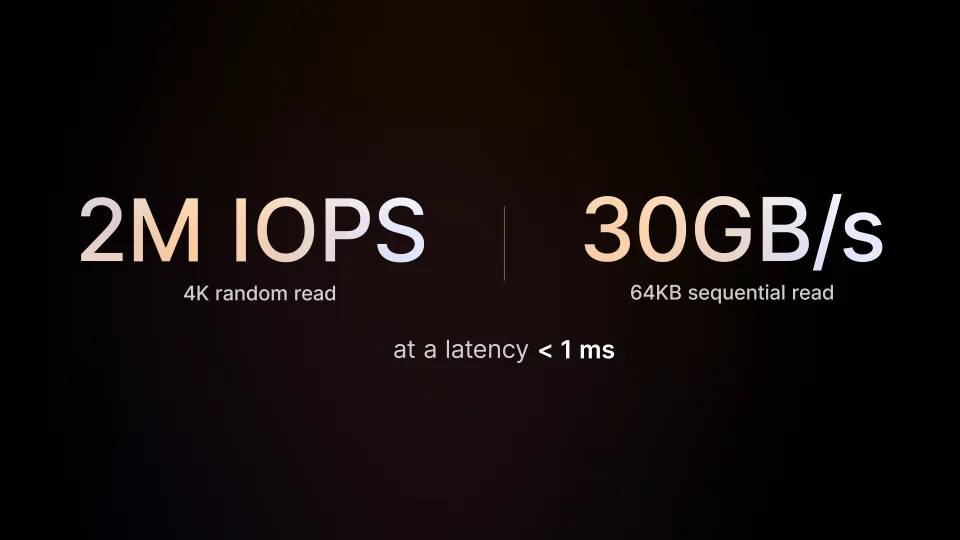
- Up to 2 million IOPS and 30 GB/s sequential throughput in Synology internal testing
- 100GbE networking, with file and block protocols including NVMe over Fabrics
- Scales to 216 drives and 1.65 PB raw with seven expansion units
- Immutable snapshots, replication, offsite tiering, and inline plus offline deduplication
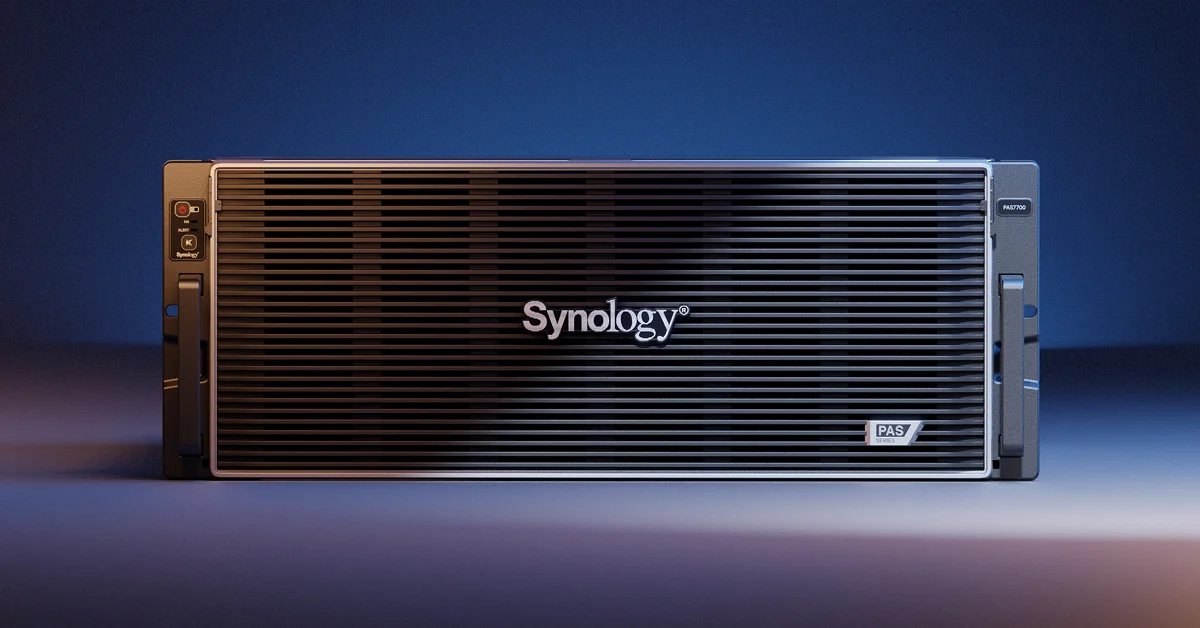
Tier 1 is for workloads where a stopped controller stops the business. Think of an engineering or design firm where hundreds of people open the same shared project models all day, a transaction database behind an ERP system, or the datastore under a production virtualisation cluster. In each case a takeover pause of even a minute means a floor full of people waiting, which is exactly the failure the PAS7700 is designed to remove.
A Public PAS7700 Deployment: Quantitative Trading
The first public PAS7700 deployment we can point to in Taiwan is a quantitative trading firm whose IT manager presented the project at Synology Solution Day 2026 in Taipei. The firm keeps at least three years of market data for factor research and backtesting, and on its previous NAS a single full backtest could take as long as three days, which slowed down every new trading strategy.
After moving research and backtesting storage to a PAS7700, its own tests showed average 4K random write latency falling from 117 ms to 2.9 ms, about one fortieth of the original, and sequential reads running roughly 14 times faster. The IT manager put the cost at about one third of other brands, and said the simple management interface matters for a small IT team that cannot spend its days tuning storage. The firm also added a Synology ActiveProtect appliance to bring its backups under one console. Backtesting is a good fit for the top data center tier: it is a burst of random reads across years of data, and every hour saved is an hour sooner a strategy goes live.
We wrote a separate deep dive on PAS7700 deployment, partners and support for buyers in the Middle East, and most of it applies anywhere: Synology PAS7700 in the UAE.
Choosing a Synology Data Center Platform in 4 Steps
Most sizing mistakes come from starting with the hardware. Start with the cost of downtime instead. These four steps are the order we use when someone asks which Synology data center system to buy.
Price an hour of downtime
Write down what one hour of storage outage costs the business in lost work, missed deadlines or contract penalties. If the number is large enough that a 60 second failover is unacceptable, you are shopping for Tier 1 and the PAS7700. If a short takeover is fine, Tier 2 is on the table.
Separate hot data from cold data
List which workloads need flash latency, such as VM datastores, databases and render scratch, and which only need capacity, such as backups, archives and video. Hot data goes to PAS or FlashStation. Cold data goes to an HD6500 or SA unit, which costs far less per terabyte.
Match the protocol to the hosts
Check what your hypervisors and applications speak. File shares over SMB or NFS suit FlashStation and PAS. Pure block storage over iSCSI or Fibre Channel for a VMware or Hyper-V cluster suits the UC series. NVMe over Fabrics at 100GbE points to the PAS7700.
Plan protection before go-live
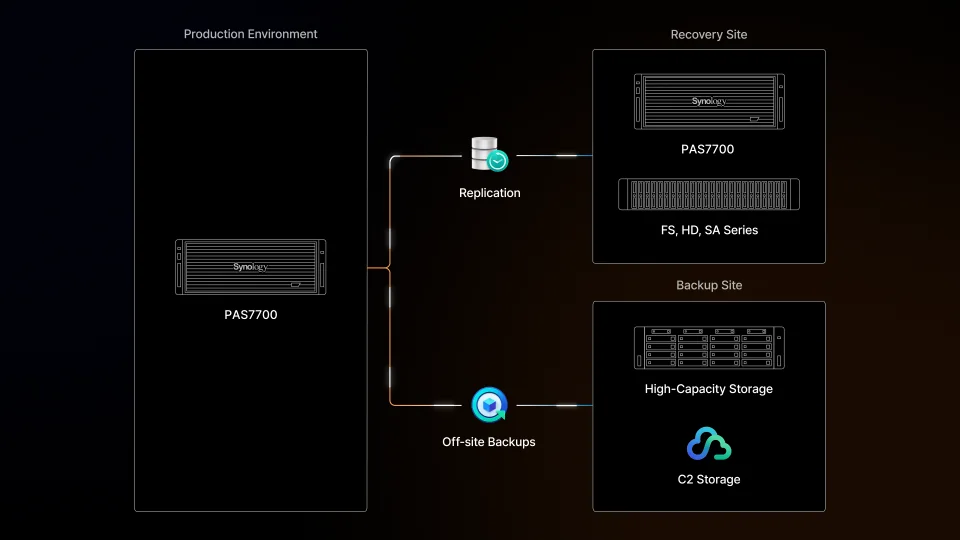
Decide where snapshots replicate to and where the offsite copy lives before the first production byte lands. A second Synology system at a recovery site plus an immutable backup copy is the minimum we recommend for any data center deployment.
Where FlashStation Fits: The Workhorse Tier
FlashStation is the all-flash line Synology has shipped since 2017, and it is the most widely deployed Synology option in data center racks today. Each unit is a 2U rackmount with 24 SSD bays and a single controller. The current models run from the FS3410 and FS3420 for mid-sized clusters up to the FS6400 and the new FS6420 for heavy throughput.
| Modello | processore | Max memory | Notes |
|---|---|---|---|
| FS6420 | AMD EPYC 7303, 16 cores | 1,024 GB | 24 SATA SSD bays, PCIe Gen4, newest flagship |
| FS6400 | Dual Intel Xeon Silver 4110, 8 cores each | 512 GB | Expands to 72 drives with two FX2421 units |
| FS3600 | Intel Xeon D-1567, 12 cores | 128 GB | Expands to 72 drives with two FX2421 units |
| FS3420 | Intel Xeon D-1739, 8 cores | 192 GB | Dual 10GbE built in, PCIe Gen4 |
What FlashStation gives up compared with Tier 1 is the second controller in the same chassis. If the controller fails, the volume is offline until the unit is repaired, unless you bought two identical units and joined them with Synology High Availability. In that setup the passive unit takes over automatically, usually within a minute or two. For render farms, development clusters, VDI and most virtualisation workloads, that is a perfectly acceptable trade for a much lower price per terabyte.
How Taiwan’s NCHC Runs Synology in a Data Center
The best evidence that FlashStation belongs in a data center comes from the National Center for High-performance Computing (NCHC), the national supercomputing center of Taiwan. NCHC has operated a cloud 3D render farm since 2011, used by animation studios, film teams and student competitions. When it rebuilt the render farm in 2019, it put Synology storage underneath it, and it has run on Synology since.
- An all-flash FlashStation FS3017 hosts the render farm virtual machines, with close to 100 VMs rendering at the same time, plus intermediate storage for huge numbers of small files.
- An RS3617xs+ in Taichung holds render output and point cloud data, more than 100 TB with two expansion units.
- A DS3617xs at the Hsinchu headquarters is the backup target.
- Snapshot Replication keeps versions on a schedule and Hyper Backup sends a copy offsite.
Two results stand out in the published case study. With the Synology VAAI plug-in, copying VM data dropped from roughly 40 minutes to a few minutes, and the team estimated an overall transfer gain of three to four times. And when a competition team deleted about 1 TB of files by mistake, the data came back from a snapshot. The NCHC team made a point that every data center architect should remember: in classic HPC, storage was a supporting actor, but in 3D rendering it becomes a lead role. That is exactly the kind of data center workload FlashStation was built for.
How Active-Active Failover Actually Works
The phrase active-active gets used loosely, so it is worth being precise. In an active-passive design, one controller owns the storage and the other waits. When the active controller fails, the standby has to detect the failure, take ownership of the disks, import the volumes and bring the network addresses up. That takes time, and every client connection sees it.
In an active-active design such as the PAS7700 or the UC series, both controllers serve I/O at the same moment. Memory, the system layer, the network and the protocol layer each have a failover path, and every drive is reachable from both controllers. When one controller drops, the surviving one is already running and already holds the state it needs, so clients keep reading and writing. Synology demonstrates this by pulling a controller in the middle of a large file copy, and the copy simply keeps going.
There is a cost to that design. Both controllers must agree on every write, which needs fast mirrored memory and drives with two ports. That is why the PAS7700 only accepts Synology U.3 NVMe drives and why active-active is reserved for the top data center tier.
The Other Rack Lines: HD6500, UC3400 and SA Series
Not everything in a computing center needs flash. A large share of any data center is backup, archive and long-lived project data. These lines fill the rest of the rack:
- HD6500: 4U with 60 drive bays, expandable to 300 drives with four RX6025sas units, built for multi-petabyte backup, media and surveillance archives.
- UC3400 and UC3200: 12-bay dual-controller SAN with active-active controllers, iSCSI and Fibre Channel only, and up to 36 drives with expansion. Good for a hypervisor cluster that only needs block storage.
- SA3400D and SA3200D: 12-bay dual-controller units with active-passive failover inside one chassis, a step up in availability from a single RackStation.
A typical layout we see is PAS7700 or FlashStation for the hot tier, an HD6500 as the backup and replication target in the same room, and a second system at a recovery site. If the hypervisors are clustered, the virtual machines themselves can also move between hosts. We covered that side in our VMM Pro write-up: right-sizing a production VM with VMM Pro.
Dove trovare ulteriori risorse ufficiali
These three official Synology videos are the fastest way to see the hardware and the failover behaviour for yourself.
Data Center Limits to Know Before You Buy
No storage platform is right for every data center, and Synology has clear boundaries. Know them before the purchase order goes out.
Drive compatibility is strict. The PAS7700 requires Synology U.3 NVMe drives, and FlashStation models enforce their compatibility lists. Budget for Synology drives from the start rather than planning to reuse an existing SSD pool.
Single-controller FlashStation needs a pair for high availability. One FS unit alone has no controller redundancy. If uptime matters, price two identical units and Synology High Availability, not one.
Some older names in case studies are discontinued. The FS3017 and RS3617xs+ that NCHC deployed have been succeeded by newer models. Use the case study for the architecture, then pick from the current lineup.
Performance figures are vendor figures. The 2 million IOPS and 30 GB/s numbers come from Synology internal testing. Run your own workload on a demo unit or a proof of concept before you size a data center deployment on them.
Support and spares are part of the design. Check the on-site service level, spare parts availability and response times in your country. In a data center the replacement controller matters as much as the one you bought.
Plan the network first. A 100GbE storage array behind a 10GbE core switch is a 10GbE storage array. Make sure the switching, cabling and host adapters match the tier you are buying.
If you are in Taiwan and want help choosing or deploying any of these systems, our sister company SynoEXP is a Synology-listed system integrator: contact SynoEXP.
Riferimenti
- Synology PAS7700 product page, specifications, drive bays and expansion
- Synology announces PAS7700, the official data center launch announcement
- Synology case study: NCHC, the national supercomputing center render farm
- Synology FlashStation FS6420, the newest all-flash flagship
- Synology HD6500, high-density capacity storage
- Synology Solution Day 2026 customer sessions, the PAS7700 quantitative trading case (Chinese)
Domande frequenti
Which Synology model is best for a data center?
For mission-critical primary storage the PAS7700 is the only Synology system with active-active controllers and all NVMe drives in one chassis. For VM datastores and render or analytics scratch space, FlashStation is the proven choice. For backup and archives, the HD6500 gives the lowest cost per terabyte.
Is FlashStation suitable for data center use?
Yes. FlashStation is a 2U all-flash rackmount line with out-of-band management and 25GbE or Fibre Channel options. The national supercomputing center in Taiwan has run its render farm virtual machines on FlashStation since 2019. Pair two units with Synology High Availability if you need controller redundancy.
What does active-active mean on the PAS7700?
Both controllers serve read and write requests at the same time and every drive is reachable from both. If one controller fails, the other is already running, so clients keep working without a takeover pause.
Can a Synology data center system use third-party SSDs?
The PAS7700 requires Synology U.3 NVMe SSDs, and FlashStation models enforce a compatibility list. Plan to buy Synology drives for these systems.
How far can the PAS7700 scale?
Up to 216 NVMe drives and 1.65 PB of raw capacity using seven expansion units, with up to 2,048 GB of memory across the two controllers.
What is the difference between UC3400 and FlashStation?
The UC3400 is a block-only SAN with active-active dual controllers and iSCSI or Fibre Channel. FlashStation is a single-controller all-flash system that serves both files and blocks. Choose UC for a hypervisor cluster that only needs block storage.
Is the HD6500 a data center product?
Yes, as a capacity tier. It holds 60 drives in 4U and scales to 300 drives, which makes it a strong backup, archive and media target. It is not designed for latency-sensitive primary workloads.
Has Synology storage been used in a national data center?
Yes. The National Center for High-performance Computing in Taiwan has run Synology all-flash storage under its 3D render farm since 2019, with close to 100 rendering VMs on a FlashStation FS3017 and Synology RackStation and DiskStation units for capacity and backup.