

Synology MailPlus SMTP-relé: Fiksing avvist e-post med sending på nytt

Oppdatert på 11. oktober 2026
An SMTP relay is a second mail server that sends your messages on your behalf, so the receiving side judges its reputation instead of yours. On 9 October 2026 we needed one in a hurry. SynoPower Club runs entirely on Synology, and every order confirmation and license key leaves through Synology MailPlus. That evening a customer in Belgium paid for a license, and the email carrying the key came straight back with 552 5.2.0 Your message is considered spam. SPF, DKIM and DMARC were all passing. This NAS Hosting 101 article shows how we added Resend as an SMTP relay for only the recipient domains that reject us, which records it needs, how we tested it, and what the service quietly changes in your messages.
SynoPower Club-punkt: I spent years on the support side of Synology, and deliverability was the reason most people gave up on running their own mail. They assumed the fix was to move every mailbox to a hosted suite. It rarely is. In our case the mail server was healthy, the DNS was correct, and exactly one hop on the way out had a poor name with a few strict providers. Synology MailPlus lets you change that one hop for those providers only, with a rule that took us ten minutes to create. The mailboxes, the logs and the customer data never left our own NAS.
Why Correctly Signed Mail From a NAS Still Gets Rejected #
Authentication proves who you are. It does not prove you are welcome. SPF, DKIM and DMARC tell the receiving server that a message really comes from your domain, and after that the server asks a second question: what has it seen before from the IP address that is handing the message over?
A self-hosted mail server usually loses that second question in one of two ways. If it sends directly, the public IP often carries a generic reverse DNS name from the internet provider, which many receivers treat as a home connection. If it sends through the provider’s own outgoing server instead, as ours did, the message inherits the reputation of a machine shared with thousands of other customers.
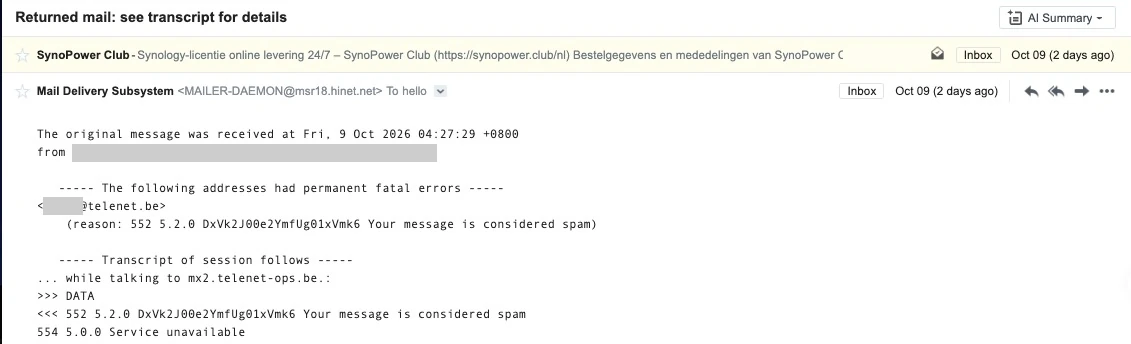
That was our situation. The bounce did not complain about our domain or our signature. It was a verdict on the path, and large European mailbox providers such as Telenet and GMX are known for strict filtering on exactly that signal. Nothing inside the mail server could change it, because the problem sat one hop after the NAS.
What an SMTP Relay Changes, and What It Does Not #
An SMTP relay replaces that last hop. Your server authenticates to it on port 587, hands over the message, and the SMTP relay delivers it from its own IP addresses with its own sending history. Transactional email services exist for precisely this job: their addresses send nothing but receipts, password resets and notifications, so receivers trust them more than a general-purpose outgoing server.
A good SMTP relay also signs the message with a DKIM key for your domain, so the customer still sees your address and DMARC still passes. What it cannot do is repair bad content, a missing SPF record or a list of people who never asked for your mail. Fix authentication first, then look at the path.
Why We Chose Resend as the SMTP Relay #
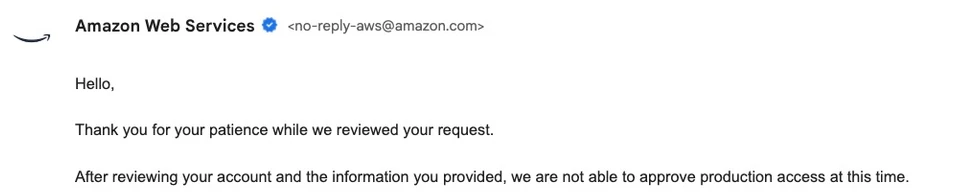
Our first attempt was Amazon SES. We verified the domain, described our volume as 20 to 50 transactional emails a day, and were declined for production access the next day without a stated reason. That is a common experience for a brand new account, and it left a store with license keys waiting to be delivered.
Resend was the second attempt, and it was sending signed mail for our domain about ten minutes after sign-up. Three things made it a good fit for a small Synology-hosted shop:
- It speaks plain SMTP. No plugin or API integration is needed, so a mail server on a NAS can use it as an SMTP relay without any extra software.
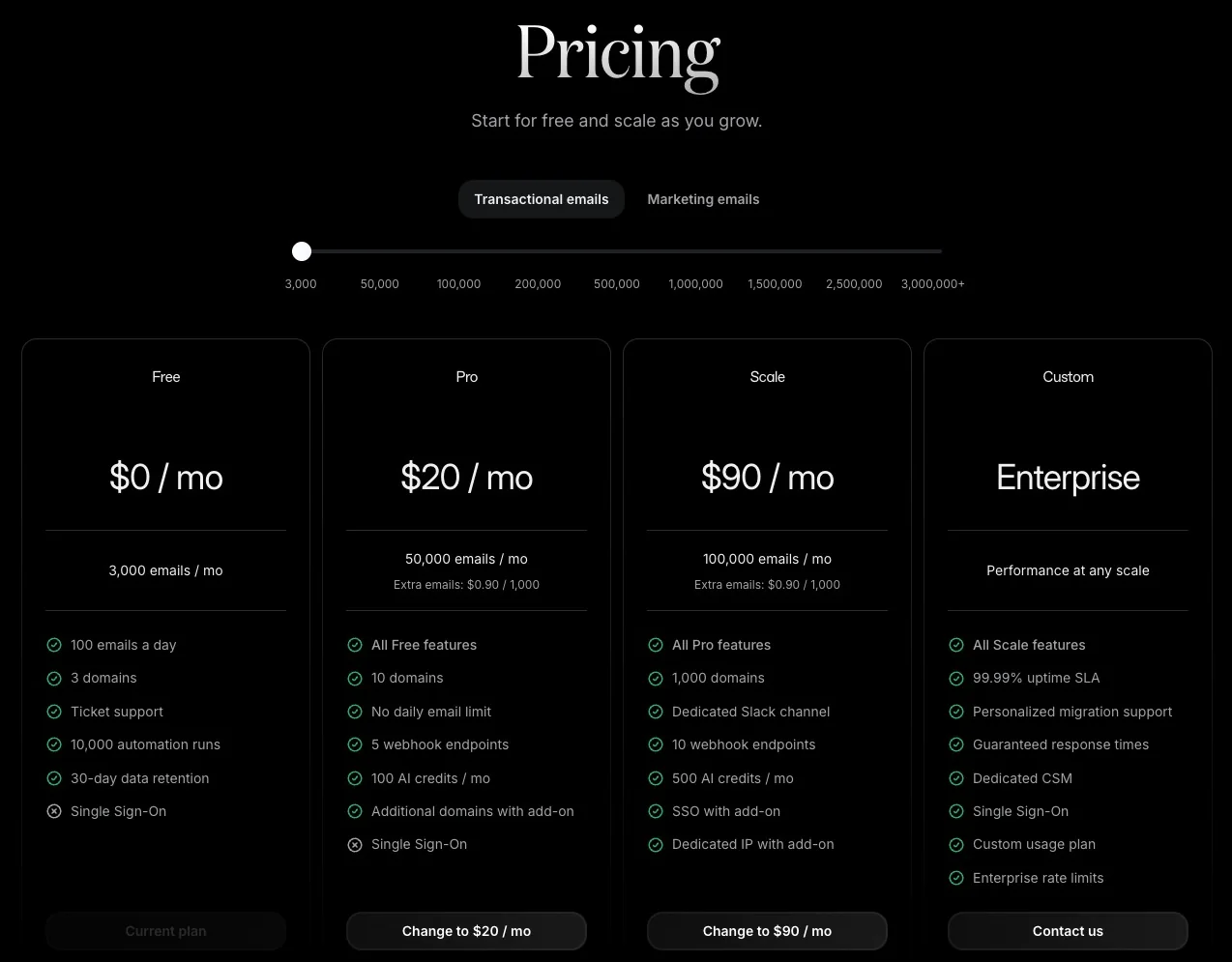
- The free plan covers a small store. In October 2026 it allows 3,000 emails a month, 100 a day and 3 domains, which is far above our order volume.
- Domain verification is automatic with Cloudflare. One authorisation screen created every DNS record for us.
- Every message is listed in a dashboard. You can see whether the receiving server accepted or bounced each one.
One detail made us smile. The headers of our first test showed the message leaving through Amazon SES infrastructure in Tokyo. Resend is built on the very platform that had turned our own application down, with the sender reputation and the approval already taken care of.
Relay Everything, or Only the Domains That Reject You? #
Most guides tell you to send all outgoing mail through the new SMTP relay. We did not, and Synology MailPlus is the reason we did not have to. Its SMTP relay settings accept exception rules, and each rule carries its own server, port and credentials. Mail for the domains listed in a rule takes that route, and everything else keeps using the default route.
Splitting the traffic this way has real advantages for a business mail server:
- Ordinary correspondence stays untouched. Replies, threads and messages with several recipients keep their original headers.
- Less of your mail passes through a third party. Only messages for the listed domains leave your own infrastructure early.
- You stay inside the free allowance. A hundred emails a day is plenty for a handful of domains and not much for a whole company.
- Rolling back is one checkbox. Disable the rule and those domains return to the default route.
We started with two domains, the one that bounced and one more with a similar reputation for strictness, and further European providers will follow as real orders confirm the result.
Setting Up a MailPlus SMTP Relay With Resend in 4 Steps #
The whole SMTP relay setup happens in two browser tabs: the Resend dashboard and the MailPlus Server console in DSM. Take a snapshot or export the mail server configuration first if this is a production system.
Legg til domenet ditt i Resend og publiser DNS-postene #
Opprett en Resend-konto, åpne Domener og legg til domenet du sender fra. Velg regionen på dette trinnet. Resend viser deretter en DKIM-post og to poster for det avviste underdomenet. Med Cloudflare DNS oppretter knappen Automatisk konfigurasjon dem etter én autorisasjonsskjerm. Med en hvilken som helst annen DNS-vert kopierer du postene manuelt. La dine eksisterende SPF-, DKIM- og DMARC-poster være som de er.
Vent på bekreftet, og opprett deretter en API-nøkkel kun for sending #
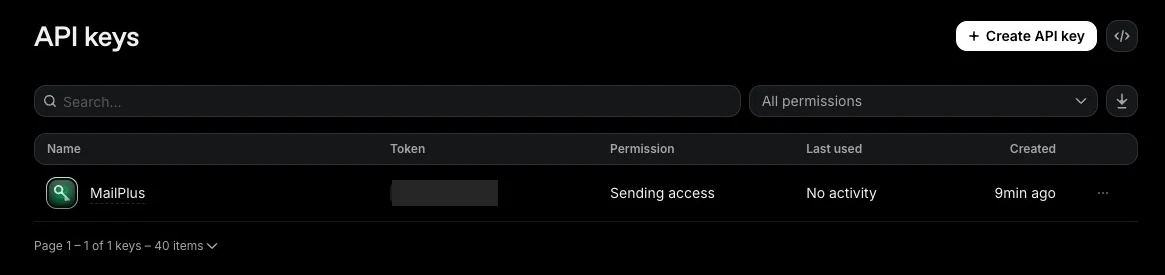
Verifiseringen tok noen minutter for oss. Når domenestatusen viser Verifisert, åpner du API-nøkler og oppretter en nøkkel med tilgangstillatelsen Sender, begrenset til det domenet hvis du vil. Kopier den umiddelbart, fordi hele nøkkelen bare vises én gang. Denne nøkkelen er passordet for SMTP-reléet.
Opprett en mottakerregel i MailPlus-serveren #
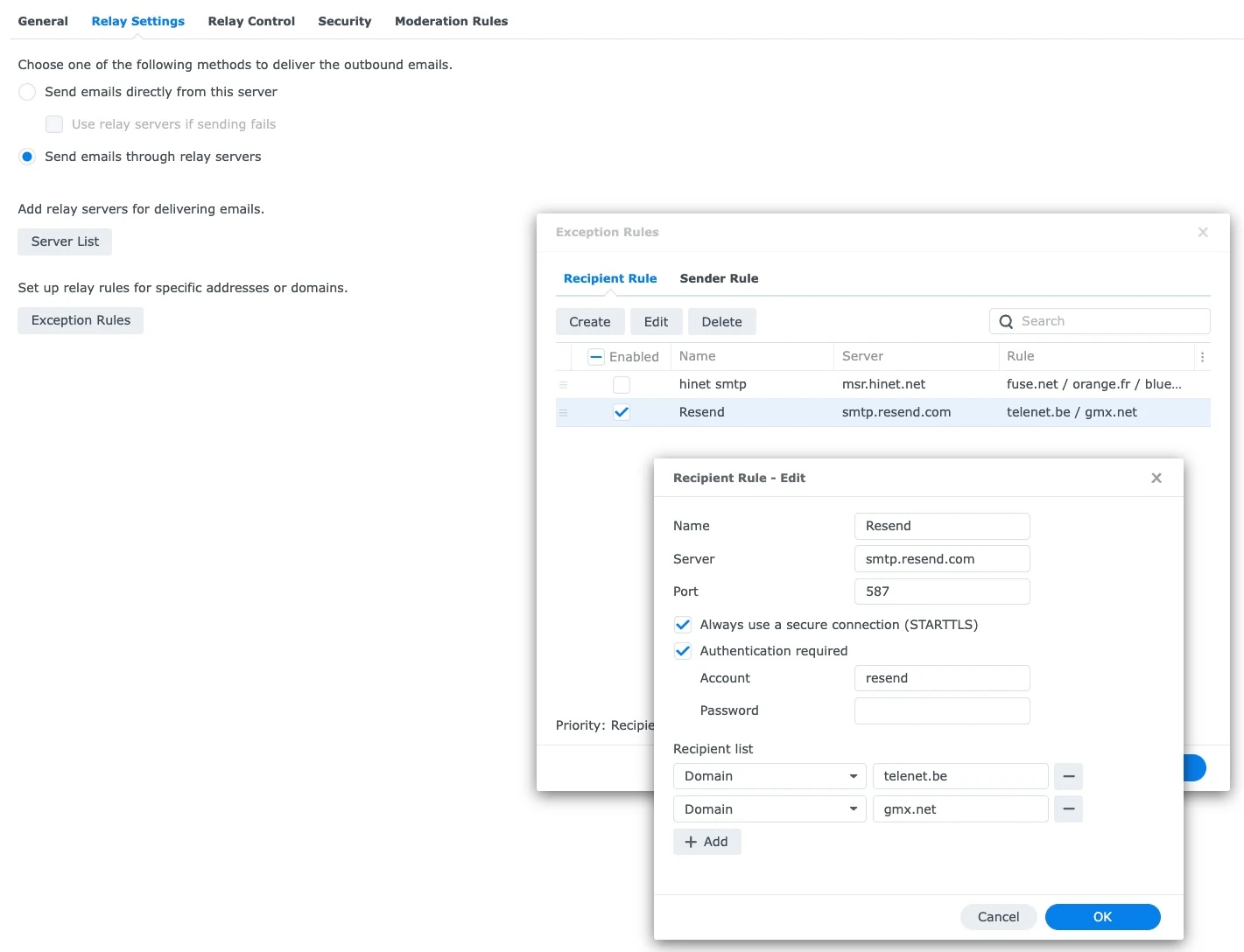
I MailPlus Server åpner du Mail Delivery, deretter Relay Settings, deretter Exception Rules, og opprett en regel i fanen Recipient Rule. Skriv inn smtp.resend.com som server og 587 som port, merk av i boksene for sikker tilkobling og autentisering, skriv inn resend som konto og lim inn API-nøkkelen som passord. Legg til hvert mottakerdomene i listen, bekreft og bruk deretter.
Send en test og les resultatet på begge sider #
Send en melding til en postboks på et av de oppførte domenene. I MailPlus Server skal køsiden være tom noen sekunder senere. I Resend Emails-siden skal meldingen vises som Levert. Til slutt åpner du meldingen hos mottakeren og sjekker at SPF, DKIM og DMARC alle viser godkjenning for ditt eget domene.
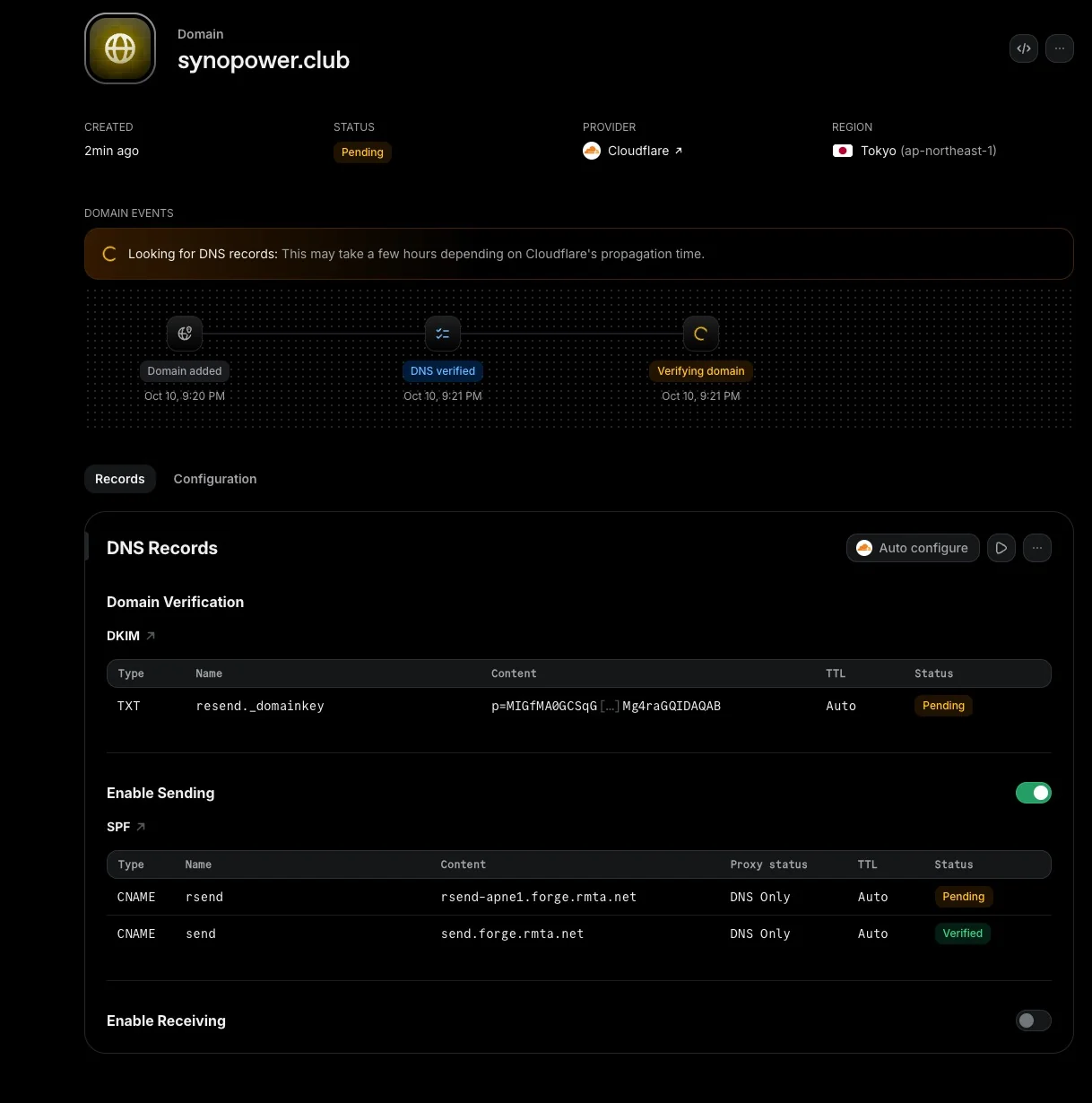
The DNS side deserves one extra sentence. Resend signs with its own DKIM selector and uses its own subdomain for bounces, so nothing it adds collides with the records your mail server already relies on. Both routes stay fully authenticated at the same time, which is what makes a split setup safe.
How to Confirm the SMTP Relay Is Really in Use #
Our first save of the rule was wrong, and nothing on screen said so. The browser’s password manager had filled the Password field with the DSM login password while we were typing the other fields, and the form accepted it happily. A message for those domains would have sat in the queue with an authentication error.
Three checks tell you whether the SMTP relay is working before a customer does:
- Paste the key last, and look at its length. A Resend key starts with
re_and is 36 characters long. A short row of dots means the browser filled in something else. - Watch the queue. After a test message, the Queue page in MailPlus Server should be empty. A deferred message there shows the reason the SMTP relay gave.
- Watch the key. The Last used column on the Resend API keys page says No activity until the first message authenticates successfully.
We also tested the SMTP relay directly before touching the mail server, by sending messages to one of our own mailboxes over SMTP. They arrived with SPF, DKIM and DMARC passing for our domain, and a non-English subject, an HTML body with a plain text part, a PDF attachment and a custom header all came through intact, so the SMTP relay does not damage ordinary message content. That matters for a store whose order emails go out in 16 languages.
Then came the test that mattered. On 11 October we sent the Belgian customer’s order email again, the same message that had bounced two days earlier. The mail log showed MailPlus Server handing it over 3.2 seconds after it entered the queue, and the dashboard marked it Delivered, which means the provider’s server accepted the message instead of refusing it.
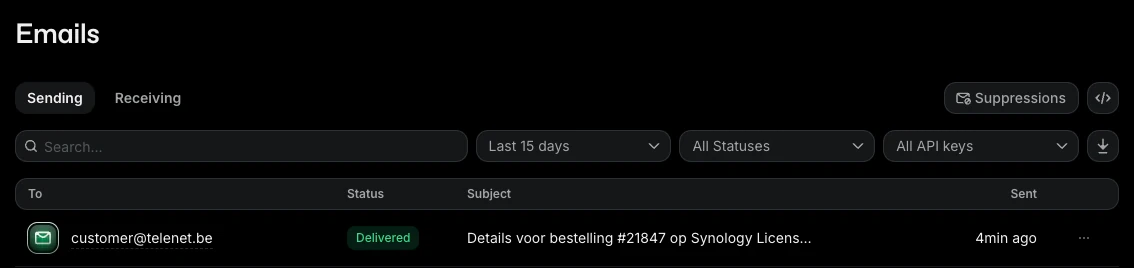
One message is a result, not a statistic. Delivered tells you the receiving server said yes, and it cannot tell you which folder the message was filed in. We will keep watching real orders to these providers before we move more domains across.
What Resend Rewrites in Your Messages #
An SMTP relay that rebuilds messages is not a transparent pipe, and the differences are worth knowing before you route anything important through it. Comparing what we sent with what arrived showed four changes:
- The To header becomes the single recipient. Each recipient gets a copy addressed only to them, so the original list of recipients is no longer visible.
- The Message-ID is replaced. Mail clients use that value to group replies, so threads can split.
- The Date header is converted to UTC. The moment is the same, the displayed time zone is not.
- The Received lines from your own server are removed. The recipient no longer sees the internal path.
None of this matters for an order confirmation sent to one customer. It matters a great deal for a conversation with three people in copy, and it is the strongest argument for giving the SMTP relay only selected domains instead of everything.
Why Our Mail Still Lives on Synology MailPlus #
Adding an outside SMTP relay for two domains does not change where our mail lives. Every mailbox, every sent message and every delivery log is still on our own NAS, and Synology MailPlus still decides, message by message, which route to take. A hosted mail suite would not have given us that choice. We would have had one outgoing path, the vendor’s, and no rule to steer around a problem.
It is also why the fix cost nothing. The server includes five email accounts for free, the licenses for more are bought once instead of rented monthly, and the SMTP relay rules are part of the package. If you are weighing up running your own mail, the full picture is in our guide: Synology MailPlus mail server guide.
SMTP Relay Limits and Caveats #
An SMTP relay solves one specific problem, and it brings a few of its own.
The messages you route through it are processed by a third party. Ours contain license keys, so we keep the list of domains short and use a key that can send and do nothing else. Check your own privacy commitments before sending customer mail through any outside service, particularly for customers in the European Union.
The free plan has a daily ceiling. A hundred emails a day is generous for selected domains, but a mailing to your whole customer list would hit it within minutes. Newsletters belong on a separate plan, and ideally on a separate subdomain, so that marketing complaints never touch the reputation of your order emails.
Reputation is borrowed, not owned. Shared sending addresses are well kept, but you do not control who else uses them. If a provider still rejects you after the change, read the bounce text in the dashboard before assuming the path is at fault.
Finally, an API key that has been pasted into a chat, a ticket or a screenshot should be replaced. Create a new key, update the SMTP relay rule, send a test and delete the old one. It takes two minutes and removes a risk that otherwise lasts for years.
Ofte stilte spørsmål #
Hva er et SMTP-relé? #
En SMTP-relé er en e-postserver som tar imot meldinger fra din egen server og leverer dem for deg. Mottakersiden vurderer deretter reléets omdømme i stedet for adressen serveren sender fra.
Hvorfor havner e-post fra min Synology NAS i søppelpost når SPF, DKIM og DMARC passerer? #
Disse tre kontrollene beviser at meldingen faktisk kommer fra domenet ditt. Mottakerne scorer også IP-adressen som leverer den. Et generisk omvendt DNS-navn eller en delt utgående server med blandet historikk kan mislykkes i den andre testen alene.
Støtter Synology MailPlus bare SMTP-relé for bestemte domener? #
Ja. Under E-postlevering, Reléinnstillinger, Unntaksregler kan du opprette mottakerregler, hver av dem et separat SMTP-relé. Hver regel har sin egen server, port og påloggingsinformasjon, og gjelder bare for domenene eller adressene i listen.
Er Resend gratis å bruke som en SMTP-relé? #
Gratisabonnementet tillot 3000 e-poster i måneden, 100 om dagen og 3 domener da vi registrerte oss i oktober 2026. Det er nok for transaksjonsposten til en liten butikk, spesielt når bare noen få domener bruker den.
Hvilken SMTP-reléserver, port og pålogging bruker Resend? #
Serveren er smtp.resend.com. Port 587 med STARTTLS fungerer med MailPlus-serveren, og 465 er tilgjengelig for implisitt TLS. Kontonavnet er alltid resend, og passordet er API-nøkkelen din.
Do I have to change my existing SPF or DKIM records? #
No. Resend adds a DKIM key under its own selector and uses its own subdomain for bounces. The records your mail server already uses stay in place, so the default route and the SMTP relay both remain authenticated.
Will customers still see my own address as the sender? #
Yes. The From address is unchanged and the message is signed for your domain, so DMARC passes. In our tests the visible changes were limited to the To, Message-ID, Date and Received headers.
Can I choose the SMTP relay by sender instead of by recipient? #
MailPlus Server also has a Sender Rule tab next to Recipient Rule, for routing by the sending address. When both kinds of rule match the same message, the console states that the recipient rule takes priority.
Referanser og videogjennomganger #
- Resend SMTP documentation, listing the server name, the available ports and the login format.
- Resend pricing, for the current allowances of the free and paid plans.
- Synology MailPlus Server Mail Delivery help, the official description of the delivery and relay settings.
- Google email sender guidelines, the authentication and reputation rules Gmail applies to incoming mail.
- DMARC overview, explaining how SPF and DKIM alignment decide whether a message passes.
These Synology videos cover the mail server this article is built on, from first installation to the security settings.
More from this series on hosting a business on a NAS: Email bombing through a contact form. Planning your own mail server? Start with a MailPlus license pack, or browse all licenses on SynoPower Club.