Official Synology Surveillance Station License: Why Keygens Are Dangerous
Thinking about a Synology license keygen? Since Surveillance Station 7.1-4056, Synology enforces online activation — all keygens are blocked and instantly detectable. One failed attempt can trigger a 14-day lockout on every license tied to your Synology device, including legitimate ones.
An official Synology license and a keygen-generated key look identical until the moment you press activate. One works for the life of your NAS; the other fails and can lock the licenses you already paid for. This page explains what a Synology license actually is, what it costs, how to tell a genuine key from a fake, and what happens to a NAS that has had an invalid key entered on it.
SynoPower Club Point: Having worked as Synology’s first dedicated global customer support representative starting in 2006, I handled hundreds of cases where users unintentionally damaged their surveillance setups by using invalid license keys. After joining the official Synology partner network as a reseller in 2023, I launched SynoPower Club to provide a fast, reliable, and 100% official alternative. The cases I saw firsthand are exactly why this page exists: keygen tools do not just fail — they can lock your entire Synology device for up to 14 days, disable updates, and expose your NAS to serious security threats.
Synology Surveillance Station is a professional video management system (VMS) built into every Synology NAS. It supports over 8,400 IP cameras from 150+ brands, including ONVIF-compliant devices, and handles live view, recording, motion detection, smart analysis, and remote access through the DS cam mobile app.
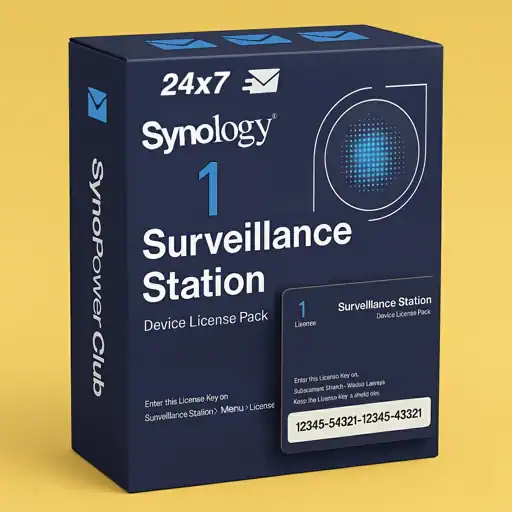
Every Synology NAS comes with 2 free camera licenses pre-installed. To connect more cameras, you purchase official Synology Camera License Packs (CLP) — available as 1-pack, 4-pack, or 8-pack. Each is a one-time purchase with no annual renewal fee and includes lifetime Surveillance Station software updates.
How Many Cameras Can I Monitor for Free?
A Synology NAS includes 2 free licenses. Synology’s dedicated surveillance hardware includes more: an NVR-series unit ships with 4 and a Deep Learning NVR (the DVA series) with 8. To go beyond your model’s default, an official license pack is required.
Why Do Users Search for a Synology License Keygen?
A Synology license pack is a one-time cost: US $62.10 for a single camera, or US $61.38 per camera when bought as an 8-pack. Some users try to avoid this cost with keygens or cracked license scripts. These tools worked intermittently before Surveillance Station 7.1-4056 (2015), but Synology introduced mandatory online activation that renders all generated keys invalid. By 2024, Synology further tightened enforcement — invalid keys are now detected in real time and can trigger automated account restrictions.
What a Synology license costs
Pricing is the reason people look for a keygen in the first place, so it is worth seeing the real numbers. A Synology license is bought once and never renewed, which changes the comparison against any subscription camera service.
CLP1, one camera:US $62.10
CLP4, four cameras:US $246.10, which is US $61.53 per camera
CLP8, eight cameras:US $491.05, which is US $61.38 per camera
Official Synology License vs. Keygen: Full Comparison
Feature
✅ Official License (SynoPower Club)
❌ Keygen / Crack
Legal status
Legal — from an authorized Synology partner
Illegal under Synology EULA
Works on DSM 7+
Yes — online activation supported
No — blocked since 2022, undetectable since 2024
System updates
Lifetime free updates included
Updates disabled or blocked
14-day lockout risk
None
High — one failed attempt locks your account
License transferability
Yes — move to a new NAS (SS 8.2.6-6009, 2019)
Not applicable — key is invalid
Synology technical support
Fully eligible
Not eligible — Synology may require DSM reset
Security patches
Continuous and automatic
Blocked — system left unpatched
Malware / ransomware risk
Minimal (patched system)
High — unpatched NAS is a prime target
Delivery
Instant email, 24/7
N/A
Price
One-time purchase, no recurring fee
Free upfront, high risk cost
How a Synology License Keygen Can Harm Your NAS
14-Day Lockout Risk — Even for Your Legitimate Licenses
This is the risk most users are not aware of. When Synology’s activation server detects an invalid key, it does not just reject that key — it can flag your entire Synology account for a 14-day lockout, preventing activation of any license including ones you legitimately purchased. Releasing this timer lock early requires contacting Synology Support directly. See our camera license troubleshooting guide for details.
System Updates Are Blocked
Official Synology licenses are tied to online activation. A NAS running an invalid license either loses access to Synology’s update servers or must operate in a degraded offline mode. As DSM updates address security vulnerabilities (CVEs), a NAS without updates quickly becomes a liability on any network.
Malware and Ransomware Exposure
Unpatched Synology NAS devices are frequently targeted by ransomware campaigns — Synology itself has issued multiple security advisories about this. A device locked out of DSM updates due to a keygen-related activation failure is at significantly higher risk of compromise, with potential loss of all stored footage and data.
No Technical Support Eligibility
Synology Support will not assist with any device running modified or invalid licenses. In more severe cases, Synology may require a full DSM factory reset to resolve issues caused by keygen-related activation failures — wiping your configuration and requiring a full reconfiguration of Surveillance Station.
How to tell a genuine Synology license from a fake
There is no way to inspect a key and judge it by eye. The only reliable test is activation itself, but these four steps will tell you where you stand before and after you try.
Check where the key came from
A genuine Synology license comes from Synology directly or from a partner listed in Synology’s own Where to Buy directory. A key from a marketplace listing far below the normal price, a generator, or a forum post is not a Synology license; it is a string of characters that will fail activation.
Activate it while the NAS is online
Open Surveillance Station, go to the license area and add the key with the NAS connected to the internet. Online activation is mandatory since Surveillance Station 7.1-4056, and it is the step that separates a real key from a generated one. A genuine key activates immediately.
Confirm the license count actually increased
After activation the total number of device licenses should rise by the size of the pack you bought. If the total is unchanged, the key was not accepted, whatever message appeared on screen.
Keep the invoice and link the NAS to your Synology account
Your invoice is what makes a warranty or support claim possible, and linking the NAS to a Synology account is what later allows a Synology license to be transferred to replacement hardware. Doing both at purchase time costs nothing and protects the money you just spent.
Benefits of an Official Synology Surveillance Station License
Lifetime License — No Annual Renewal Fees
Official Synology Camera License Packs are a one-time purchase. There are no subscription fees, no annual renewals, and no expiry. The license remains valid as long as you use Synology Surveillance Station, and it includes all future software updates at no additional cost.
Transfer Your License When You Upgrade Your NAS
Starting from Surveillance Station 8.2.6-6009, official licenses can be migrated to a new NAS device through your Synology account. This means your investment is protected even when you upgrade your hardware — something that is simply not possible with a keygen-generated key.
Continuous Security Patches and Software Updates
Synology actively maintains Surveillance Station with new camera compatibility (currently 8,400+ cameras from 150+ brands), codec support (H.265, H.264), analytics improvements, and security patches. An official license keeps your system on the latest version without any manual intervention.
A Synology license against a subscription camera service
The comparison people actually face is rarely official key against keygen. It is a Synology NAS against a consumer camera brand that stores footage in its own cloud for a monthly fee, and that is where the one-time cost stops looking expensive.
Nothing recurring. A Synology license is paid once. A cloud plan billed per camera per month overtakes it within a few years on most sizes of system, and keeps going.
The footage stays on hardware you own. No retention window decided by someone else, and no clips that disappear when a plan lapses.
It survives the vendor. A subscription service can change its pricing, its retention or its existence. A license activated against your NAS does not depend on that.
Two cameras cost nothing at all, which no subscription service matches.
What to do if a keygen key has already been used
This is the situation people write to us about most often, usually after the lockout has already started. Nothing here is a guaranteed fix, but this is the order that gives the best outcome.
Stop attempting activation. Repeated failed attempts are what escalate a temporary restriction. One more try will not succeed and can extend the lockout.
Remove the invalid key from Surveillance Station so the system is no longer presenting it for activation.
Wait out the restriction window before adding a genuine Synology license. Adding a real key during a lockout can fail for reasons that have nothing to do with the key, which then looks like a faulty purchase.
Bring DSM and Surveillance Station up to date. A NAS that has spent time unable to reach Synology’s servers is usually behind on security patches, and that is the part of this with real consequences.
If activation still fails after the window has passed, our guide on why a camera license will not add covers the other causes, most of which are ordinary and fixable.
Why Buy Your Official Synology License from SynoPower Club?
SynoPower Club is run by Adair Hsu, Synology’s first dedicated global customer support representative (2006). During that time, Adair directly handled cases across Asia, Europe, and North America — including hundreds involving invalid license keys and the downstream damage they cause.
After nearly two decades in the Synology ecosystem, SynoPower Club was established in 2023 as an official Synology authorized partner (SynoPower Club, SynoEXP LTD), bringing that first-hand product knowledge directly to customers who need it.
Instant 24/7 global delivery — license key sent to your email immediately after payment, any time of day
60-day return policy — buy with confidence
Direct Synology VIP support portal — for escalations that go beyond standard support
Frequently asked questions about a Synology license
Is it safe to use a Synology Surveillance Station license keygen?
No. Keygen-generated keys are detected by Synology’s online activation server. Using one risks a 14-day lockout on your entire Synology account, blocks system updates, and disqualifies your device from Synology technical support.
What happens if I use a cracked Synology license?
Synology’s activation server flags the invalid key and may lock your account for up to 14 days, preventing you from activating any license, including legitimate ones you have paid for. In more severe cases Synology support may require a DSM factory reset to clear the condition.
Where can I buy an official Synology license?
From Synology directly, or from a partner listed in Synology’s Where to Buy directory. SynoPower Club is an authorised partner and delivers keys by email immediately after payment, at any hour.
Can I transfer my Synology license to a new NAS?
Yes. Since Surveillance Station 8.2.6-6009, official licenses can be migrated to a new NAS through your Synology account. The free licenses that came with the hardware stay with that hardware and cannot be moved.
How long does a Synology license last?
Indefinitely. Official camera licenses are one-time purchases with no expiry date and no annual fee, and they include all future Surveillance Station updates at no extra cost.
How many cameras does each license pack cover?
Three sizes are sold: CLP1 covers one camera, CLP4 covers four and CLP8 covers eight. Each pack is a single key that activates the corresponding number of channels, and packs stack with each other and with the free licenses.
Why is a Synology license so much cheaper per camera in the 8-pack?
The larger packs carry a lower per-camera price, so if you expect to grow past the pack you are considering, buying the next size up is usually cheaper than buying two smaller packs later. Packs stack, so there is no penalty for combining them.
Does a keygen still work on older Surveillance Station versions?
No, and running an old version to try is the worst possible trade. Online activation has been mandatory since Surveillance Station 7.1-4056, and staying on an unpatched release to avoid it leaves the NAS exposed to exactly the ransomware campaigns Synology publishes advisories about.
Where can I see a Synology license being activated?
Three independent walkthroughs covering Surveillance Station setup and license activation. They are third-party tutorials rather than Synology productions, so menus may differ slightly between versions.
Surveillance Station full setup guide, including the license step