

NGINX2Shell on Synology: How to Check, Mitigate and Patch DSM

Download the NGINX2Shell fix first. For DSM 7.4 the fixed build is 7.4.1-90080-2, shown as 7.4.1-90080 Update 2, and the update packs for every model are at archive.synology.com/download/Os/DSM/7.4.1-90080-2. For DSM 7.3 you need 7.3.2-86009-6 or later, and for any other DSM version or model lookup use the Synology Download Center. DSM does not always push the notification, and ours did not reach every machine on the same day, so do not wait for it.
To install by hand, pick the file that matches your exact model, then go to Control Panel, Update and Restore, choose Manual DSM Update and select the file. Take a configuration backup first, and never install a pack made for a different model. If you cannot update today, turn HTTP/2 off as described in step 2 below.
NGINX2Shell is the name given to CVE-2026-123007 and CVE-2026-123633, two memory-corruption flaws in the HTTP/2 code of nginx that F5 patched on 18 November 2026. The worse of the two, CVE-2026-123007, lets an unauthenticated attacker who can reach an HTTP/2 listener corrupt the heap of an nginx worker and, with enough effort, run commands as that worker. Synology builds nginx into DSM, so every NAS with a web interface, a reverse proxy or Web Station is in scope. Synology published advisory Synology-SA-26:20 on 19 November and shipped the fix for DSM 7.4 and DSM 7.3 on 20 November.
This guide covers what NGINX2Shell actually is, how to check whether your NAS negotiates HTTP/2, the official mitigation, the exact fixed DSM versions, why nginx -v cannot prove you are patched, and the second critical advisory, SA-26:21, that shipped in the same update.
SynoPower Club Point:We run every public site through one Synology reverse proxy, which made NGINX2Shell personal the moment F5 disclosed it on 18 November. A quick ALPN check showed HTTP/2 switched on, Synology had published nothing yet, and researchers had already shown a working exploit chain against stock builds. We turned HTTP/2 off the next afternoon, watched twelve hostnames keep answering over HTTP/1.1, and waited. Synology’s fix arrived on 20 November as DSM 7.4.1-90080 Update 2. The lesson is not about speed. The mitigation took a few minutes and broke nothing we could find, while the patch took two days to exist. If your NAS faces the internet, do the cheap thing first and the patch second.
What Is NGINX2Shell and Why HTTP/2 Is the Door
NGINX2Shell is not a single bug. The NGINX2Shell name covers two flaws that both live in the HTTP/2 implementation, and both need HTTP/2 to be enabled on the listener. A broader write-up by Xint calls the whole November release NGINX2Root and counts five CVEs, which is also the title Synology used for its advisory. Synology’s advisory lists only CVE-2026-123007, so keep that detail in mind when we get to the fixed versions.
CVE-2026-123007 is an integer underflow in HTTP/2 flow control. When a cancelled stream’s queued data is discarded, nginx hands the unused flow-control allowance back without checking it against the protocol maximum. The counter can then exceed that maximum, an unsigned bounds check wraps around, and the oversized value eventually becomes a negative length in the TLS send path. The result is an out-of-bounds copy on the heap. It affects open source nginx 1.9.5 through 1.31.8, and Wiz reports it as exploitable in default configurations that have HTTP/2 enabled.
CVE-2026-123633 is a use-after-free. An idle HTTP/2 connection is marked reusable while nginx waits for the rest of a HEADERS frame. When a request stream then starts, the connection is not taken off the reusable list, so nginx can close it while the request is still running and the request keeps using freed memory. It affects 1.19.7 through 1.31.8, applies to reverse-proxy processing, and becomes more likely when connection slots run low. Both NGINX2Shell flaws are fixed in nginx 1.30.7 (stable) and 1.31.9 (mainline).
On severity, F5 scores each NGINX2Shell CVE at 9.2 on CVSS 4.0. Synology’s own advisory is more cautious about CVE-2026-123007: it carries a CVSS 3.1 base score of 8.1, with attack complexity marked high, while the advisory header still says Critical. Wiz confirmed remote code execution with an ASLR bypass in its lab on official 1.31.7 and 1.31.8 builds, but describes exploitation as difficult, needing memory disclosure and heap grooming. Wiz says it will not release its exploit, and none of the sources we checked reported confirmed attacks in the wild at the time of writing.
NGINX2Shell vs the Other Bugs in the Same nginx Release
F5 shipped fixes for several nginx flaws on the same day as NGINX2Shell, and only some of them are blocked by switching HTTP/2 off. This table follows the Xint analysis of the five NGINX2Root CVEs.
| CVE | What it is | Needs HTTP/2 | Switching HTTP/2 off helps |
|---|---|---|---|
| CVE-2026-123007 | Integer underflow in HTTP/2 flow control, out-of-bounds write on the heap | Yes | Yes |
| CVE-2026-123633 | Use-after-free on an HTTP/2 connection that stays eligible for draining | Yes | Yes |
| CVE-2026-123634 | Use-after-free in the resolver, needs a resolver, a request-derived proxy_pass and mirror | No | No |
| CVE-2026-121810 | Use-after-free when a QUIC connection closes mid-request, HTTP/3 only | No | No |
| CVE-2026-113425 | Use-after-free in the mail proxy auth_http path | No | No |
The three bugs outside the NGINX2Shell pair each need a specific feature to be configured: a request-derived proxy target, an HTTP/3 listener, or nginx’s mail proxy. A typical NAS reverse proxy uses none of those, but we only checked HTTP/2 on our own box, so treat that as a likely situation rather than a verified one. Xint also reports that it chained an nginx bug with a separate Linux kernel SCTP flaw to reach root on the host, including from inside a Docker container. Whether that applies to DSM depends on the kernel, and neither Synology advisory mentions it.
How to Tell If Your NAS Is Exposed to NGINX2Shell
The question is simple: does the nginx on your NAS agree to speak HTTP/2 when a client asks? You can test that without any special tool. The NGINX2Shell check below offers HTTP/2 during the TLS handshake, which is called ALPN, and prints what the server picked.
# Does the NAS negotiate HTTP/2 on its HTTPS port? Replace NAS_IP and the port.
echo | openssl s_client -alpn h2,http/1.1 -connect NAS_IP:443 2>/dev/null | grep ALPN
# ALPN protocol: h2        means HTTP/2 is on, so the NGINX2Shell bugs are reachable
# ALPN protocol: http/1.1  means HTTP/2 is off

# Same idea per hostname, the way a browser would see it
curl -sk --http2 -o /dev/null -w '%{http_version}\n' https://your-site.example/
Run it against the NAS itself, not against your public domain. If your site sits behind a CDN such as Cloudflare, a test through the domain tells you about the CDN, which terminates HTTP/2 on its own. Use the NAS address on your LAN, or the direct origin address, so you are testing the nginx that Synology ships. Then test every HTTPS port you forward from your router, because the DSM web interface on 5001 and a reverse proxy on 443 are separate listeners that can be exposed independently.
Patching NGINX2Shell on Synology in 4 Steps
This is the order we would follow for NGINX2Shell on any Synology that faces the internet: stop the exposure first, then install the fix, then verify it properly.
Check whether HTTP/2 is on
Run the ALPN test against every HTTPS port your NAS exposes, including the reverse proxy port and the DSM ports. An answer of h2 means the NGINX2Shell flaws are reachable. An answer of http/1.1 means HTTP/2 is already off for that listener.
Turn HTTP/2 off as a stopgap
Open Control Panel, then Network, then the Connectivity tab, clear the HTTP/2 option and apply. This is the mitigation Synology itself lists in SA-26:20. Run the ALPN test again and expect http/1.1 on every port. Open a few of your sites to confirm they still load.
Install the fixed DSM build
Open Control Panel, then Update and Restore. On DSM 7.4 install 7.4.1-90080 Update 2, shown as 7.4.1-90080-2. On DSM 7.3 install 7.3.2-86009-6 or later. On DSM 7.2.2 and 7.2.1 Synology recommends upgrading to 7.3.2-86009-6 or later. If DSM says it is up to date but your build is older, do not wait for the notification. Download the update pack for your model from the Synology archive and use the Manual DSM Update button. Plan the update outside business hours because the web service restarts.
Verify the build and your sites
Check the version under Info Center and compare it with the advisory table. The nginx version string will not change, so do not use it as proof. Because the Synology advisory names only CVE-2026-123007, leave HTTP/2 off until the advisory moves from Ongoing to Resolved, then switch it back on if you need it.
Which Synology Products Have an NGINX2Shell Fix Today
This is the NGINX2Shell state of SA-26:20 as of its second revision, published at 16:25 on 20 November 2026 (UTC+8). The advisory status is still Ongoing, so check it again before you plan an upgrade, because Synology updates these tables in place.
| Product | Status in SA-26:20 | What to do |
|---|---|---|
| DSM 7.4 | Fixed | Upgrade to 7.4.1-90080-2 or above |
| DSM 7.3 | Fixed | Upgrade to 7.3.2-86009-6 or above |
| DSM 7.2.2 | Ongoing | Synology recommends upgrading to 7.3.2-86009-6 or above |
| DSM 7.2.1 | Ongoing | Synology recommends upgrading to 7.3.2-86009-6 or above |
| DSM 7.1 | Ongoing | Turn HTTP/2 off and wait for a fix |
| DSM Enterprise 1.0 | Ongoing | Turn HTTP/2 off and wait for a fix |
| BeeStation OS 1.5, APM 1.2, APM 2.0 | Ongoing | Turn HTTP/2 off and wait for a fix |
| SRM 1.2 and 1.3 | Not affected | Nothing to do |
Two details matter here. First, the advisory header calls the issue Critical, but the entry for CVE-2026-123007 itself says Important, so you will see both labels in different news stories. Second, Synology says the flaw can let a remote attacker read or write arbitrary files and cause denial of service, and that code execution is possible where ASLR is disabled or can be bypassed. It also notes the issue is data plane only, with no control plane exposure.
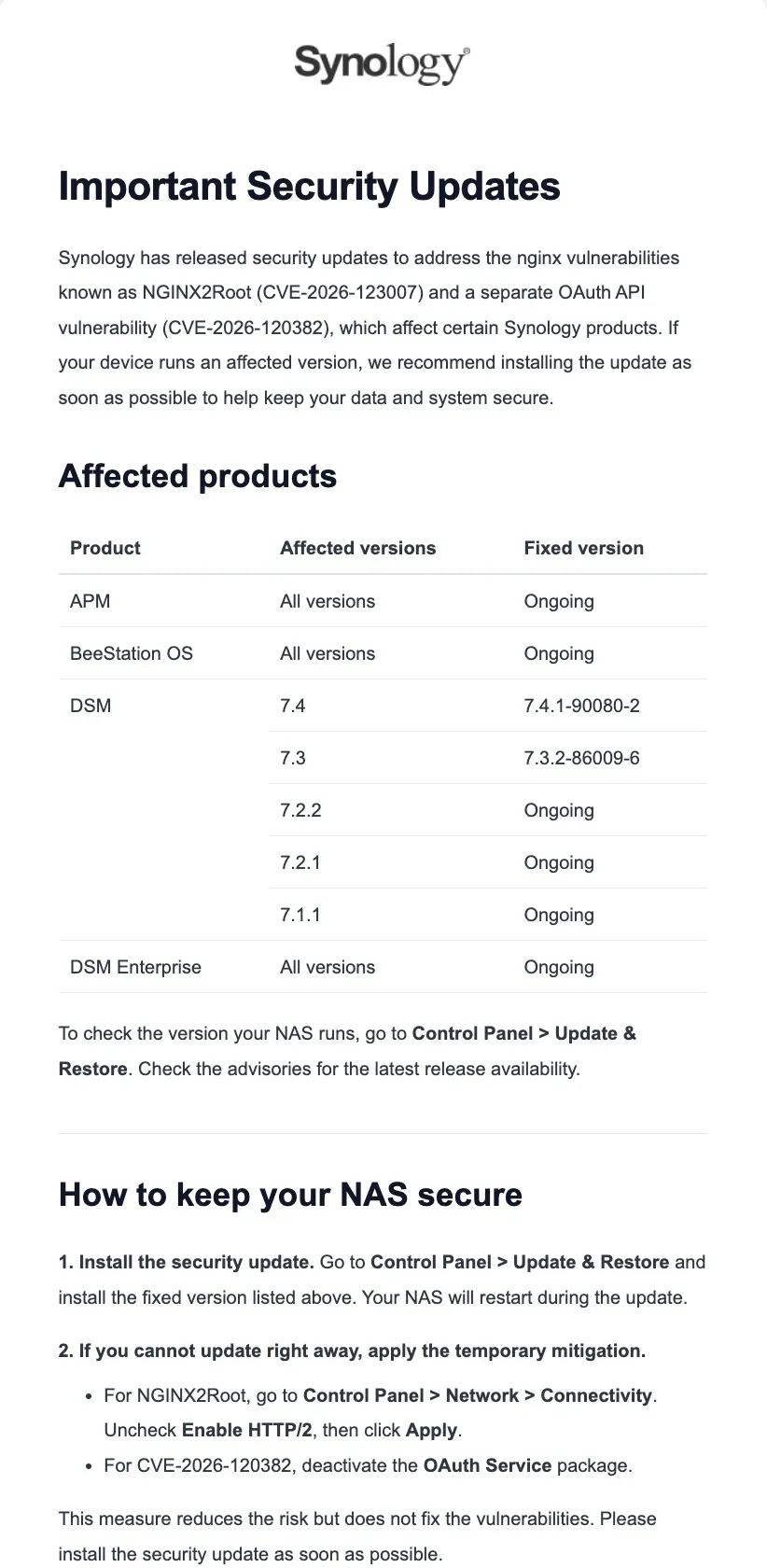
On 21 November 2026 Synology also emailed the same summary to registered owners, shown below. It confirms the table above: only DSM 7.4 and DSM 7.3 have fixed builds so far, while APM, BeeStation OS, DSM 7.2.2, DSM 7.2.1, DSM 7.1.1 and DSM Enterprise are still Ongoing. The email names the oldest affected DSM as 7.1.1, where the advisory says 7.1.
How We Handled NGINX2Shell on Our Reverse Proxy
All of our public sites enter through one DSM 7.4.1 reverse proxy running nginx 1.23.1, with more than two dozen hostnames on port 443. When F5 disclosed NGINX2Shell on 18 November, the first thing we checked was whether that proxy spoke HTTP/2. It did: the ALPN test answered h2, even though no listen line in the generated configuration says so, because DSM sets HTTP/2 as the default listen option for every TLS listener.
Synology had no NGINX2Shell advisory at that point. We switched HTTP/2 off on 19 November to close the NGINX2Shell door, restarted the nginx workers so the change took effect, and the ALPN test changed to http/1.1. Twelve hostnames, including our main store, kept returning 200 over HTTP/1.1, and so did the DSM login on port 5001. We also tried to find out whether anything beyond web and mail ports was reachable from outside. As far as we could test from inside the LAN, only ports 80 and 443 and the mail ports are forwarded, while 5000, 5001, 433 and 5357 are not.
The most useful thing we learned is what does not help. We lock our main store to Cloudflare addresses, which returns a 403 for anyone else. That rule runs after nginx has parsed the request, so it does nothing against NGINX2Shell, a bug in the HTTP/2 parser itself, and every site shares port 443 anyway. Access rules inside nginx are not a defense against a flaw in nginx. Several of our sites are served directly to visitors without a CDN, so we also could not simply restrict port 443 to Cloudflare at the router.
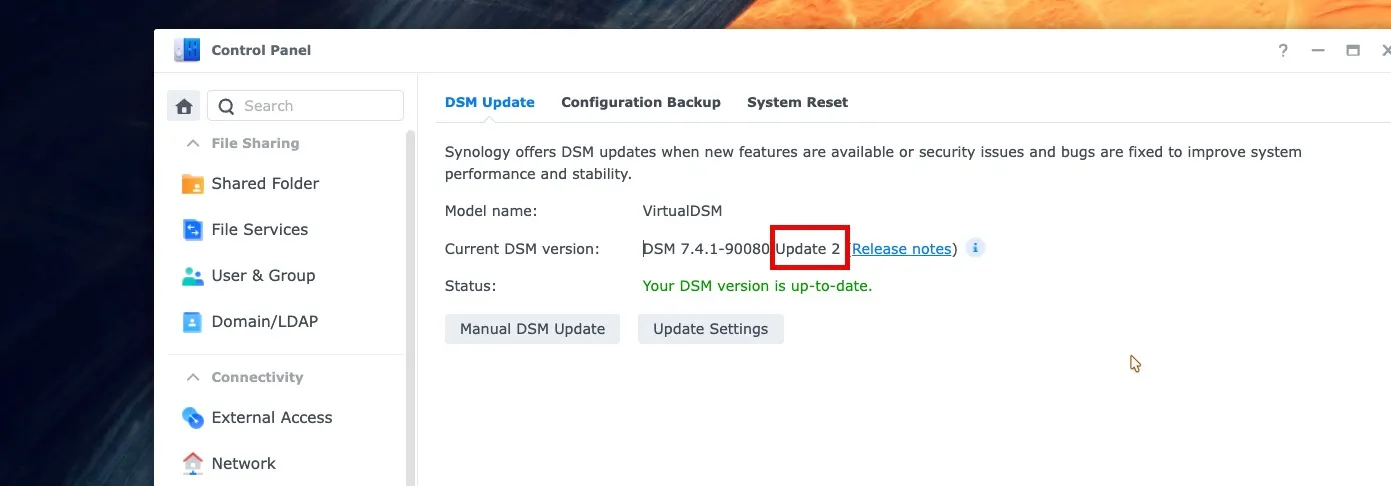
We installed Update 2 on 20 November. It is worth knowing how it reached us: the reverse proxy was offered the update immediately, but the other Synology machines on our network showed nothing at the same time. We do not know Synology’s rollout rules, so we did not wait, and neither should you. If a push notification does not arrive, download the pack by hand from the links at the top of this guide.
The HTTP/2 setting survived the update, so the proxy still negotiates http/1.1, and we have not turned HTTP/2 back on. The NGINX2Shell reasoning is in step 4 above: the Synology advisory names only CVE-2026-123007, and the cost of leaving HTTP/2 off for a few more days is close to nothing. The earlier writeup on how we handled a similar emergency is in our guide to patching six sites for PHP2Shell in one day.
The Second Advisory: SA-26:21 and the OAuth Service Package
Synology published a second advisory at almost the same moment, and it is easy to miss because the headlines are about NGINX2Shell. Synology-SA-26:21 covers CVE-2026-120382, an improper neutralization of argument delimiters in a command, in the OAuth API of DSM. It is scored 9.8 on CVSS 3.1 with network access, low complexity, no privileges and no user interaction, which is the profile of a bug you patch the same day. Synology says a remote attacker could read or write arbitrary files and cause denial of service.
The fixed builds match SA-26:20: DSM 7.4.1-90080-2 for DSM 7.4 and DSM 7.3.2-86009-6 or above for DSM 7.3, with the same recommendation to move DSM 7.2.2 and 7.2.1 to 7.3.2. The status is also Ongoing, and BeeStation OS 1.5 and DSM 7.1 are still waiting. The mitigation Synology gives is to deactivate the OAuth Service package. That is worth checking in Package Center even after you update, because the advisory is a good reminder that the bug lives in a package you may not remember installing.
Why nginx -v Cannot Prove NGINX2Shell Is Patched
After the NGINX2Shell update our proxy still reports nginx 1.23.1. That looks wrong, because upstream fixed the bug in 1.30.7 and 1.31.9, but it is expected. Synology does not rebase DSM onto a new nginx for a security fix. It backports the patch into the version it already ships and leaves the version string alone. Xint says the same thing in its advisory: distributions may backport fixes without changing the nginx -v output, so you have to compare the full package version against the vendor advisory.
For a Synology that means three checks. Read the DSM build under Info Center and compare it with the table in SA-26:20. Confirm the ALPN result matches what you intended. And look at the binary on disk if you can: ours carries a modification time of 19 November 2026, which fits a rebuild for this release, though we did not capture a before-and-after snapshot, so treat that as a hint and not as proof.
If you run your own nginx instead of DSM’s, for example the official nginx Docker image, the rules change. Pull 1.30.7 or 1.31.9 and recreate the container, and note that a reload alone does not replace the running binary, so restart the process. Containers built on the Apache variant of the WordPress image do not contain nginx at all, but the proxy in front of them still does.
Where to Find More Official Resources
NGINX2Shell is two days old at the time of writing and the Synology advisories are still marked Ongoing, so go to primary sources rather than summaries. There is no official video walkthrough from Synology or F5 yet, so the list below is documentation.
- Synology-SA-26:20 is the authoritative product and version table for the nginx flaw, and the one to re-read before each upgrade.
- Synology-SA-26:21 covers the DSM OAuth API flaw that shipped in the same update.
- The DSM 7.4.1-90080-2 download archive lists the update packs for each model, all dated 20 November 2026.
- The nginx.org security advisories list the affected and fixed upstream versions for each CVE.
- The Wiz analysis explains both HTTP/2 flaws and the preconditions for exploitation.
For background on running public sites on Synology virtual machines, our walkthrough on moving a Docker stack between VDSM guests covers the snapshot and rollback habits that make emergency changes like this one safe.
NGINX2Shell Limits and Security Notes
Everything above about NGINX2Shell reflects what was published by 20 November 2026 at 16:25 UTC+8, and it will go out of date. The Synology advisories are marked Ongoing, and Synology has already revised them once. Check the live pages before you act on any version number in this guide.
Our NGINX2Shell measurements come from one environment. The ALPN results, the twelve hostnames and the port tests describe our reverse proxy and our router, not yours. Port tests from inside a LAN depend on the router supporting loopback connections, so confirm your own exposure from outside your network if it matters.
Turning HTTP/2 off covers CVE-2026-123007 and CVE-2026-123633 only. It does nothing for the resolver, HTTP/3 and mail proxy bugs in the same nginx release, and we did not verify whether DSM’s nginx build includes those features. Clients that depend on HTTP/2, such as native gRPC, will stop working while it is off, though ordinary browsers fall back to HTTP/1.1 without any visible change.
The Synology advisories do not mention CVE-2026-123633 at all. That does not prove DSM is unaffected or unpatched, only that the vendor has not said, which is why we keep HTTP/2 off after updating. We also have not reviewed how QNAP, ASUSTOR or other NAS vendors are responding, so this guide says nothing about their products.
Finally, the Linux kernel SCTP flaw that Xint chained with nginx has no Synology statement that we could find. If you host anything sensitive on a NAS that faces the internet, treat the HTTP/2 mitigation as a minimum and keep the NAS behind a firewall that only forwards the ports you actually need.
References
- Synology-SA-26:20 NGINX2Root security advisory, published 19 November 2026 and revised 20 November, status Ongoing, with fixed DSM 7.4 and DSM 7.3 builds.
- Synology-SA-26:21 DSM security advisory for CVE-2026-120382, CVSS 3.1 score 9.8, mitigation: deactivate OAuth Service.
- nginx.org security advisories for CVE-2026-123007 and CVE-2026-123633, fixed in 1.30.7 and 1.31.9.
- Wiz: Unauthenticated Remote Code Execution in NGINX, 18 November 2026, technical analysis and mitigations.
- Xint: NGINX2Root, 18 November 2026, the five-CVE analysis and the Linux SCTP chaining claim.
Frequently Asked Questions
What is NGINX2Shell?
NGINX2Shell is the name for two HTTP/2 memory-corruption flaws in nginx, CVE-2026-123007 and CVE-2026-123633, patched by F5 on 18 November 2026. The first can let an unauthenticated attacker corrupt a worker process and, with enough effort, run commands as that worker. Both need HTTP/2 to be enabled.
Does NGINX2Shell affect my Synology NAS?
Yes if your DSM web server negotiates HTTP/2, which is the default. Synology lists DSM 7.4, 7.3, 7.2.2, 7.2.1, 7.1, DSM Enterprise 1.0, BeeStation OS 1.5, APM 1.2 and APM 2.0 as affected, and SRM 1.2 and 1.3 as not affected. Run the ALPN test to see what your own NAS answers.
Which DSM version fixes NGINX2Shell?
DSM 7.4 is fixed in 7.4.1-90080-2, shown as 7.4.1-90080 Update 2, and DSM 7.3 in 7.3.2-86009-6 or above. For DSM 7.2.2 and 7.2.1 Synology recommends upgrading to 7.3.2-86009-6 or above. DSM 7.1, DSM Enterprise, BeeStation OS and APM were still marked Ongoing on 20 November 2026. If your NAS is not offered the update yet, download the pack for your model from archive.synology.com and use Manual DSM Update.
Should I turn HTTP/2 off before I install the NGINX2Shell update?
Yes if you cannot update today. Open Control Panel, then Network, then Connectivity and clear the HTTP/2 option. This is the mitigation Synology lists, and ordinary browsers fall back to HTTP/1.1. After the update, we suggest leaving it off until the advisory is marked Resolved.
Does Cloudflare protect me from NGINX2Shell?
Only partly against NGINX2Shell. Wiz notes that a CDN or WAF that terminates HTTP/2 may make exploitation harder, but an attacker who can reach your origin address directly bypasses it. Check what your NAS answers on the origin itself, and restrict who can reach it.
Can I use nginx -v to confirm the patch is installed?
No. Synology backports the NGINX2Shell fix and keeps the old version string, so our proxy still reports nginx 1.23.1 after the update. Compare the DSM build number in Info Center with the fixed versions in SA-26:20 instead.
What is Synology-SA-26:21 and is it related?
It is a separate critical advisory for CVE-2026-120382, an argument injection flaw in the DSM OAuth API with a CVSS 3.1 score of 9.8. It shipped in the same DSM update as the NGINX2Shell fix and uses the same fixed versions. The mitigation is to deactivate the OAuth Service package.
Is NGINX2Shell being exploited in the wild?
None of the sources we checked on 20 November 2026 reported confirmed attacks. Wiz demonstrated remote code execution in its lab and said it will not release its exploit, and describes exploitation as difficult. Treat that as a reason to act quickly, not as a reason to wait.