

C3RB3R Ransomware on Synology: Origins, Recovery and How to Stay Safe

C3RB3R ransomware started showing up on Synology NAS units around 28 October 2026, and within a day it was the only topic on r/synology. Files come back renamed with a .L0CK3D extension (a zero, not the letter O), every folder gets a read-me3.txt ransom note, and a Tor portal asks for Bitcoin. The fastest and most useful information did not come from English news sites. It came from Chinese-speaking forums, where Synology has a huge user base, and from three GitHub repositories written by victims who actually got their data back, or proved they could not. This guide collects what is confirmed about C3RB3R ransomware so far: where it came from, how it gets in, the one recovery path that has worked, and the backup design we run so that an attack like this costs us a restore instead of a ransom.
Update, 31 October 2026: Synology has now settled the entry point. In an email to customers on 30 October, it confirmed that C3RB3R ransomware exploits only the vulnerability fixed in Synology-SA-24:20, patched in December 2024, and that the campaign is not related to the PHP2Shell vulnerability patched the same month. We have added Synology’s own four-step checklist, our reading of why the attacks went off when they did, and one extra layer we run that most owners already pay for: Active Insight ransomware protection.
SynoPower Club Point:One victim in a Chinese NAS group had more than 50 TB on a single box and no snapshots. The encryptor was slow enough that only his 2024 photos were hit, and those happened to have a cold copy on a cloud drive. Another lost five years of private GitLab repositories, because RAID 6 plus three backups all lived on the same machine. C3RB3R ransomware did not beat their storage, it beat their backup design. We run our public sites as Docker inside Virtual DSM, snapshot the whole guest from the host, replicate it to a second NAS, and export it to USB and the cloud on a schedule. If a guest gets encrypted tonight, we roll it back to the last snapshot and the attacker gets nothing.
What Is C3RB3R Ransomware?
C3RB3R ransomware is a Linux build of the Cerber family, a ransomware line that has been around since 2016 and has targeted NAS devices on and off for years. 360 attributes the October 2026 wave on Synology to it. On an infected DSM box, the C3RB3R ransomware encryptor runs as a statically linked, UPX-packed x86-64 binary named libgld. It deletes its own file after starting, so the running process shows (deleted) next to its executable path.
What you see as the owner of a box hit by C3RB3R ransomware is consistent across every report:
- Files renamed to
name.ext.L0CK3D. Some reports spell it.LOCK3D, but the GitHub analyses quote the zero. - A ransom note named
read-me3.txtin every encrypted folder, with the heading C3RB3R INSTRUCTIONS. - A Tor page titled C3rb3r Decryptor. One victim screenshot showed 0.03696 BTC (about US$2,952) if paid within five days, doubling to 0.07392 BTC (about US$5,904) after that, with a countdown timer.
- Persistence through cron entries matching
/etc/cron.d/synot*, which recreate themselves and survived a DSM upgrade in at least one case. - Backup files on the same volume encrypted along with everything else, including Hyper Backup targets and database dumps.
Where It Started: r/synology and the Chinese Forums
C3RB3R ransomware first surfaced in English on r/synology, where victims posted within about a day of each other around 28 and 29 October 2026. Within hours readers were saying a new thread appeared every time they reloaded the subreddit. Three of those threads are worth reading in full, because each adds a different piece:
- The forensic write-up. A DS918+ owner on DSM 7.2.1-69057 Update 5, with the web interface reachable from the internet, shut the box down and examined the disks read-only on a Proxmox host. The DSM authentication log held a login request whose account field carried injected
LD_PRELOADandLD_DEBUG_OUTPUTlines plus an encoded shell command, and a file under/etc/cron.d. That matches the published CVE-2024-10441 technique. A 3-2-1 backup meant the attack cost a restore, not a ransom. Read it here: Well, it finally happened. My first real ransomware incident. - The Photos-only user. This owner believed DSM was up to date and used only Synology Photos, but UPnP on the router was on. After a mode 2 reset, folders covered by Snapshot Replication came back. Folders without snapshots did not, and the local Hyper Backup USB drive was encrypted along with the NAS. Read it here: Hit with c3rb3r ransomware this AM.
- The QuickConnect discussion. The original poster only noticed after DSM degraded and a reinstall revealed the encrypted files. In the replies, another reader with a strong password, 2FA and QuickConnect enabled said they had been hit too, and others pointed out that app-only users can turn off DSM access in QuickConnect entirely. Read it here: Hit with C3RB3R ransomware.
Read together, the pattern is clear. C3RB3R ransomware needed a DSM login page it could reach, nothing more. Passwords and 2FA did not help, because the exploit runs before authentication. The forensic write-up put it plainly: the request reached a vulnerable application, and another password prompt would not have fixed that.
The deeper technical work happened in Chinese. Victims in WeChat and Xiaohongshu groups posted ransom notes, compared timelines, and pointed each other at the GitHub repositories covered below. A Taiwanese Synology community on Facebook collected the same recovery links for local users. That makes sense: Synology is a Taiwanese company and its largest user communities are Chinese-speaking, so that is where the volume of C3RB3R ransomware cases, and therefore the fastest pattern-matching, came from.
Synology itself published a security notice on 29 October 2026, saying it had identified threat actors exploiting a vulnerability patched in December 2024 against outdated DSM versions, and urging everyone to update immediately.
How C3RB3R Ransomware Gets In
For the first two days there were two candidate entry points. Synology has since confirmed the older one. Its 30 October email says the attacks exploit only the vulnerability addressed in Synology-SA-24:20, and that C3RB3R ransomware has nothing to do with PHP2Shell. The table below shows both candidates as they were debated, because the 360 pair is still worth patching.
| Synology says | 360 says | |
|---|---|---|
| Advisory | Synology-SA-24:20 (Pwn2Own 2024) | Synology-SA-26:13 |
| CVE | CVE-2024-10441, CVSS 9.8, unauthenticated remote code execution in the system plugin daemon | CVE-2026-13639 (login logic) and CVE-2026-13684 (SCGI), both CVSS 9.8 |
| Patched | November to December 2024 | 18 September 2026 |
| Fixed builds | DSM 7.2.2-72806 Update 1, 7.2.1-69057 Update 6, 7.2-64570 Update 4, 7.1.1-42962 Update 7 | DSM 7.4-90075, 7.3.2-86009 Update 4, 7.2.2-72806 Update 9, 7.2.1-69057 Update 12 |
The forensic evidence leans toward the older bug on at least some victims. The most detailed Reddit write-up matched its own surviving logs to the published CVE-2024-10441 exploit, while noting that Synology had not confirmed it and that the same box was also below the SA-26:13 fix level. The soimy write-up says memory logs from the infected guest point to environment-variable injection through the DSM login plugin, consistent with CVE-2024-10441, and a public proof of concept that abuses the login username field appeared on GitHub days before the outbreak. Two of the three documented rescue cases ran on non-genuine hardware with a DS918+ bootloader, one of them on DSM 7.2-64570 Update 3, which is exactly one update short of the CVE-2024-10441 fix. Clone hardware cannot take official updates easily, which makes it the softest target in the population.
The practical conclusion has not changed: update to a build that covers both advisories, and stop exposing DSM to the internet. But one question remained. If the hole was patched in December 2024, why did so many boxes go off with C3RB3R ransomware within the same two days in October 2026, including some whose owners believed they were up to date?
Planted Early, Detonated on Cue
Our reading, and it is our interpretation rather than anything Synology has said, is that the C3RB3R ransomware break-in and the encryption are two separate events. The evidence points that way:
- The backdoor came first. In the Xiaohongshu case below, a backdoor shell had been living on the NAS for 37 days and had turned on telnet as root before a single file was encrypted.
- It survives updates. The cron entries under
/etc/cron.d/synot*recreate themselves, and at least one victim found them still in place after upgrading to the latest DSM. Updating closed the hole but left the intruder inside. - The detonations were synchronised. C3RB3R ransomware boxes that had been compromised at different times, on different builds, started encrypting within roughly 48 hours of each other.
That pattern fits an operator who planted C3RB3R ransomware implants on unpatched boxes over months and then chose when to pull the trigger remotely. The moment they chose was the PHP2Shell week, when every Synology admin was busy patching, many boxes had just been updated, and owners felt safe because they had. Synology is clear that PHP2Shell was not the way in. It was the cover. The lesson is that a box once exposed while unpatched should be treated as compromised until checked, which is exactly what step one of Synology’s checklist asks you to do.
First Response to C3RB3R Ransomware in 4 Steps
If you find .L0CK3D files right now, the order of the next ten minutes decides whether recovery is possible at all. The key that unlocks your files exists only inside the running C3RB3R ransomware process. A reboot, a kill -9 or a DSM reinstall destroys it.
Cut the network, not the power
Unplug the WAN side or remove the router port forwards and UPnP mappings. Do not shut the NAS down and do not reboot it. Close any SSH or telnet access you did not open yourself.
Find and freeze the encryptor
Over SSH as root, list processes whose executable has been deleted, then send SIGSTOP with kill -STOP and the PID. A frozen process keeps its memory, and its memory holds the session key.
Dump the frozen process memory
Follow the Benjamin-zlt repository to read the writable memory of that PID from the proc filesystem onto a separate disk. On a virtual machine, a full guest memory snapshot from the hypervisor also works.
Preserve evidence, then clean up
Keep every L0CK3D file and ransom note untouched. Copy out data that is still readable. Only after the memory is safe, remove the synot cron entries, rotate every password, and update DSM.
The commands behind steps 2 and 3 look like this. Read the repositories before running anything, because the details depend on which binary you have.
# Step 2: find the encryptor (its executable shows as deleted)
ls -l /proc/*/exe 2>/dev/null | grep deleted

# Freeze it. Never use kill -9 here.
kill -STOP <PID>
grep State /proc/<PID>/status     # should show T (stopped)

# Look for the persistence that brings it back
ls -l /etc/cron.d/ | grep synot
Can You Decrypt It? The Three GitHub Rescue Cases
There is no universal C3RB3R ransomware decryptor, and anyone selling one is guessing. What exists are three careful case studies that tell you exactly when recovery works.
| Repository | Machine | Result | Why |
|---|---|---|---|
| soimy/c3rb3r-rescue | DSM in a Proxmox VE virtual machine running GitLab | Recovered | A 16 GiB copy of guest RAM held the 48-byte session key. GitLab restored with 80 projects and 9,253 LFS objects. |
| Benjamin-zlt/c3rb3r-baremetal-rescue | Bare-metal DS918+ clone, DSM 7.2 | Recovered | Froze the live encryptor with SIGSTOP and dumped about 2 GB of its memory. 84,500 files, about 940 GB, decrypted in 2.5 hours. |
| lllong1377/c3rb3r-never-rebooted-still-no-key | DS918+ clone, DSM 7.2-64570 Update 3, 149 days uptime | Not recovered | The encryptor had already exited about 30 hours earlier. Full RAM and swap scans found no key. |
The third repository is the most important one to read, because its title is its lesson: never rebooted does not mean recoverable. What matters is whether the C3RB3R ransomware process is still alive. Once it exits, it zeroes its key buffer, and the key is gone. A key recovered on one victim is also useless on another, because every run generates a new session key.
Why the Key Lives Only in Memory
The Benjamin-zlt analysis spells out the C3RB3R ransomware file format, and it explains both why this works and why it usually does not.
- Each file gets its own random ChaCha8 key. That key is wrapped with a session master key using AES-256-CBC and stored in a 588-byte trailer at the end of the file.
- The session master key is 48 bytes: a 16-byte IV plus a 32-byte AES key. It is never written to disk. A global pointer inside the running process points at it.
- The trailer also carries a blob wrapped with the attacker public key (RSA-2048), so without the running process, only the attacker can recover the session key.
- Not every file is fully encrypted. In a 400-file sample, about 56% used segmented mode, 31% had only the first 1 MiB encrypted, and 13% were encrypted end to end. Partly encrypted files still are not readable, but footer triage tells you what is left.
So the weakness in C3RB3R ransomware is narrow and time-limited: the encryptor keeps the master key in memory for the whole session. Freeze it while it is running and you can lift the key out. Miss that window and you are left with the public-key blob, which is designed to be unbreakable.
A Victim Story: 50 TB and No Snapshots
A detailed account posted on Xiaohongshu on 29 October 2026 by the user 柯基爱好者 follows one member of their NAS group through the night. He noticed the C3RB3R ransomware note, confirmed the C3RB3R INSTRUCTIONS header, and was close to buying Bitcoin before the group pointed him at the GitHub cases.
He then used an AI coding assistant over SSH to investigate. It found and froze the encryptor, so nothing new was encrypted after that point. It also found that a probable backdoor shell had been living on the NAS for 37 days and had enabled telnet as root, which means the initial break-in and the encryption were more than a month apart. It wrote an evidence-collection script and, correctly, waited for him to confirm before running anything as root.
His luck was that C3RB3R ransomware is slow. With more than 50 TB to chew through, the encryptor had only reached his 2024 photos, and those had a cold copy on a cloud drive. He moved working data to a smaller NAS and parked the encrypted volume for later. His own summary was blunt: he had no snapshots, and with snapshots this would have been easy to fix. A second victim on X summed up the same lesson from the other side: RAID 6 plus three backup sets, all on the same box, all encrypted together.
How We Keep C3RB3R Ransomware Away From Our Backups
Every lost-data story above has the same shape: the backups were reachable from the machine that got owned. C3RB3R ransomware encrypts whatever the compromised DSM can write to, so the fix is to keep at least one copy somewhere that DSM cannot write to at all. This is how we do it for the sites we host, and it maps onto the 3-2-1-1-0 rule.
| Rule | Meaning | How we do it |
|---|---|---|
| 3 | Three copies of the data | The live VM, a replica on a second NAS, and a scheduled export |
| 2 | Two kinds of media | NAS volumes plus a USB drive and a cloud drive |
| 1 | One copy off site | Exports synced to Google Drive with Cloud Sync |
| 1 | One copy offline or immutable | Host-side VM snapshots the guest cannot touch, plus the unplugged USB export |
| 0 | Zero errors on restore | We actually restore and boot from the replicas when we move VMs between hosts |
Run Docker inside Virtual DSM, not on the host
Our WordPress containers do not run on the physical NAS. They run inside a Virtual DSM guest, and the guest is protected by Virtual Machine Manager on the host. If C3RB3R ransomware gets root inside the guest, they own that guest and nothing else. The snapshots of the guest live on the host storage, outside the guest file system, so ransomware inside the VM cannot see them, let alone encrypt or delete them. Recovery is a snapshot rollback measured in minutes.
VMM Pro adds the parts that turn that into a real backup: a protection plan that snapshots the VM and replicates it to a second NAS in the cluster, so a dead host is covered too. Our cluster is a DS1621xs+ and a DS1525+ replicating to each other. We wrote up the scheduled export and Cloud Sync to Google Drive part separately, and the free VMM vs VMM Pro comparison explains which pieces need the license.

If you run Docker directly on DSM, use immutable snapshots
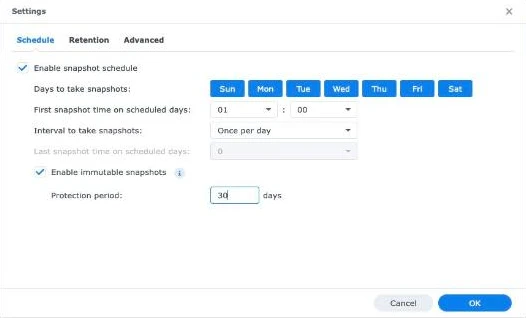
Not everyone wants a VM layer. If your containers run on the host, the defence against C3RB3R ransomware is immutable snapshots. Turn them on in Snapshot Replication for the shared folder that holds your container data. They need DSM 7.2 or later and a Btrfs volume, and during the lock period nobody can delete them, including an administrator account the attacker has taken over. Two details make or break this:
- Use bind mounts into a shared folder such as
/volume1/docker/app. Docker named volumes live under/volume1/@docker, which is not a shared folder and cannot be snapshotted at all. - Dump databases to a file before the snapshot. A snapshot of a running MariaDB is a power-cut copy. A scheduled
mysqldumpinto the same shared folder gives you a clean restore point that the snapshot then locks. - Pick a lock period longer than an attacker can sit quietly. The victim above had a backdoor for 37 days before encryption started. Seven days of immutable snapshots would not have reached back to a clean state.
Our Extra Layer: Active Insight Takes a Snapshot When Encryption Starts
Here is the layer most guides miss. Active Insight, the Synology cloud monitoring service, can watch file activity on your shared folders, and once it decides it is looking at ransomware, it reacts on its own. Synology documents it in its NAS security guide: when a ransomware event is detected, Active Insight sends an event notification and automatically takes a snapshot of the shared folder, and on models that support it, that snapshot is immutable.
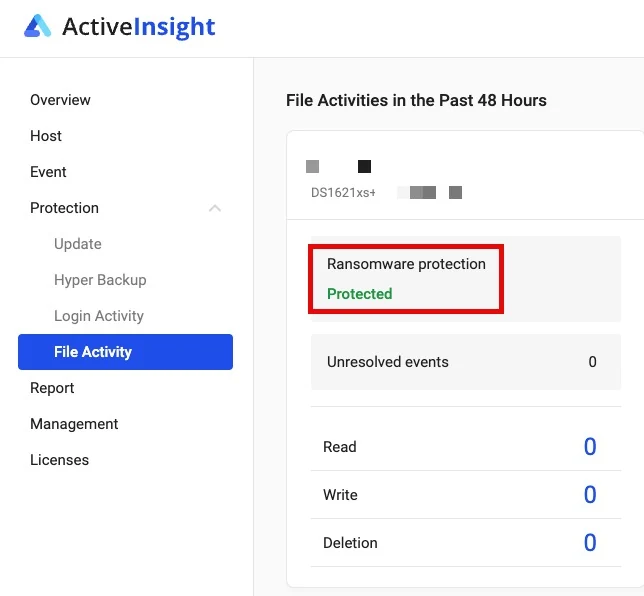
Why this matters for C3RB3R ransomware in particular: the C3RB3R ransomware encryptor is slow. The victim with more than 50 TB was only into his 2024 photos when he noticed. A snapshot taken when the encryption pattern first appears freezes everything that has not been touched yet, which can be most of the volume. It also does not care how C3RB3R ransomware got in, because it watches what happens to the files, not the login page. On our DS1621xs+ the File Activity page shows ransomware protection as Protected.
Read the limits before you rely on it. They come from Synology’s File Activity documentation:
- File activity monitoring is off by default. Register the NAS for Active Insight in Control Panel, then enable monitoring for each host in the Active Insight portal.
- It needs Snapshot Replication, DSM 7.2 or later, Active Insight 3.0.2 or later, at least 1 GB of memory, and an Active Insight license assigned to that NAS.
- At most one automatic snapshot per shared folder per day. It is a safety net taken after detection, not a replacement for scheduled immutable snapshots.
- Not covered: Surveillance Station recording folders and shared folders on external USB drives.
- Immutability depends on the model. On a model without immutable snapshots, an attacker with root can still delete the automatic snapshot, so pair it with the immutable schedule above.
Want the same setup? SynoPower Club sells genuine licenses for both building blocks: a Virtual DSM (VDSM) license to run your Docker services in an isolated guest, and a VMM Pro license for protection plans, cross-NAS replication and live migration. Keys are delivered by email.
Where to Find More Official Resources
C3RB3R ransomware on Synology is two days old in public at the time of writing, and there is no official video coverage yet, so this section lists primary sources instead of walkthroughs.
- The Synology security notice of 29 October 2026, which tells outdated DSM users to update immediately and to enable automatic updates, followed on 30 October by a customer email confirming SA-24:20 as the only vulnerability involved.
- Synology-SA-24:20 and Synology-SA-26:13 are the version tables. Check your build in Control Panel, then Update and Restore, against both.
- lllong1377/c3rb3r-never-rebooted-still-no-key is the best index of all known cases, including ones not covered here, and the clearest explanation of when memory forensics is pointless.
- The three r/synology threads linked above, especially the forensic write-up, which includes the read-only disk investigation commands step by step: Well, it finally happened.
Synology’s Own Checklist (30 October 2026)
Synology’s email to customers ends with four steps. They are short, and every one of them matters against C3RB3R ransomware:
- Check for intruders. C3RB3R ransomware leaves scheduled persistence behind, so run a Security Advisor scan, then look in Task Scheduler for scripts you did not create and in User and Group for administrator accounts you did not add. If anything looks wrong, contact Synology Support.
- Update everything. Install the latest DSM in Control Panel, Update and Restore, then update every package in Package Center.
- Turn on automatic updates in Update and Restore, so future security fixes land as soon as they are released.
- Keep an off-site backup. Use Hyper Backup and Snapshot Replication to keep a copy in a separate location, and check regularly that the backup tasks actually complete.
Step one is the one people skip. If your box was reachable from the internet before the December 2024 fix, C3RB3R ransomware may already have a foothold, and updating today does not tell you whether someone is already inside.
A Free Tool That Runs the Check for You
If you are comfortable with a terminal, step one can now be a single command. synology-nas-cli is an open-source command-line tool under the MIT license, released on 30 October 2026 by independent developer Akari Sora. It signs in to DSM through its web API and audits the box against this campaign. The project is on GitHub: akari-sora/synology-nas-cli.
We read through its code before linking it. It uses only the Python standard library, and it talks to nothing except your NAS, the Synology download server, PyPI and the soimy rescue toolkit. It sends no telemetry, and the basic audit only reads. This is what it checks:
- Patch level. Your DSM build against Synology-SA-26:13, which also covers the older SA-24:20 fix, and your installed packages against SA-26:14.
- Exposure. QuickConnect, UPnP port forwarding on the router, the DSM firewall, AutoBlock, SMB1 and the built-in admin account.
- Traces of C3RB3R ransomware. The injected login strings in the connection log,
/etc/cron.d/synot*entries, thelibgldandqnetdbinaries, extra root accounts, SSH keys and ransom notes on your shares. - Snapshots. Shared folders that have no working snapshot schedule.
It can also fix most of what it finds. If files are being encrypted right now, its contain command freezes the encryptor with SIGSTOP, the same move as step two of our first-response list. Its rescue command then drives the soimy toolkit to capture memory and search for the key.
nas incident                 # read-only audit
nas incident --deep          # also look for the implant (one read-only root script)
nas incident fix --dry-run   # list every change it would make, change nothing
Read these notes before you let it change anything:
- It is brand new. The project is a few days old, comes from a single developer, is not affiliated with Synology and has had little outside review. Start with the read-only audit and the dry run.
- The firewall fix can lock you out. It switches the DSM firewall to deny everything except the networks you list. Run it from a computer on the same LAN, and know where the RESET button is.
- It turns QuickConnect off. That is the safer setting, but if your family reaches Synology Photos or Surveillance Station through QuickConnect, set up a VPN or Tailscale first.
- The deep scan, contain and rescue run as root. They work through a temporary Task Scheduler task, because that is the only way to read root-only logs and freeze processes.
- The README suggests handing it to an AI agent. If you do, keep the password in a password manager rather than in the chat, and confirm the fix yourself.
- Memory rescue only works while the encryptor is alive. The same rule as the three GitHub cases applies.
For the rest of the hardening picture, our guides on running a public website on a Synology NAS and on what Threat Prevention can and cannot see cover the network side, and the PHP2Shell patch guide covers the other critical issue that landed the same week.
C3RB3R Ransomware Limits and Security Notes
Updating does not remove an existing infection. At least one victim found the cron persistence still in place after upgrading to the latest DSM. If you were exposed while unpatched, check /etc/cron.d, the Task Scheduler, startup scripts and enabled services such as telnet, then rotate every credential.
Up to date is not the same as clean. One Reddit victim believed DSM was current, and another was hit with 2FA and a strong password in place. A box that was breached before it was patched can carry the implant through every later update. Treat any DSM login page that the internet can reach as a target, including ones published by UPnP that you never set up deliberately. Use a VPN or Tailscale for remote access and turn UPnP off on the router.
RAID and local backups are not backups against C3RB3R ransomware. Anything the compromised DSM can write to will be encrypted, including Hyper Backup targets on the same box and mounted network shares.
Do not pay before reading the cases. Paying C3RB3R ransomware operators funds the next wave and guarantees nothing. If the encryptor is still running, the free memory route is your best chance. If it is not, the realistic paths are your own off-box copies.
Be careful what you paste into an AI assistant. AI tools helped several victims here, but do not hand them passwords, recovered keys, full memory dumps or business data. Let them propose commands, and run anything that needs root yourself.
Clone hardware carries extra risk. Several documented victims ran DSM on non-genuine hardware, where official updates are hard or impossible to apply. If that is your setup, assume you are unpatched and keep it off the internet entirely.
References
- Synology security notice on DSM ransomware attacks, 29 October 2026.
- Synology-SA-24:20 DSM (Pwn2Own 2024), CVE-2024-10441 and the fixed DSM builds.
- Synology-SA-26:13 DSM, CVE-2026-13639 and CVE-2026-13684, published 18 September 2026.
- Benjamin-zlt C3RB3R ransomware bare-metal rescue, the file format, key layout and SIGSTOP workflow.
- synology-nas-cli by Akari Sora, an open-source audit and response tool for this campaign.
- IT-Connect on the C3RB3R campaign, summarising the 360 attribution and the timeline.
- Synology Knowledge Center: enhancing the security of your Synology NAS, including how Active Insight snapshots a shared folder when it detects ransomware.
Frequently Asked Questions
What is C3RB3R ransomware?
C3RB3R ransomware is a Linux variant of the Cerber family that has been hitting Synology NAS devices since late October 2026. It renames files with a L0CK3D extension, leaves a read-me3.txt ransom note in each folder, and demands Bitcoin through a Tor page.
How does C3RB3R ransomware get into a Synology NAS?
Through DSM exposed to the internet. On 30 October 2026 Synology confirmed it exploits only CVE-2024-10441 from Synology-SA-24:20, patched in December 2024, and that it is unrelated to PHP2Shell. Update DSM, check for scripts and admin accounts you did not create, and stop exposing DSM directly.
Can C3RB3R ransomware files be decrypted for free?
Only if the encryptor process is still running. Freeze it with SIGSTOP and dump its memory, because the session key exists only there. Once the process exits or the NAS reboots, no public tool can recover the key.
Should I reboot or shut down an infected NAS?
No. Cut the network connection instead. A reboot or kill -9 destroys the only copy of the key. Freeze the process first, save its memory to another disk, and only then clean up.
Does updating DSM remove C3RB3R ransomware?
No. Updating closes the hole but does not remove what is already there. Victims found cron persistence surviving an upgrade. Check the cron.d directory, scheduled tasks and telnet, and rotate every password.
Do Synology snapshots protect against C3RB3R ransomware?
Immutable snapshots do, because nobody can delete them during the lock period, not even a hijacked admin account. Active Insight adds a safety net by snapshotting a shared folder automatically when it detects ransomware, at most once a day per folder.
Why run Docker inside Virtual DSM?
Because the VM snapshots live on the host, outside the guest. Ransomware that takes over the guest cannot see or delete them, so recovery is a rollback. VMM Pro adds replication to a second NAS.
Is paying the ransom a good idea?
We do not recommend it. Payment is not guaranteed to work and it funds the next attack. Check the GitHub rescue cases first, then restore from copies kept outside the infected NAS.
Make the next C3RB3R ransomware attack cost you a restore, not a ransom. Run your Docker services inside Virtual DSM and protect the whole guest with VMM Pro protection plans, replicated to a second NAS. SynoPower Club sells genuine licenses for both, with keys delivered by email.