

Synology Threat Prevention: What It Catches and What It Cannot See

Updated on October 25, 2026
Threat Prevention is the package most people reach for the moment they decide to host a website on a Synology NAS. It sits on the router, it has a shield icon, and its dashboard counts attacks in the hundreds, so it looks like the thing that keeps a public site safe. We run it on an RT6600ax in front of every machine we own, and it has been worth having. It is also, for a self-hosted website, almost entirely beside the point.
This NAS Hosting 101 article opens our own router, reads a real week of events out of it, and shows exactly where Threat Prevention stops being able to help, using PHP2Shell as the example of an attack Threat Prevention was never going to see.
SynoPower Club Point: I spent a long time on the Synology support side, and the question came in constantly: which option do I switch on to stop this attack. It is the right instinct aimed at the wrong box. What finally made it click for me was reading our own event list instead of the feature page. Every alert our router has recorded this month was an address with a bad reputation, not a request with a bad payload. Once you have seen that, you stop asking Threat Prevention to inspect traffic it is holding in a sealed envelope.
What Threat Prevention Actually Does on a Synology Router #
Threat Prevention is an intrusion detection and prevention system built on the Snort and Suricata lineage. It reads packets as the router forwards them, compares them against a signature set, and either records an alert or drops the packet. On our RT6600ax the signature feed is ET Open, the free tier of the Emerging Threats ruleset, refreshed on a daily schedule at 09:00.
Three properties follow from that design, and all three matter more than any checkbox in the interface:
- It can only examine packets the router forwards. Traffic that never crosses the routing engine is not slow to inspect, it is invisible.
- It can only match on bytes it can read. There is no TLS interception anywhere in Threat Prevention, so an encrypted payload is opaque.
- It can only match signatures somebody else wrote. The interface exposes vendor classes to switch on and off, and nothing that accepts a rule you author yourself.
None of that is a defect. An IPS at the network perimeter is a reasonable and useful thing to own. The mistake is assuming the perimeter is where a website is attacked.
Threat Prevention vs a Web Application Firewall #
The clearest way to see the gap is to put Threat Prevention next to a web application firewall and ask what each one is holding when it makes its decision. Threat Prevention is holding a packet. A WAF is holding a decrypted HTTP request.
| Question | Router IPS | Reverse-proxy WAF |
|---|---|---|
| Where it runs | On the routing path, before TLS ends | At the edge, after TLS ends |
| What it inspects | Packet headers and any cleartext bytes | Method, path, headers, cookies, body |
| HTTPS traffic | Opaque | Fully readable |
| Rules you can add | Vendor classes on or off | Your own expressions, plus managed rulesets |
| Same-subnet traffic | Never seen | Not applicable, it is upstream of everything |
| Typical catch | Reputation hits, scans, cleartext exploits, outbound command and control | Injection, traversal, known CVE request shapes, credential stuffing, bots |
Those are not competing products. They cover different segments of the same journey, and a self-hosted site needs the second one far more than the first. We keep both, and we expect completely different things from each.
Reading 595 Events From One Week on Our Own Router #
Here is the Threat Prevention overview screen of our production router on 25 October 2026. Five hundred and ninety-five malicious events over seven days, 75 of them high severity. It reads like a wall holding back a flood.
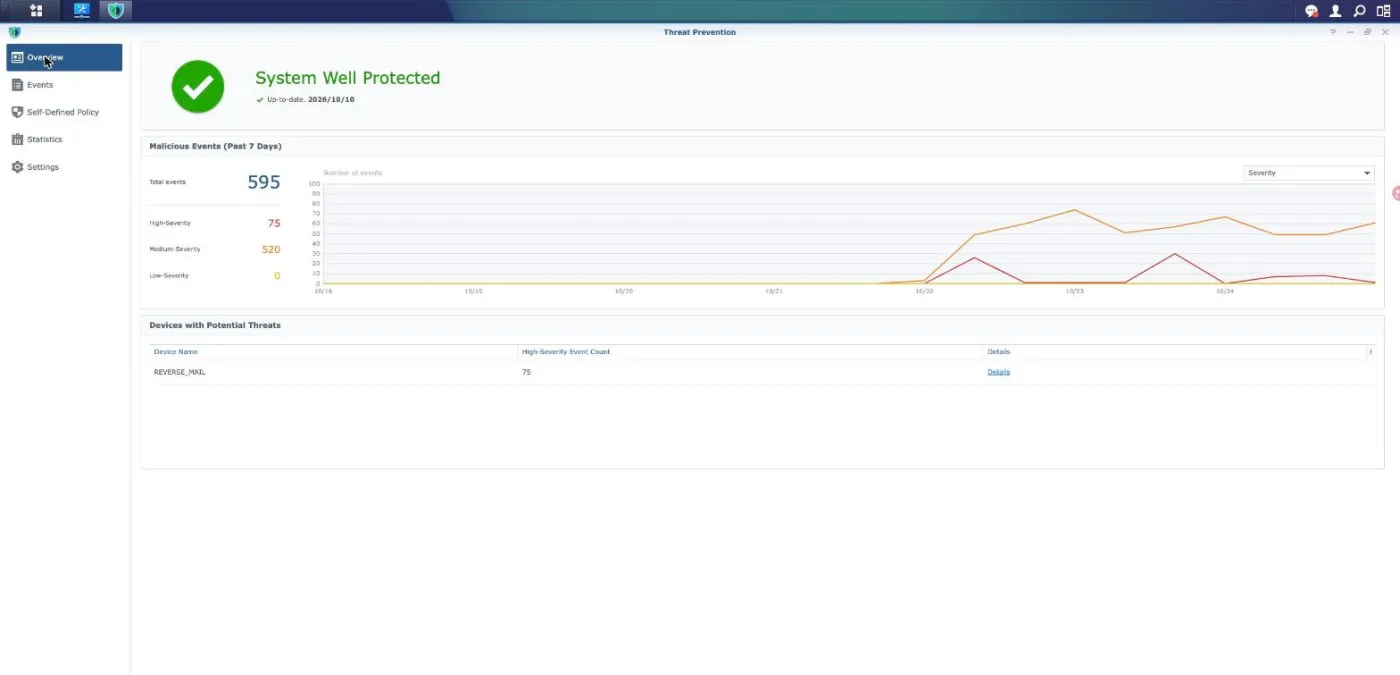
Two details in that screen are worth more than the headline number. The first is that only one device appears under potential threats at all, and it is REVERSE_MAIL, the machine that terminates TLS and runs MailPlus. The second is the signature date next to the green tick. Now open a single event and read what actually fired.
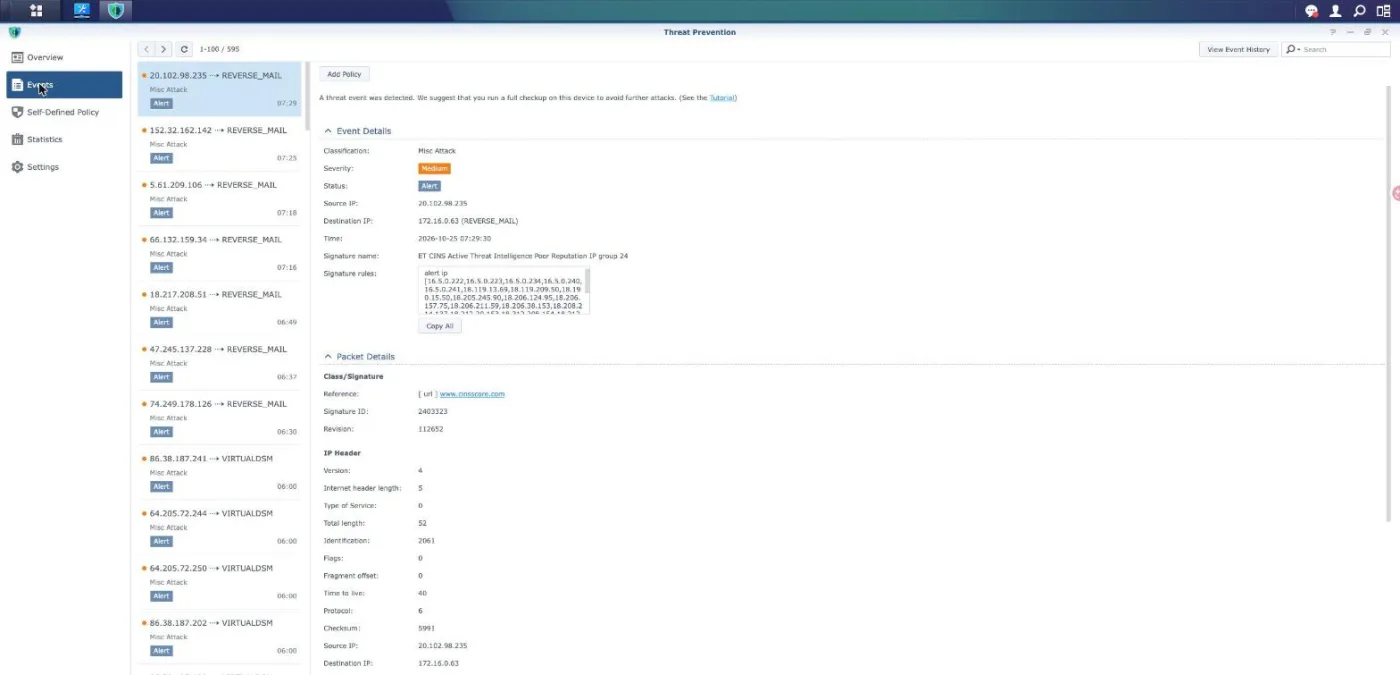
Classification Misc Attack, severity Medium, status Alert, signature name ET CINS Active Threat Intelligence Poor Reputation IP group 24. Open the rule body and it starts with alert ip and then a long list of addresses. That is a blocklist lookup. No part of the HTTP request was read, because no part of it could be. We sampled events against a second destination, our Virtual DSM host, and found the same class of rule with a different group number.
So the honest summary of one week is this: the router recognised a few hundred connections from addresses that already had a bad name. That is genuinely useful. It is not web attack detection, and nobody should read the number 595 as though it were.
How to Audit Threat Prevention in 4 Steps #
Before trusting Threat Prevention with anything, spend ten minutes finding out what it is actually doing on your own network. Every step below is read-only and changes nothing.
Open one event and read the signature body #
Go to Threat Prevention, then Events, and click any entry. Look past the coloured severity badge at the Signature rules box. A rule that begins with alert ip is matching on address reputation alone. A rule that contains content or pcre is matching on payload. Count how many of each you can find in your own list before you decide what Threat Prevention is protecting.
Check which interfaces are monitored #
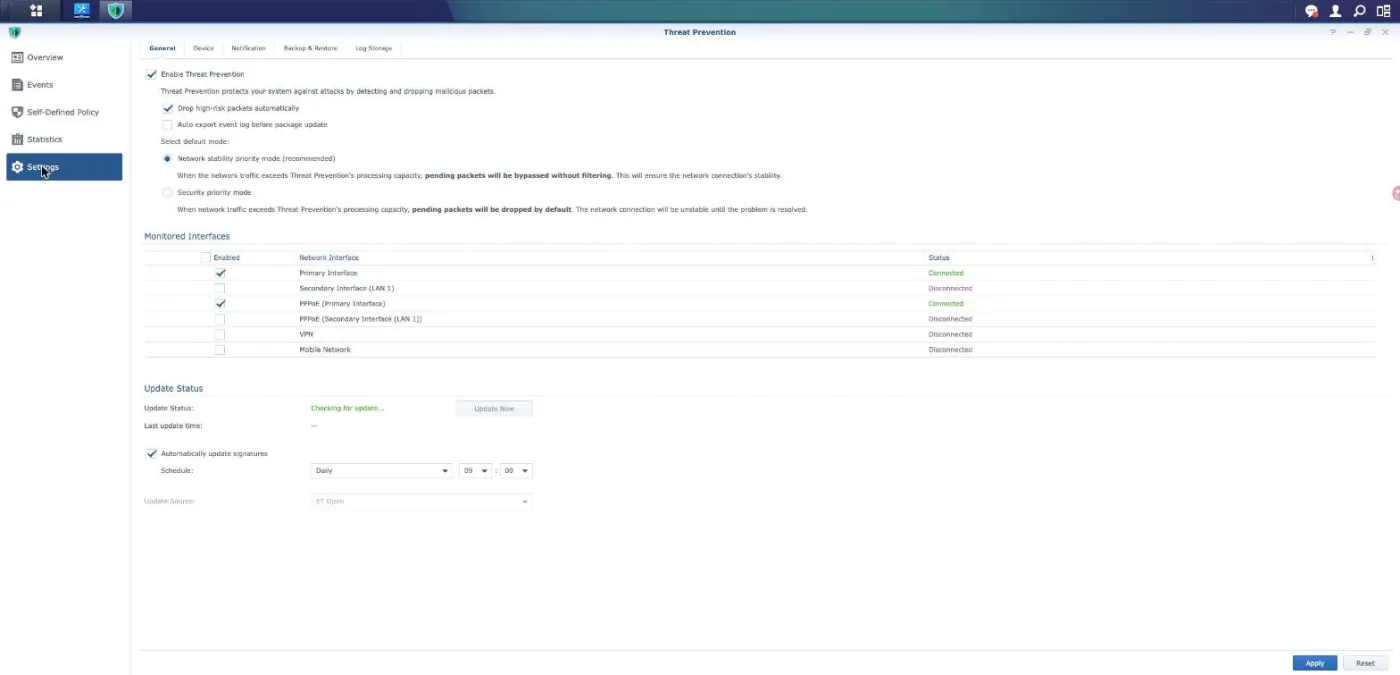
Open Settings and read the Monitored Interfaces table. Only the interfaces ticked there are inspected, and in a normal deployment those are the internet-facing ones. Traffic between two devices on the same LAN subnet is switched rather than routed, so it never reaches the inspection engine and no setting on this page can change that.
Find out what happens when the router is busy #
In the same panel, look at the default mode. Network stability priority means that when traffic exceeds what the engine can process, the excess is passed through unfiltered. Security priority means the excess is dropped instead. One choice fails open and keeps your line up, the other fails closed and takes your line down. Decide which one you actually want.
Try to add a rule of your own #
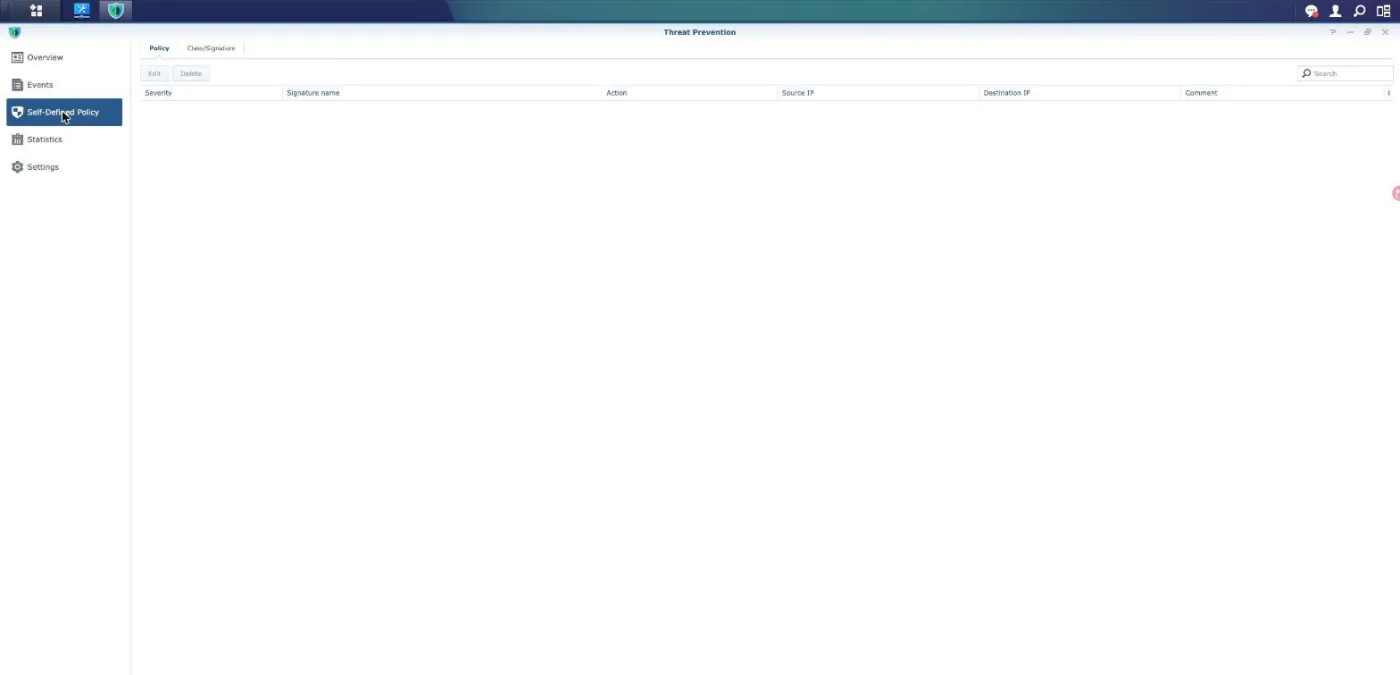
Open Self-Defined Policy. You can change the action for a signature the vendor already ships, and you can scope it by source or destination address. There is no field anywhere that accepts a signature you wrote. If your threat is newer than your signature feed, this screen is where you discover you have no way to respond.
Where It Genuinely Earns Its Place #
We keep Threat Prevention switched on, and not out of superstition. There are four jobs it does that nothing else in our stack does.
- Outbound command and control. This is the strongest case by far. A compromised device has to call home, that call has to leave through the router, and a good share of it is still either cleartext or aimed at a known address. Our router ships the Malware Command and Control Activity class with 3,450 of 3,498 rules enabled, and the Domain Observed Used for C2 class with 7,157 of 7,202.
- Cleartext protocols from the internet. Our mail server answers on port 25, and SMTP is cleartext until STARTTLS. That is real inspectable traffic, and it is no accident that the mail host is the one device our events list keeps naming.
- Scanning and reconnaissance. Port sweeps and fingerprinting are recognised by connection behaviour rather than by payload, so encryption does not hide them.
- Visibility. A searchable log of who knocked and with what reputation is worth having, even when every entry is only a reputation hit. It is monitoring value, and it should be counted as monitoring value rather than as protection.
What those four have in common is that none of them is an attack on a website.
Why a Site Owner Asks Threat Prevention for the Wrong Thing #
When you host a site on a NAS, the request path usually has a reverse proxy in it. Ours looks like this, and the shape is what decides everything:
- The visitor reaches Cloudflare, which answers most requests from cache and inspects the rest in cleartext.
- What is left crosses the router, where Threat Prevention sees an encrypted TLS stream and nothing more.
- The reverse proxy NAS terminates TLS and forwards plain HTTP to the machine that runs the site.
- That last hop is on the same subnet, so the frame goes through a switch and the router is not in the path.
Read those four lines together and the trap is obvious. The only segment where the request exists in readable form is the final hop, and that is the one segment the router cannot observe. Everywhere the router can observe, the request is encrypted. There is no checkbox that resolves a contradiction like that, and Threat Prevention is not failing when it stays quiet. It is reporting accurately on traffic it is structurally unable to read.
This is also why pointing Threat Prevention at a specific site does not work. The package is bound to router interfaces, not to hostnames. It has no concept of which of your sites a connection belongs to, because it never sees the Host header.
Three Reasons PHP2Shell Was Invisible at the Router #
PHP2Shell, the pair of pre-authentication remote code execution flaws tracked as CVE-2026-109618 and CVE-2026-109619, leaked on 20 October 2026 and was patched upstream the next day. It is the exact kind of thing people hope a router IPS will absorb, and it is worth being specific about why it could not.
First, the traffic was encrypted on every segment the router watches. The exploit lives in the HTTP request, and the HTTP request only exists in the clear after TLS has been terminated, which happens downstream of the router on a hop the router never carries.
Second, no Threat Prevention signature exists to switch on. We checked again on 25 October 2026 and found no published Snort or Emerging Threats rule for either CVE. Our feed is ET Open, the free tier, which lags the commercial set, and the Self-Defined Policy screen accepts no rule of your own. So even an operator who knew precisely what to match for had nowhere to put it.
Third, and most fundamentally, this attack has no payload shape to match. The chain takes two requests. The first has to push PHP into exhausting its memory limit, which makes the engine abandon a request through a path that skips cleanup and leaves some global state behind. The second request is ordinary, and it is the one that reaches a stale pointer and turns into code execution.
The first request is defined by how much memory it consumes, not by any sequence of bytes, and a large upload, a huge JSON body, a deep array and a long string in a regular expression all qualify. The second carries no malicious bytes at all. An IPS decides per packet and per flow. It has no model of a worker process carrying contaminated state from one request into the next, which is precisely where this bug lives.
That also sets the limits of the mitigation doing the rounds at the time, which was to switch off session.upload_progress in the PHP configuration. It does remove one well-documented way to reach the second CVE, and on a machine you genuinely cannot patch it is better than nothing. It is not a fix: memory exhaustion is not reachable only through that one feature, and the setting has no bearing at all on CVE-2026-109618. We used it as a stopgap on exactly one host and treated it as borrowed time, not as a resolution. The full account of how we patched is in our PHP2Shell write-up.
Fail Open by Design, and the Day It Cost Us Our Mail #
There is one more property worth knowing before you treat Threat Prevention as a control you can rely on. Its recommended default is network stability priority mode, and the interface states what that means without any euphemism: when traffic exceeds the processing capacity, pending packets are bypassed without filtering. The alternative, security priority mode, drops them instead and warns that the connection will be unstable until the problem is resolved.
That is a sensible default for a home router. It does mean Threat Prevention is weakest at the exact moment you would want it strongest, because a flood is both the thing you want filtered and the thing that exceeds capacity.
We also have the other failure mode on record. On 2 August 2026 somebody hammered our reverse proxy 116 times with an exploit for a Windows PHP-CGI bug that cannot work against Linux at all. Threat Prevention dropped enough packets to wedge its own state, then started refusing the outbound traffic of the very machine it was defending. Our mail queue stalled and the symptom looked exactly like a DNS failure. Rebooting the router fixed it. Nothing appeared in the proxy access log, because nothing ever reached the proxy. An attack that was structurally incapable of succeeding still cost us an outage, by way of the thing that was supposed to stop it.
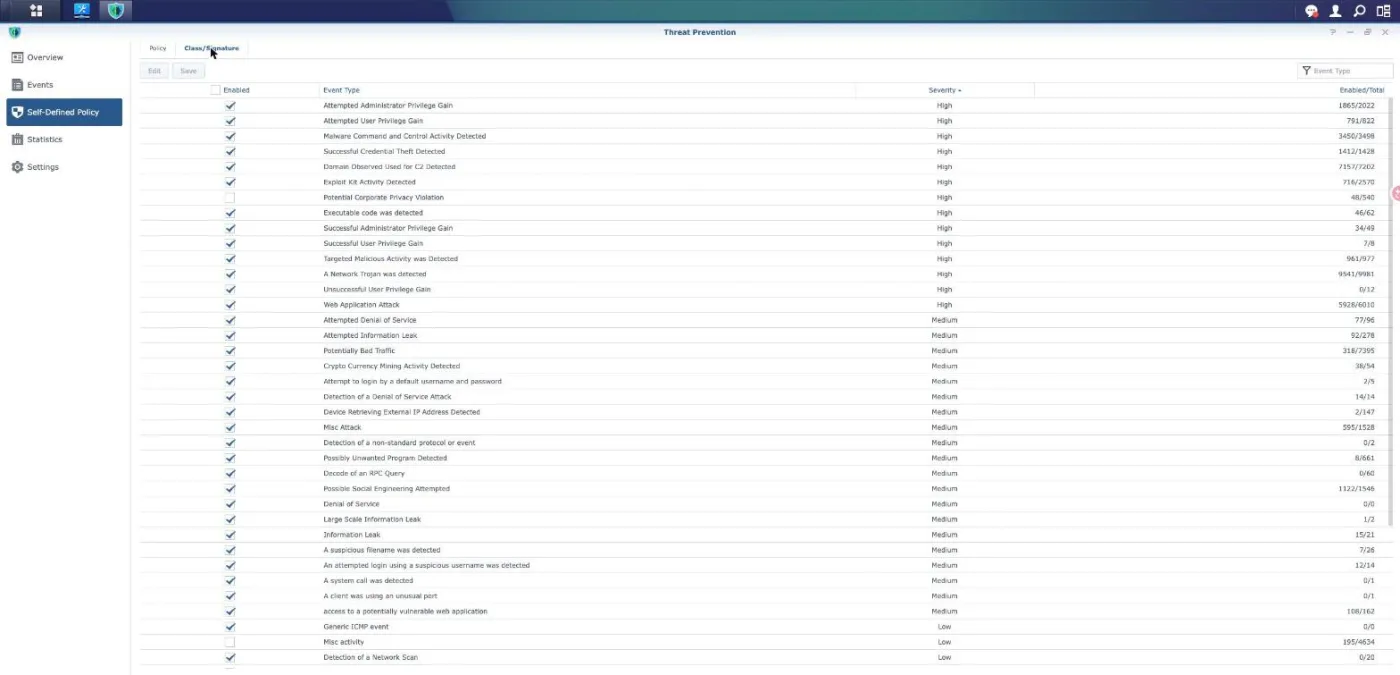
Look at the enabled counts in that list while you are there. Web Application Attack shows 5,928 of 6,010 rules active, and the ratio is similar across the classes we care about. Switching a class on does not switch on every rule inside it, and the interface gives you no way to see which of the remainder you are missing.
Put a Proxy in Front, Then Lock the Origin to It #
If you serve a website from a NAS, the control that does the job the router cannot is a reverse-proxy WAF. We use Cloudflare, and the reason is position rather than brand: TLS terminates at the edge, so the full request is readable at the moment the decision is made. Method, path, query, headers, cookies and body are all available to a rule.
That is why the PHP2Shell protections arrived there and not on the router. When the CVEs broke, the managed ruleset gained seven rules for the pair within two days, and they were live on all four of the zones we run before we had finished rebuilding our own containers. No equivalent ever appeared in the Threat Prevention feed, and five days later there is still no public Snort or Emerging Threats rule to install.
One warning that matters more than the choice of provider. A proxy in front only helps while it cannot be walked around. If your origin address answers the public internet directly, anyone who discovers it skips every edge rule you have written. Restrict port 443 on the origin to the proxy network ranges, pull those ranges from the provider endpoint rather than hard-coding them, and verify the lock by requesting the site straight from its address. Our wider setup, and the four layers behind this one, are described in the five layers we run.
Threat Prevention Limits and Security Notes #
Threat Prevention needs external storage on the router and is not available on every model, so confirm support for your hardware before planning around it. The engine is also the busiest thing your router does, and on a consumer unit it is the component most likely to become the throughput ceiling. Measure before and after rather than trusting the marketing figure.
Treat every number on the overview screen as a count of signature matches, not a count of attacks stopped. The two differ in both directions. A reputation hit against a scanner that was never going to achieve anything inflates the total, and a quiet week proves nothing about the HTTPS traffic the engine cannot read.
In Threat Prevention, status matters as much as severity. Drop high-risk packets automatically only acts on the high band, so medium-severity entries are recorded and forwarded. An interface that says Alert is telling you the packet was delivered.
The signature feed is a supply chain. ET Open refreshes on a schedule, lags the commercial ruleset, and may ship nothing at all for a vulnerability that is days old. A dashboard that reports the database as up to date is reporting that it matches the feed, not that the feed covers what is currently being exploited.
None of this replaces patching. Every layer discussed here buys time for the thing that actually closes a vulnerability, which is updating the affected software. For PHP2Shell that meant new PHP packages and rebuilt containers, and no network control substituted for it.
Finally, resist the urge to switch on every class after reading an advisory. Classes like Misc activity carry thousands of low-value rules that mostly generate noise and consume the same capacity the useful classes need. A quiet, well-tuned event list that you actually read beats a loud one you learn to ignore.
Frequently Asked Questions #
Does Threat Prevention protect a website hosted on my NAS? #
Barely, and not in the way the name suggests. A website is served over HTTPS, and Threat Prevention performs no TLS interception, so the request is opaque wherever the router can see it. On a typical setup the request only becomes readable after a reverse proxy terminates TLS, and that hop is usually on the same subnet, so it is switched rather than routed and the router never carries it. Use a reverse-proxy WAF for the website and keep Threat Prevention for what it is good at.
Which option should I switch on to stop a specific CVE? #
Usually none, because the answer depends on whether the vendor shipped a signature for it at all. Open Self-Defined Policy and you will find you can change the action on an existing signature but cannot add one of your own. If no rule exists in the feed, there is nothing to enable, and for a vulnerability a few days old that is the normal case.
Why does my event list only name one or two devices? #
Because those are the devices receiving traffic the engine can actually read. On our network it is consistently the mail server, which answers cleartext SMTP on port 25. A web host behind a reverse proxy produces few entries not because it is attacked less, but because its traffic is encrypted at every point the router inspects.
Does Threat Prevention inspect traffic between devices on my LAN? #
No. Two devices in the same subnet reach each other through a switch, and the router is not in that path, so the packets are never offered to the inspection engine. The Monitored Interfaces table in Settings shows the real scope, and no option there extends it to same-subnet traffic.
Is it safe to leave Threat Prevention enabled? #
Yes, with one caveat worth knowing. The recommended default passes traffic through unfiltered when the engine is saturated, which keeps your line up at the cost of inspection. The opposite mode drops that traffic instead. We have also had the engine wedge under a flood of harmless exploit attempts and start refusing a server’s outbound traffic, which cost us a mail outage, so include the router in your list of suspects when a machine goes quiet.
Did Threat Prevention help with PHP2Shell at all? #
No, and three separate reasons each would have been enough on their own. The traffic was encrypted everywhere the router looks, no Snort or Emerging Threats signature was published for either CVE, and the exploit has no payload shape to match because the first request is defined by the memory it consumes and the second looks completely ordinary. The fix was new PHP packages, with a reverse-proxy WAF covering the gap in the meantime.
Is disabling session.upload_progress enough on an unpatchable host? #
It helps and it is not enough. Switching it off removes one documented route to CVE-2026-109619, which is worth doing on a host you truly cannot update, but memory exhaustion is reachable by other means and the setting does nothing for CVE-2026-109618. Treat it as borrowed time and plan the package update.
What should I buy or configure first for a NAS-hosted site? #
Put a reverse proxy with a managed ruleset in front of the site, then restrict the origin so port 443 only answers that proxy network. Those two steps together move the inspection point to somewhere the request is readable and remove the bypass that would undo it. Keep Threat Prevention enabled afterwards for outbound command and control and for cleartext services, which is where it does real work.
References and Video Walkthroughs #
Primary sources for everything stated above, plus three walkthroughs worth the time.
- Synology Knowledge Center: Threat Prevention covers requirements, modes and model support.
- Synology-SA-26:14 lists the fixed PHP package versions for DSM, including the 7.4 build.
- Synology Statement on PHP2Shell names the affected packages and the one that needs a manual update.
- Cloudflare WAF managed rules explains how managed rulesets are versioned and deployed.
- Cloudflare IP ranges is the endpoint to read when locking an origin to the proxy instead of hard-coding addresses.