

How to Migrate a VMM Pro License After Removing a Cluster Host

Mis à jour le 18 octobre 2026
A VMM Pro license is activated on one Synology NAS, and the whole Virtual Machine Manager cluster borrows it from that host. That works until the day you remove the host the license lives on. The moment it leaves, every remaining host shows the VMM Pro license as Invalid with a 30-day countdown, even though the key itself is paid for and still has months left. This guide shows the fix we used on our own cluster on 18 October 2026: add the same key again on a host that stays, accept the migration, and the license moves across in about a minute. Every screenshot below comes from that run, with the license keys, account and serial number blurred out.
Point SynoPower Club : Our FlashStation FS2017 held the VMM Pro license for the cluster, but it is loud, so it only woke up at night to collect replicas and then went back to sleep. Once our DS1621xs+ and DS1525+ could protect each other, the FS2017 had no job left, and I removed it from the cluster. The console immediately turned orange: Invalid, 30 days remaining. There is no “transfer” button anywhere in Virtual Machine Manager. The fix turns out to be hiding behind the ordinary Add license button, and the dialog that confirms it is the only place Synology spells the move out. I recorded the whole thing so you do not have to guess.
What Happens to a VMM Pro license When Its Host Leaves the Cluster #
VMM Pro is sold as 3-node and 7-node packs, valid for one or three years and not refundable once activated. You activate the pack on one host, and that host carries it for every NAS in the same cluster. The license is tied to that host rather than to the cluster, so when the host is removed it takes the license with it into its own single-node cluster.
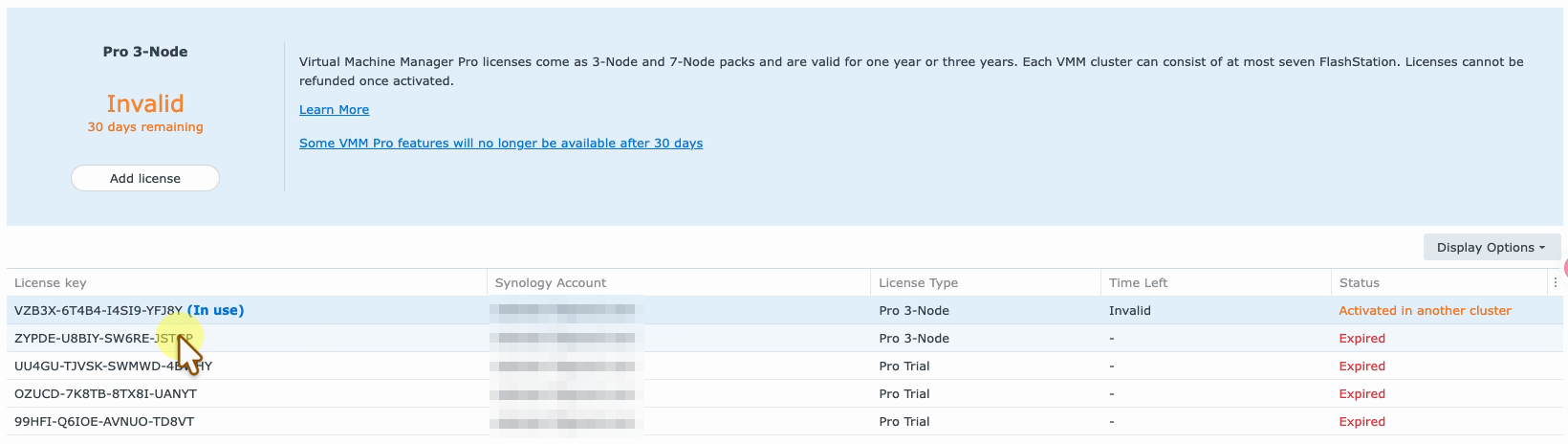
The hosts left behind keep the key in their license list, but its status changes to Activated in another cluster and Time Left reads Invalid. The summary panel switches to Invalid with 30 days remaining, and a link warns that some VMM Pro features will no longer be available after 30 days. Your virtual machines keep running during that grace period; nothing is shut down. The countdown is simply your deadline to put a valid license back.
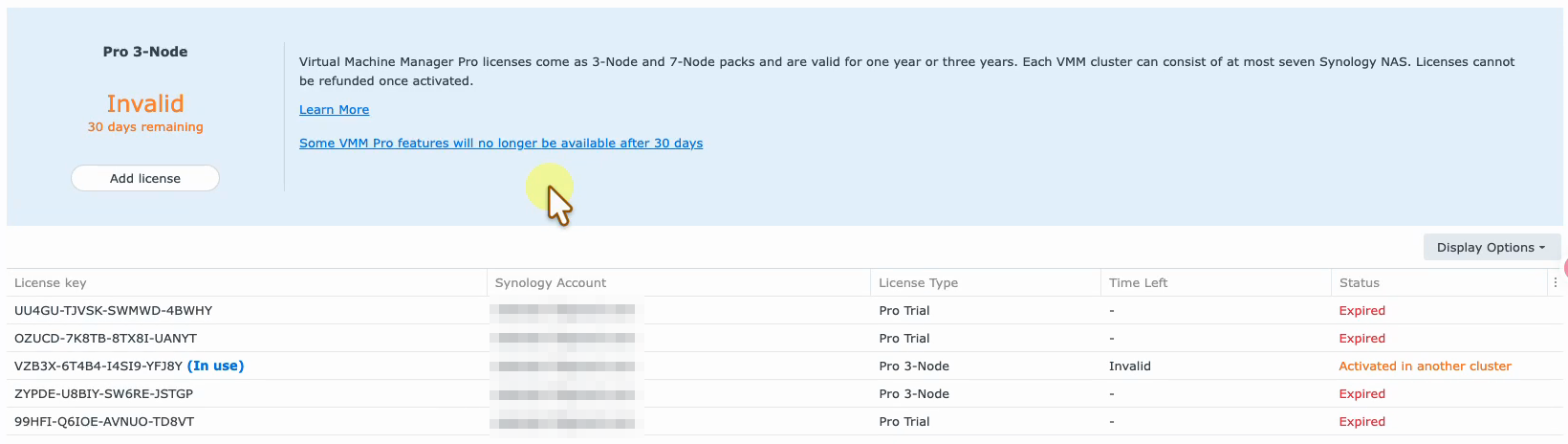
Why We Removed the License Host From Our Cluster #
Our cluster used to have three members: a DS1621xs+ and a DS1525+ running production guests, and an FS2017 acting as a cold standby. The FS2017 held the 3-node VMM Pro license because it was the first host we activated. It powered on at night, accepted scheduled replicas from the other two, and powered off again. The full design is in our production cluster write-up.
Two things changed. The DS1525+ was upgraded to 64 GB of memory, and every protection plan was pointed at the other production host instead of the standby, so the DS1621xs+ and DS1525+ now replicate to each other. That made the FS2017 redundant, and since it is loud enough to hear from the next room, it was removed from the cluster. The only side effect was the license.
| Hôte | Avant | Après |
|---|---|---|
| FS2017 | Cold standby, held the VMM Pro license | Removed from the cluster, license now Invalid |
| DS1621xs+ | Production host | Production host, now holds the VMM Pro license |
| DS1525+ | Production host | Production host and replication partner |
Migrate or Buy Again: Your VMM Pro license Options #
When the license host leaves, there are three ways forward, and only one of them costs nothing:
- Migrate the same key. Add the key you already own on a host that stays. Synology recognises it is active elsewhere and offers to move it. Free, and the expiry date does not change. This is what this guide covers.
- Rejoin the old host. Add the removed host back to the cluster and the license is valid again. Useful as a rollback, but it defeats the purpose if you wanted that host gone.
- Activate a new pack. Only needed when the old key is expired, the cluster has grown past the pack size, or you want to move up from a 3-node to a 7-node pack. A new VMM Pro license pack starts a fresh term.
For a general answer on which Synology licenses can move between machines, see whether purchased Synology licenses can be transferred.
Move a VMM Pro license to Another Host in 4 Steps #
Run these steps in DSM on a host that will stay in the cluster and should carry the VMM Pro license from now on. We used the DS1621xs+. The host needs internet access, because the move is confirmed against the Synology license server.
Open License on a remaining host #
Sign in to DSM on a host that stays in the cluster, open Virtual Machine Manager, go to License and confirm the key shows Activated in another cluster. Then click Add license.
Agree and link the Synology Account #
Accept the license agreement, then sign in with the Synology Account that owns the key. It must be the same account the license was originally registered to.
Enter the same license key #
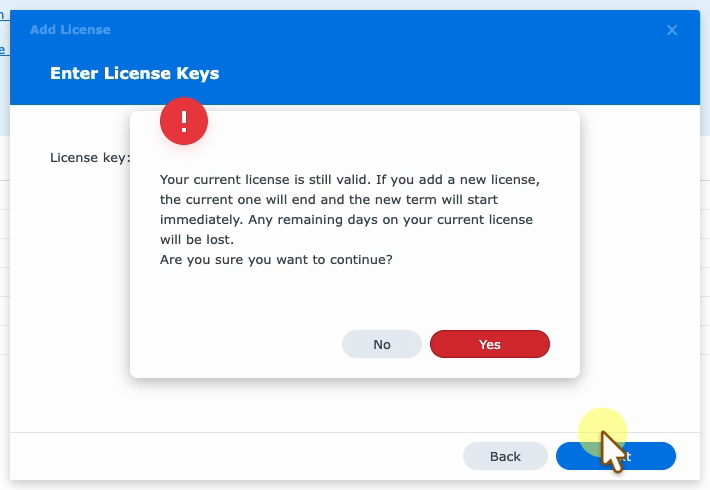
Type the existing key, click Next and answer Yes to the warning about the current license. The wizard then shows the host the key is active on and offers to migrate it.
Confirm the migration #
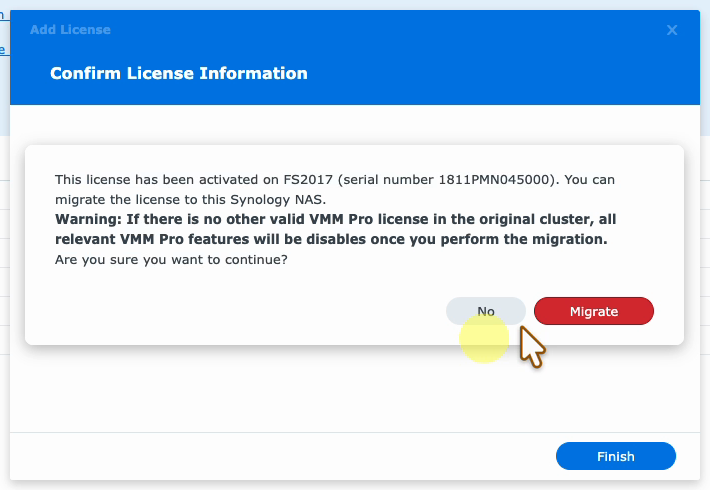
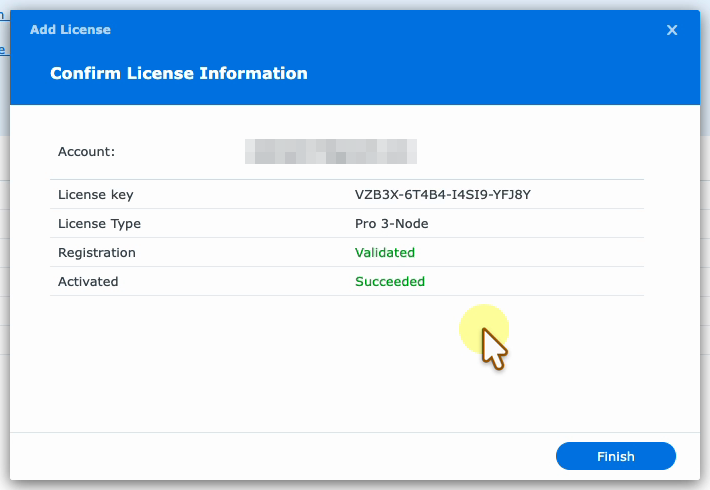
Click Migrate, wait for Registration Validated and Activated Succeeded, then click Finish. The panel changes from Invalid to Normal with the original expiry date.
Prefer to watch? This one-minute recording shows the whole migration on our DS1621xs+, from the Invalid warning to the old host losing the license.
What Each Screen in the Add License Wizard Means #
The wizard is the normal one for adding any license, so it helps to know which screens are routine and which one actually performs the move.
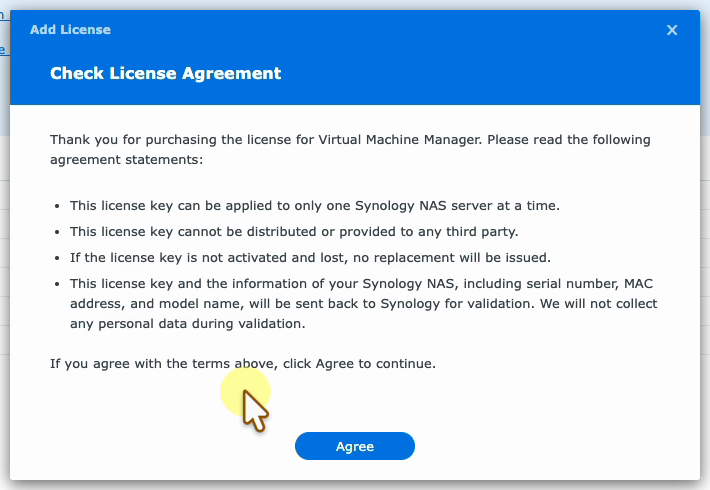
The agreement already hints at what happens next: a key can be applied to only one Synology NAS at a time, so adding it here must take it away from the FS2017.
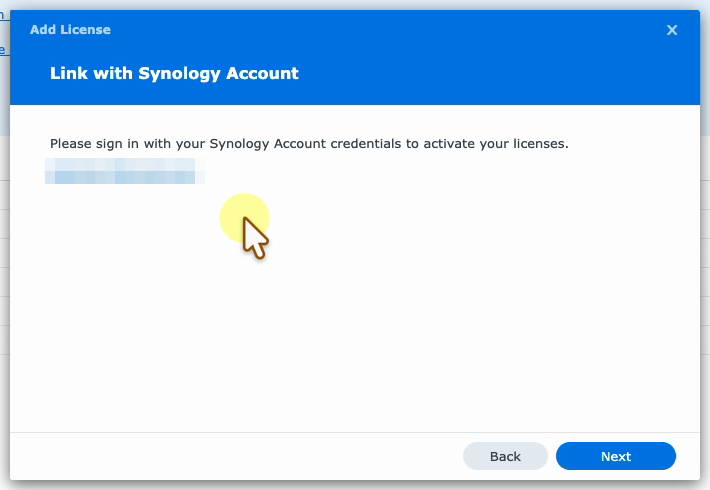
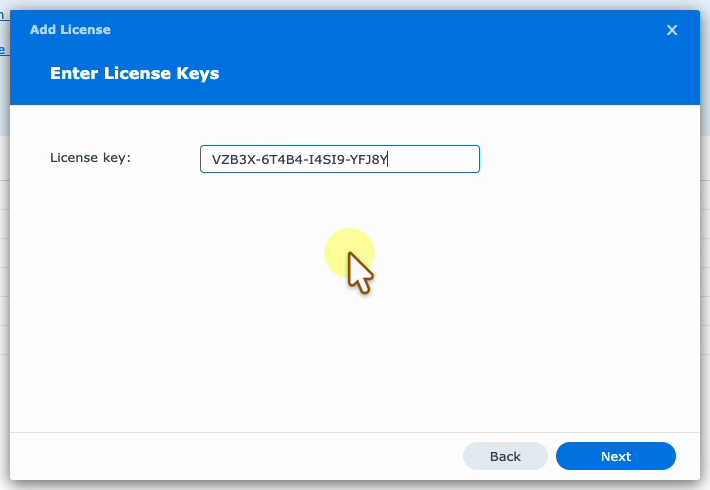
After you click Next, a red warning says your current license is still valid and that adding a new license ends the current one, losing any remaining days. That message is generic and appears for any add. In our case we were adding the same key, and the term was not shortened: the expiry date after the move was exactly the one the FS2017 had shown.
The real decision is the next dialog. It names the NAS the key is activated on, with its serial number, and warns that if the original cluster has no other valid VMM Pro license, its Pro features will be disabled once you migrate. That is exactly what we wanted, so we clicked Migrate.
How the Old Host Reacts After the Migration #
Back on the summary page, the DS1621xs+ now shows the VMM Pro license as Normal with an expiry of 16 February 2027, and the key row reads Validated with 121 days left. The whole run, from clicking Add license to the green result, took just over a minute.
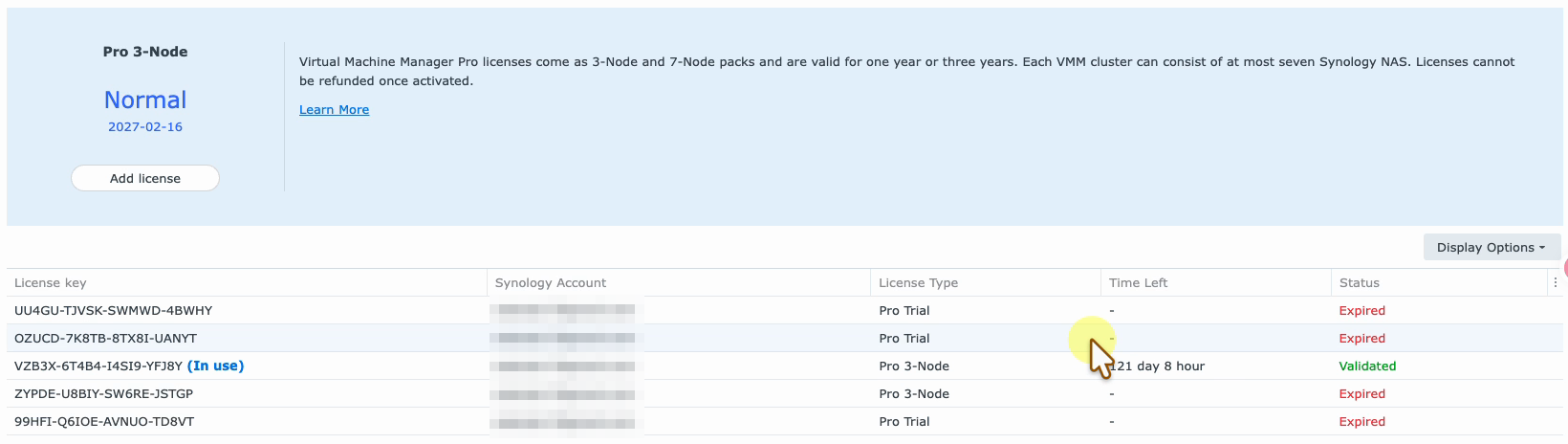
On the FS2017 the license page still showed Normal for a few seconds, then a notification popped up reading Invalid VMM Pro license, and its own panel switched to Invalid with the key marked Activated in another cluster. The roles had simply swapped.
Before You Remove a Host: A VMM Pro license Checklist #
Removing a host is the step that triggers all of this, so it is worth preparing for it. This is the checklist we worked through first:
- Move every running guest off the host, both its compute and its storage. A guest whose disks still live on a removed host cannot start anywhere else.
- Re-point protection plans that replicate to the host you are removing. Ours all targeted the standby, so each one was changed to replicate to the other production host and given a fresh full sync. Keep an independent copy as well; we export guests to Google Drive as described in our VMM backup guide.
- Check what the cluster needs afterwards. High availability needs at least three hosts, so a two-host cluster has to rely on replication and manual switchover instead.
- Have the Synology Account login ready, and make sure the host that will receive the VMM Pro license can reach the internet.
- Know the order. Remove the host first, then migrate. While the license host is still a member there is nothing to migrate, because the cluster already has a valid license.
What Changes in a Two-Host Cluster #
A 3-node VMM Pro license does not need three hosts. With two members it covers the cluster with one slot to spare, so the DS1525+ and DS1621xs+ keep every Pro feature they used before: live migration between them, protection plans with remote replication in both directions, and switchover when one of them needs maintenance.
We used exactly that the same day. Before the DS1525+ memory upgrade, every guest on it was switched over to the DS1621xs+ with only a few minutes of downtime each, and then moved back after the upgrade. The free edition of Virtual Machine Manager can also cluster hosts, but it cannot do this kind of replication and switchover; our comparison of Virtual Machine Manager and VMM Pro lists what needs the Pro license.
Où trouver plus d'informations sur Synology #
These official Synology videos cover the cluster features the license unlocks:
VMM Pro license Migration Limits and Caveats #
The license follows its host, not the cluster. Whichever NAS you activate the key on carries it. If you plan to retire or power down a host, do not activate the key there in the first place, or plan to migrate it before that host goes.
The 30-day grace period is a deadline, not a free month. Guests keep running, but some Pro features stop working when it runs out. Migrate the key the same day you remove a host.
The old host loses Pro features too. After the move, the removed host shows Invalid. If it still runs guests that rely on replication or live migration, they lose those features unless it gets its own license.
The term does not restart. Migrating keeps the original expiry date. If you need more time, that is a renewal or a new pack, not a migration.
The same Synology Account is required. The wizard asks for the account that owns the key. A key bought for a client and registered to their account has to be moved while signed in to that account.
Never share the key in screenshots or tickets. The License page shows full keys, the account email and, in the migrate dialog, the serial number of the old host. Blur them before posting, as we did here.
Références #
- Pack de licences VMM Pro: official pack sizes, terms and the one-pack-per-cluster rule.
- Spécifications techniques Virtual Machine Manager: what the free and Pro editions each include.
- Gestion de clusters dans Virtual Machine Manager: adding and removing hosts.
- Protection dans Virtual Machine Manager: protection plans, replication and switchover.
- Livre blanc Synology VMM: how VMM Pro licensing and cluster features fit together, the background to this VMM Pro license guide.
Questions fréquemment posées #
Can I move a VMM Pro license to another NAS? #
Yes. On a host in the cluster that should hold the license, open Virtual Machine Manager, go to License, click Add license and enter the same key. Synology shows where the key is active and offers to migrate it.
Why does my VMM Pro license say Activated in another cluster? #
The host the key was activated on is no longer in your cluster. It took the license into its own cluster, so the hosts left behind see the key as belonging somewhere else.
Do my virtual machines stop when the license turns Invalid? #
No. Guests keep running. You get a 30-day grace period, after which some VMM Pro features stop working until a valid license is added.
Does migrating a VMM Pro license reset or shorten its term? #
No. In our migration the expiry date stayed exactly the same. The warning about losing remaining days is generic and appears whenever you add a license.
Is there a fee to migrate a VMM Pro license? #
No. Migrating an active key between your own NAS units is free. You only pay again for a new pack or a renewal.
Do I need the same Synology Account? #
Yes. The wizard asks you to sign in with the Synology Account the key is registered to before it will migrate it.
Should I migrate the license before or after removing the host? #
After. While the license host is still in the cluster the license is valid and there is nothing to move. Remove the host, then add the key on a host that stays.
Does a 3-node pack work with only two hosts? #
Yes. The pack covers up to three hosts, so two hosts are fully licensed with one slot spare. High availability still needs three hosts, so a two-host cluster uses replication and switchover instead.