Skip to content
Login
  • License Shop 24×7
    • Surveillance 1
    • Surveillance 4
    • Surveillance 8
    • MailPlus 5U
    • MailPlus 20U
    • Virtual DSM 1
  • FAQ & KB
    • FAQ
    • Knowledge Base
  • Contact Us
  • About Us
  • Warranty Policy
  • License Installation
  • Instant Delivery Service
SynoPower Club Site Logo

Official Synology Reseller | Bitter821

banner registered partner logo- synopower.club, bitter821 llc
  • About Us
    • About Us
    • Warranty Policy
    • Terms & Conditions
    • Privacy Policy
  • Synology Licenses Shop
    • Licenses for Surveillance Station
      • Synology Surveillance Station License – 1 Camera
      • Synology Surveillance Station License – 4 Cameras
      • Synology Surveillance Station License – 8 Cameras
    • Licenses for MailPlus Server
      • Synology MailPlus License – 5 Accounts
      • Synology MailPlus License – 20 Accounts
    • Licenses for Virtualization
      • Synology Virtual DSM License – 1 VDSM
      • Virtual Machine Manager Pro (VMM Pro) License
  • Support
    • Contact Us
    • Knowledge
    • FAQ
    • Tutorials
      • License Installation
        • Synology Surveillance Station
        • Synology MailPlus Suite
        • Synology Virtual DSM
      • Official Licenses vs. Cracked Keygens
      • Synology License Packs & Plans
      • Technical Specifications
  • English
    • Deutsch
    • Español
    • Français
    • Italiano
    • Čeština
    • Magyar
    • Dansk
    • Svenska
    • Nederlands
    • Norsk bokmål
    • Polski
    • Português
    • 繁體中文
    • 日本語
    • Ελληνικά
    • Slovenščina
    • Tiếng Việt
    • العربية
    • Türkçe
    • 한국어
    • ไทย
Login
Shopping cartUS $0.00 0
SynoPower Club Site Logo

Official Synology Reseller | Bitter821

Shopping cartUS $0.00 0
camera

Surveillance Station

8
  • Is there a recurring fee 💸 of Synology licenses for software maintenance?
  • Synology Surveillance Station License Easy Buy Guide with Installation (2026)
  • Activating Synology Surveillance Licenses Offline
  • All-in-One security system inside each Synology NAS – Surveillance Station Guide
  • 💡How to set up motion detection 👋 on Synology Cameras like BC500, TC500 to improve detection quality?
  • Home Mode: Auto Surveillance recording/notification push based on the network location/geofence of mobile
  • ✅ Cannot Add Your Synology Camera License? Fix Add and Registration Issues.
  • Ensure Backup for Synology licenses after purchase

Synology MailPlus

5
  • Is there a recurring fee 💸 of Synology licenses for software maintenance?
  • Receive and Install Synology MailPlus License Guide (2026)
  • 💡 What Synology NAS model does it support MailPlus? 🤔 How many email accounts users does it support?
  • 【 Synology MailPlus 】Intuitive, Scalable, Cost-Effective and Secure On-Premise Mail Server For SMB(s)
  • Ensure Backup for Synology licenses after purchase
virtualization

VMM Pro & Virtual DSM

3
  • 💡How to Add, Deactivate, Map and Unmap Virtual DSM License?
  • How to Build a Home Data Center with Synology NAS: A Personal Journey With Virtual DSM.
  • Ensure Backup for Synology licenses after purchase

Synology Tips 101

13
  • 🛠️ Upgrade a Basic Type volume of a single disk ⛁ to a bigger one on multi-bays Synology NAS.
  • 💡 Can the slot order of the hard drives on Synology NAS be changed?
  • 🛠️ Repair Synology DiskStation Hard Drive Tray Door Latch
  • Trend Doc
    • Can Synology purchased licenses be transferred or migrated?
    • Payment methods: Credit Card, Apple Pay, PayPal and more
    • Synology Surveillance Station License Easy Buy Guide with Installation (2026)
    • Activating Synology Surveillance Licenses Offline
    • Zero Delay, Zero Risk: Instant Delivery + Physical Proof Service
    • All-in-One security system inside each Synology NAS – Surveillance Station Guide
    • 🤔 How can I save emails of different accounts ( Gmail、Yahoo! …) to a Synology NAS for backup and management 📂 ?
    • 🛠️ Repair Synology DiskStation Hard Drive Tray Door Latch
    • ✅ Cannot Add Your Synology Camera License? Fix Add and Registration Issues.
    • Ensure Backup for Synology licenses after purchase
faq message

Service FAQ

21
  • Licenses
    • 🏆 Is SynoPower Club an official Synology reseller ?
    • 🤔 Can Your Synology license(s) be used globally?
    • Is there a recurring fee 💸 of Synology licenses for software maintenance?
    • Can Synology purchased licenses be transferred or migrated?
    • Synology Surveillance Station License Easy Buy Guide with Installation (2026)
    • Receive and Install Synology MailPlus License Guide (2026)
    • Activating Synology Surveillance Licenses Offline
    • 💡How to Add, Deactivate, Map and Unmap Virtual DSM License?
    • Zero Delay, Zero Risk: Instant Delivery + Physical Proof Service
    • ✅ Cannot Add Your Synology Camera License? Fix Add and Registration Issues.
    • Ensure Backup for Synology licenses after purchase
  • Orders
    • 🤔 How do I cancel or change my order?
    • How to track my order?
    • Payment methods: Credit Card, Apple Pay, PayPal and more
  • Service & Delivery
    • How Long Does It Take to Receive My Synology License?
    • Zero Delay, Zero Risk: Instant Delivery + Physical Proof Service
    • 🤔 What is different about ordering licenses from SynoPower Club?
    • Ensure Backup for Synology licenses after purchase
  • Refund & Exchange
    • What is your Refund & Exchange Policy?
    • How long does it take to get the Refund?
    • How do I track my Refund?
View Categories
  • .
  • Docs
  • Synology Tips 101
  • Trend Doc

🤔 How can I save emails of different accounts ( Gmail、Yahoo! …) to a Synology NAS for backup and management 📂 ?

Adair Hsu live picture - diving
Adair Hsu
Updated on January 19, 2026

2 min read

mail station webmail client
Manage downloaded mails of testing Gmail and Yahoo! on one Synology NAS

This tip is helpful for the following problem:

  • Need to manage multiple email accounts ( Yahoo, Gmail, school email, work email ) all in one place.
  • Email accounts have limited storage space, and you need to regularly download all of your emails, including attachments.
  • Want to securely back up all personal business emails and access anytime if necessary.

As a Synology NAS owner, we can download all emails of different providers to a NAS.

Then perform easy management and backup under one web mail client. Here is an example:

Table of Contents
  • Install either one Synology mail solution suite
  • Enable POP3 fetching function in Mail Station web mail client. 
  • Enable POP3 access for Yahoo, Gmail, and other email providers.
  • Configure Mail Station to fetch emails using POP3.
    • Need a Synology license with best value? 👉 Get one from SynoPower Club


Install either one Synology mail solution suite #

We could install one suite of two Synology mail solution suites below. This could help fetch emails via POP3:

  • [A] Mail Suite: Synolgoy Mail Server + Mail Station
  • [B] MailPlus Suite: Synology MailPlus Server + Synology MailPlus

Here we use suite [A] -Synology Mail Server suite– to install in Package Center, because Synology Mail Server is almost available in each Synology NAS model.

Its first version was release since 2012 until now. MailPlus suite was released since 2016, available for higher-end NAS models.
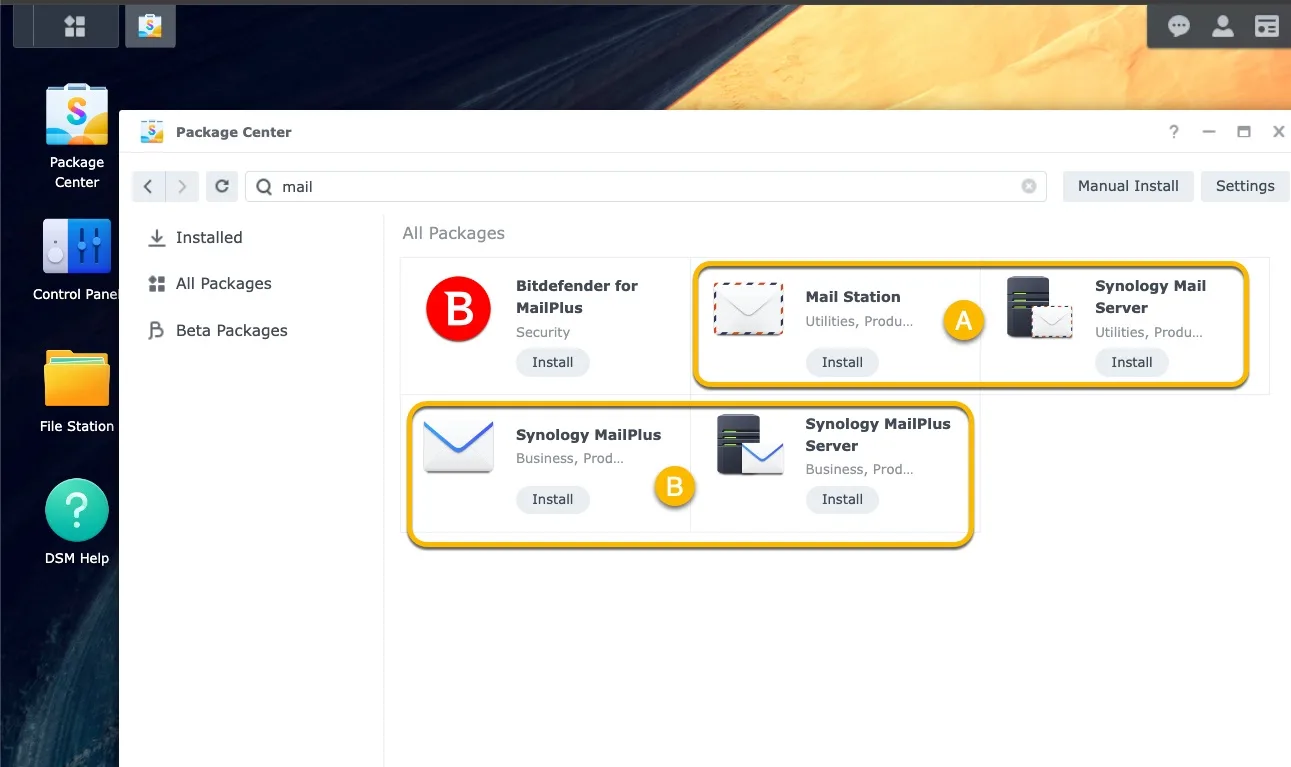
mail suite of synology
Two kinds of Synology mail solution. We will use A as example here

Click Synology Mail Server to start installation. Enable User home then Synology Mail Server could work well.

Click Synology Mail Server icon and enable Home complete the whole suite installation
Click Mail Station icon and follows its steps to complete the whole suite installation

We could also see the comparison between two suites here: What are the differences between Synology MailPlus Server and Synology Mail Server?  


Enable POP3 fetching function in Mail Station web mail client.  #

We need to enable POP3 in Mail Station web client. This option could be found in Admin Settings.

Once it is enabled, we could see POP3 configuration field in [Settings] next to [Admin Setting].

Enable POP3 option in Mail Station > Admin Setting


Enable POP3 access for Yahoo, Gmail, and other email providers. #

Configure the POP3 settings of your external email account. Later then Synology Mail Server could access and fetch.

  • Google:
    1. Set up POP3 in Gmail.
    2. Access your Google Account using an App Password.
  • Yahoo!:
    1. Generate an app password for Synology Mail Server.
    2. Set up POP3 in Yahoo Mail.
  • Outlook.com: Set up POP3 in Outlook.com.
  • Others: Refer to their official documentation for instructions.


Configure Mail Station to fetch emails using POP3.
#

a. Open Mail Station on your Synology NAS.

b. Go to Settings → POP3. Click ➕.

c. Enter the following information for each of your email accounts. We use one Gmail account to test here.


d. Configure a new mail folder called 「Gmail」 for this Gmail testing account.


e. Skip SMTP setting and choose to receive All Messages.


Wait for a moment, we could see messages come to synopower folder.

It looks like we have an Outlook or Tunderbird in our Synology.

We could change our preferred language:

Change language in Mail Station of Synology

or start searching backup mail:


The real mail address data is stored in .Maildir in every user home folder. Backup this folder is equal to backup your mail data.

Theoretically, if in the future we don’t use Synology solution anymore, we could mode this folder to other machine and it is readable by other similar client.

Additional Notes:

  • You can also use Synology MailPlus Server and Synology MailPlus instead of Synology Mail Server and Mail Station. MailPlus is a more advanced mail server and webmail application that is available on higher-end Synology NAS models. Its guide for this purpose could be found here.

Need a Synology license with best value? 👉 Get one from SynoPower Club #

Preloader image
On SaleOfficial Synology Surveillance Station License Pack 8 – $42 per license -Official Reseller SynoPower Club (with license photo proof) - Box Version

Synology Surveillance Station License 8-Camera Pack #

US $433.55 Ursprünglicher Preis war: US $433.55US $345.35Aktueller Preis ist: US $345.35.
On SaleSynology Virtual Machine Manager Pro License- 24x7 instant delivery online - SynoPower Club

Virtual Machine Manager Pro (VMM Pro) License #

US $185.00 – US $995.88Preisspanne: US $185.00 bis US $995.88
On SaleOfficial Synology Surveillance Station License Pack 4 – $46 per license -Official Reseller SynoPower Club (with license photo proof) - Box Version

Synology Surveillance Station License 4-Camera Pack #

US $226.54 Ursprünglicher Preis war: US $226.54US $191.73Aktueller Preis ist: US $191.73.
On SaleOfficial Synology Surveillance Station License Pack 1 – $52 per license -Official Reseller SynoPower Club (with license photo proof) - Box Version

Synology Surveillance Station License 1-Camera Pack #

US $59.93 Ursprünglicher Preis war: US $59.93US $53.71Aktueller Preis ist: US $53.71.
On SaleSynology MailPlus License 5 Pack – $51 per license - Official Reseller SynoPower Club (with license photo proof) - 24x7 Instant Delivery - Box Version

Synology MailPlus License 5-User Pack #

US $263.73 Ursprünglicher Preis war: US $263.73US $237.35Aktueller Preis ist: US $237.35.
On SaleSynology MailPlus License 20 Pack – $47 per license - Official Reseller SynoPower Club (with license photo proof) - 24x7 Instant Delivery - Box Version

Synology MailPlus License 20-User Pack #

US $1,042.38 Ursprünglicher Preis war: US $1,042.38US $969.41Aktueller Preis ist: US $969.41.
On SaleSynology VDSM License 24x7 Instant Delivery 3D Version - $145- SynoPower Club

Virtual DSM (VDSM) License 1-Instance Pack #

US $169.87 Ursprünglicher Preis war: US $169.87US $152.89Aktueller Preis ist: US $152.89.
All-in-One security system inside each Synology NAS – Surveillance Station Guide🛠️ Repair Synology DiskStation Hard Drive Tray Door Latch

Leave a ReplyCancel Reply

Your email address will not be published. Required fields are marked *


Table of Contents
  • Install either one Synology mail solution suite
  • Enable POP3 fetching function in Mail Station web mail client. 
  • Enable POP3 access for Yahoo, Gmail, and other email providers.
  • Configure Mail Station to fetch emails using POP3.
    • Need a Synology license with best value? 👉 Get one from SynoPower Club

Share This Article :

  • Facebook
  • X
  • LinkedIn
  • Pinterest

Was it helpful ?

  • Happy
  • Normal
  • Sad

SynoPower Club (Bitter821 LLC) - Registered Synology B2B Reseller


Quick Links

  • About Us
  • FAQ & KB
  • Contact Us
  • Privacy Policy
  • Terms of Service
  • Warranty & Return
  • License Installation
  • License Instant Display

Products

  • Camera License 1
  • Camera License 4
  • Camera License 8
  • MailPlus License 5
  • MailPlus License 20
  • VDSM 1 Pack (3 Yrs)
  • VMM Pro Pack (1, 3 Yrs)
  • SynoPower Club - Taipei, Taiwan TIN: 90247314 | Bitter821 LTD
  • Bitter821 LLC - Tokyo, Japan 法人番号: 7010003042164 | ビター821合同会社
  • [email protected]
  • (+886) 939288454
  • Mon–Fri · 9AM–4PM (GMT+8)

SynoPower Club © 2026 All rights reserved

5.0
Read our Reviews
google Rating
5.0
Read More
Alic Chou
google
Alic Chou
May 8, 2026

The physical card photo they send after purchase is actually genius. Now I have a real paper trail for my IT audit.

Biffa
google
Biffa
April 30, 2026

Convenient, fast and cost effective official Synology licenses. No drama, no fuss just what it says on the tin really.

Nils Gradert
google
Nils Gradert
April 27, 2026

Fast & Fair - Great service!

Bear Chu
google
Bear Chu
April 25, 2026

I have been burned by grey-market licenses before. Seeing they are a real Synology partner listed on the official site made me feel safe buying here.

Scott Lee
google
Scott Lee
April 23, 2026

Quick, simple, works. Exactly what I needed for my small business setup.

Steve Lou
google
Steve Lou
April 16, 2026

Price was better than Amazon and delivery was instant.

Elena Lo
google
Elena Lo
April 5, 2026

The checkout process was clean, the key arrived fast, and the follow-up email had actual useful setup tips. Good experience overall. Highly recommended!

許智超
google
許智超
April 5, 2026

Ordered on a Sunday morning. Key arrived in 45 seconds. Installed and cameras running by lunch.

Dog DieBremer
google
Dog DieBremer
March 29, 2026

SynoPower Club is a real authorized expert that helped me resolve my camra license issues way faster than expected. Their professionalism far exceeds other companies I’ve dealt with before. If you need quick and relible help with licenses, SynoPower Club is definitely the way to go!

Howard
google
Howard
March 29, 2026

"SynoPower Club delivers top‑notch technology and outstanding service. Every time I have a request, their team responds quickly and professionally. Highly recommended to everyone looking for reliable support and expertise!"

Michael Puggaard
google
Michael Puggaard
January 14, 2026

Alt var som lovet - Kun plusser her fra

Charlie Wang
google
Charlie Wang
January 9, 2026

Excellent NAS tech support! They helped me set up a secure VPN connection smoothly and efficiently. The technician was knowledgeable, patient, and explained the whole process clearly. Everything works perfectly now. Highly recommended!

YUNG CHUNG Chen
google
YUNG CHUNG Chen
October 10, 2025

這是真的,非常即時的服務與機制。

Iker Ondaro
google
Iker Ondaro
October 5, 2025

Precio competitivo y licencia oficial de Synology de por vida. Te llega al correo de forma instantánea. Sin gastos de envío. ¡Genial!

Lee Hericks
google
Lee Hericks
September 30, 2025

Kind and helpful staff and the lowest price I could find for Synology MailPlus licenses! Licenses were delivered by mail quickly and as a Synology registered partner they worked without issue. The website can be a little slow and quirky but it's worth it!

Christian Blackburn
google
Christian Blackburn
September 9, 2025

Ordered the Synology Camera licence 4 pack, received the key instantly

thomas da cunha
google
thomas da cunha
August 3, 2025

Achat d'une licence Synology, clé reçu en 30 secondes par mail, tarif correct je recommande vivement. Merci synoPowerClub.

Alessandro Magnapane
google
Alessandro Magnapane
July 18, 2025

Prezzi molto competitivi, supporto velocissimo e personale molto gentile! non esiste di meglio!! TOP!

Joey Jerome Smith
google
Joey Jerome Smith
July 16, 2025

Received my License Key via E-Mail right after payment, just what I was looking for.

Nathan Hopwood
google
Nathan Hopwood
June 18, 2025

Excellent purchasing experience, fast no-hassle transaction

zol ol
google
zol ol
May 28, 2025

Super partner

Abraham de Boer
google
Abraham de Boer
May 10, 2025

Professionele en snelle support

Jenő Dr. Rokonai
google
Jenő Dr. Rokonai
April 30, 2025

ConvenientA great site where Synology fans can get what they are looking for at a bargain price and quickly. fast shopping option.

János Szurovecz
google
János Szurovecz
April 7, 2025

The best prices. I got the license code instantly and it worked without any issues.

Marc Baumung
google
Marc Baumung
April 7, 2025

Der Lizenzschlüssel wurde innerhalb von Sekunden per Email versandt 👍

Davide Zenati
google
Davide Zenati
March 19, 2025

All Perfect - i buy more license and all ok

林寶絮
google
林寶絮
March 13, 2025

人間性を持つサポーターです、とってもいい経営方針だと思っています。

Christian Leue
google
Christian Leue
February 28, 2025

Vorbildlicher Service! Die Lizenz war in Minuten geliefert und ich konnte sie sofort auf der Synology aktivieren. Bei SynoPower Club bestelle ich zukünftig alle meine Synology Lizenzen für meine Kunden.

Marco Tomarelli
google
Marco Tomarelli
February 28, 2025

Acquistato online più volte, rapidi e affidabili.

Sonny Wilson
google
Sonny Wilson
February 26, 2025

Exactly what was advertised...quick turnaround and good experience.