Skip to content
Login
  • License Shop 24×7
    • Surveillance 1
    • Surveillance 4
    • Surveillance 8
    • MailPlus 5U
    • MailPlus 20U
    • Virtual DSM 1
  • FAQ & KB
    • FAQ
    • Knowledge Base
  • Contact Us
  • English
    • Deutsch
    • Français
    • Italiano
    • Čeština
    • العربية
    • Dansk
    • Nederlands
    • Ελληνικά
    • Português
    • Magyar
    • 繁體中文
    • 한국어
    • 日本語
    • Norsk bokmål
    • Polski
    • Русский
    • Slovenščina
    • Español
    • Svenska
    • ไทย
    • Türkçe
    • Tiếng Việt
  • About Us
  • Warranty Policy
  • License Installation
  • Instant Delivery Service
SynoPower Club Site Logo

Official Synology Reseller | Bitter821

banner registered partner logo- synopower.club, bitter821 llc
  • About Us
    • About Us
    • Warranty Policy
    • Terms & Conditions
    • Privacy Policy
  • Synology Licenses Shop
    • Licenses for Surveillance Station
      • Synology Surveillance Station License – 1 Camera
      • Synology Surveillance Station License – 4 Cameras
      • Synology Surveillance Station License – 8 Cameras
    • Licenses for MailPlus Server
      • Synology MailPlus License – 5 Accounts
      • Synology MailPlus License – 20 Accounts
    • Licenses for Virtualization
      • Synology Virtual DSM License – 1 VDSM
      • Virtual Machine Manager Pro (VMM Pro) License
  • Support
    • Contact Us
    • Knowledge
    • FAQ
    • Tutorials
      • License Installation
        • Synology Surveillance Station
        • Synology MailPlus Suite
        • Synology Virtual DSM
      • Official Licenses vs. Cracked Keygens
      • Synology License Packs & Plans
      • Technical Specifications
  • English
    • Deutsch
    • Español
    • Français
    • Italiano
    • Čeština
    • Magyar
    • Dansk
    • Svenska
    • Nederlands
    • Norsk bokmål
    • Polski
    • Português
    • 繁體中文
    • 日本語
    • Ελληνικά
    • Slovenščina
    • Tiếng Việt
    • العربية
    • Türkçe
    • 한국어
    • ไทย
Login
Shopping cartUS $0.00 0
SynoPower Club Site Logo

Official Synology Reseller | Bitter821

Shopping cartUS $0.00 0
camera

Surveillance Station

8
  • Is there a recurring fee 💸 of Synology licenses for software maintenance?
  • Synology Surveillance Station License Easy Buy Guide with Installation (2026)
  • Activating Synology Surveillance Licenses Offline
  • All-in-One security system inside each Synology NAS – Surveillance Station Guide
  • 💡How to set up motion detection 👋 on Synology Cameras like BC500, TC500 to improve detection quality?
  • Home Mode: Auto Surveillance recording/notification push based on the network location/geofence of mobile
  • ✅ Cannot Add Your Synology Camera License? Fix Add and Registration Issues.
  • Ensure Backup for Synology licenses after purchase

Synology MailPlus

5
  • Is there a recurring fee 💸 of Synology licenses for software maintenance?
  • Receive and Install Synology MailPlus License Guide (2026)
  • 💡 What Synology NAS model does it support MailPlus? 🤔 How many email accounts users does it support?
  • 【 Synology MailPlus 】Intuitive, Scalable, Cost-Effective and Secure On-Premise Mail Server For SMB(s)
  • Ensure Backup for Synology licenses after purchase
virtualization

VMM Pro & Virtual DSM

3
  • 💡How to Add, Deactivate, Map and Unmap Virtual DSM License?
  • How to Build a Home Data Center with Synology NAS: A Personal Journey With Virtual DSM.
  • Ensure Backup for Synology licenses after purchase

Synology Tips 101

13
  • 🛠️ Upgrade a Basic Type volume of a single disk ⛁ to a bigger one on multi-bays Synology NAS.
  • 💡 Can the slot order of the hard drives on Synology NAS be changed?
  • 🛠️ Repair Synology DiskStation Hard Drive Tray Door Latch
  • Trend Doc
    • Can Synology purchased licenses be transferred or migrated?
    • Payment methods: Credit Card, Apple Pay, PayPal and more
    • Synology Surveillance Station License Easy Buy Guide with Installation (2026)
    • Activating Synology Surveillance Licenses Offline
    • Zero Delay, Zero Risk: Instant Delivery + Physical Proof Service
    • All-in-One security system inside each Synology NAS – Surveillance Station Guide
    • 🤔 How can I save emails of different accounts ( Gmail、Yahoo! …) to a Synology NAS for backup and management 📂 ?
    • 🛠️ Repair Synology DiskStation Hard Drive Tray Door Latch
    • ✅ Cannot Add Your Synology Camera License? Fix Add and Registration Issues.
    • Ensure Backup for Synology licenses after purchase
faq message

Service FAQ

21
  • Licenses
    • 🏆 Is SynoPower Club an official Synology reseller ?
    • 🤔 Can Your Synology license(s) be used globally?
    • Is there a recurring fee 💸 of Synology licenses for software maintenance?
    • Can Synology purchased licenses be transferred or migrated?
    • Synology Surveillance Station License Easy Buy Guide with Installation (2026)
    • Receive and Install Synology MailPlus License Guide (2026)
    • Activating Synology Surveillance Licenses Offline
    • 💡How to Add, Deactivate, Map and Unmap Virtual DSM License?
    • Zero Delay, Zero Risk: Instant Delivery + Physical Proof Service
    • ✅ Cannot Add Your Synology Camera License? Fix Add and Registration Issues.
    • Ensure Backup for Synology licenses after purchase
  • Orders
    • 🤔 How do I cancel or change my order?
    • How to track my order?
    • Payment methods: Credit Card, Apple Pay, PayPal and more
  • Service & Delivery
    • How Long Does It Take to Receive My Synology License?
    • Zero Delay, Zero Risk: Instant Delivery + Physical Proof Service
    • 🤔 What is different about ordering licenses from SynoPower Club?
    • Ensure Backup for Synology licenses after purchase
  • Refund & Exchange
    • What is your Refund & Exchange Policy?
    • How long does it take to get the Refund?
    • How do I track my Refund?
View Categories
  • .
  • Docs
  • Synology Tips 101

🛠️ Upgrade a Basic Type volume of a single disk ⛁ to a bigger one on multi-bays Synology NAS.

Adair Hsu live picture - diving
Adair Hsu
Updated on January 19, 2026

6 min read

This tip could help clone single disk or grow the size for signal disk volume on multi-bays Synology NAS.

The proposal is from a post of Synology Community english version. ( Thank Simon56~ )

I made a testing to see if clone then modified something could do some help. Luckily it could and here is the record.

However, the process is on risk thus it is best to have a backup before proceed.

For example, if the clone direction is wrong the data on the original disk is gone. Thus, please ask if you have any doubt.

And this method is ONLY suitable for:

  • Multi-bays Synology NAS
  • Volume type MUST be【Basic】. Not for SHR Volume of single disk.


This testing is done by DSM7.2 and this may change in the future update.


STEP0. Stop all apps write data to the volume of the small disk. #

Before cloning disks, we need to STOP apps ( SMB accessing, Surveillance Station, Virtual Machine Manager…etc ) writing data to the volume related to the source disk.

If data keeps on writing the volume of the smaller disk, the cloned disk clone will contain inconsistent data.

In this testing, 1TB disk is used to create a Basic Volume 2:
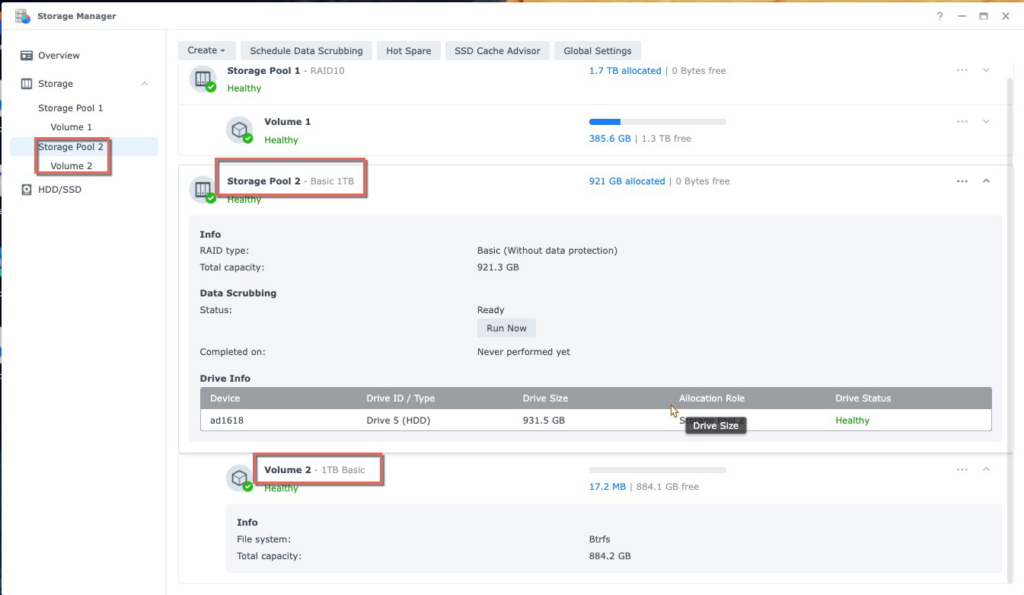
We are going to upgrade this 1TB volume 2 to bigger one by a 8TB disk.


STEP1. Know the device id under Synology terminal mode. #

To use command to control the disk, we need to know the disk id under Linux mode.

For example here, a DS1618+ has 6 disk slots:
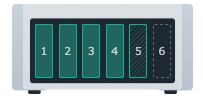
DS1618+ Drive1 ~ 6 count direction
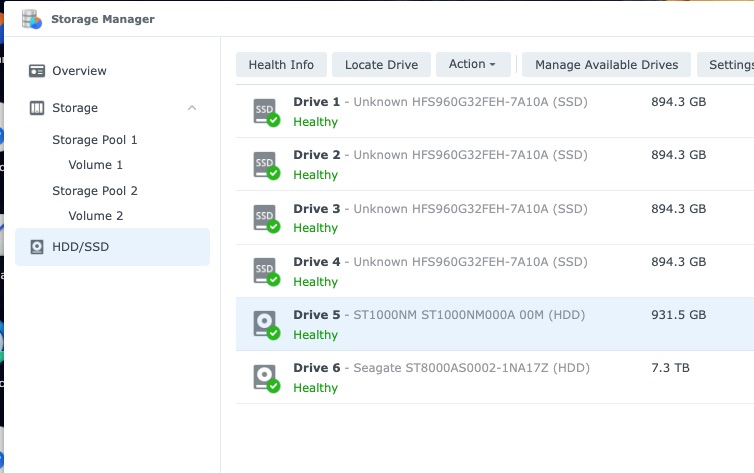
Drive 1 ~ 6 count direction from HDD/SDD list

Each disk device id is:

  • Drive 1 → /dev/sda
  • Drive 2 → /dev/sdb
  • Drive 3 → /dev/sdc
  • Drive 4 → /dev/sdd
  • Drive 5 → /dev/sde
  • Drive 6 → /dev/sdf

Similar logic could be applied to other Synology NAS model.


STEP2. Clone the source disk to target disk via Linux command dd #

dd is a basic Linux command used here to clone the sector from 1TB disk to 8TB disk.

We want to clone the smaller 1TB disk5 ( /dev/sde ) to 8TB disk6 ( /dev/sdf ).
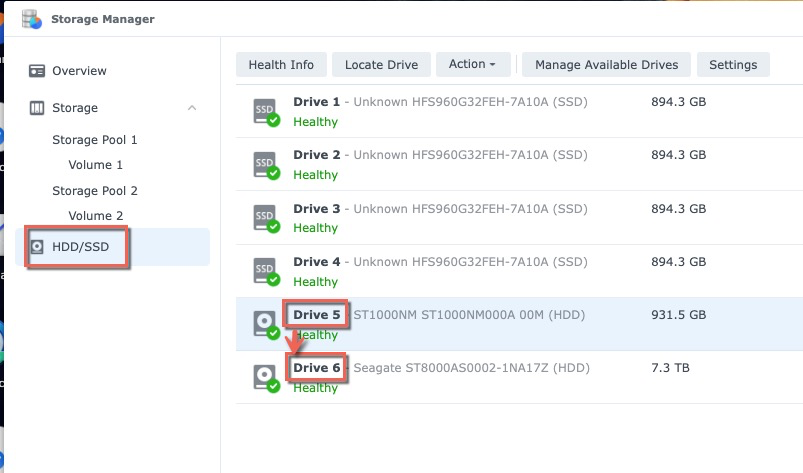
Clone direction: Drive 5 to Drive 6

Login Synology via SSH and Syntax of cloning the whole disk is:

adair@one1618p:~$ sudo -i
Password:
root@one1618p:~# dd if=/dev/sde of=/dev/sdf bs=64k
  • if = input file. Here is the source disk, disk5: /dev/sde.
  • of=output file. It is 8TB disk6, the target bigger disk: /dev/sdf.
  • bs is block size. Setting to 64k could get best clone speed in Synology NAS.

Observe the clone speed on Resource Monitor
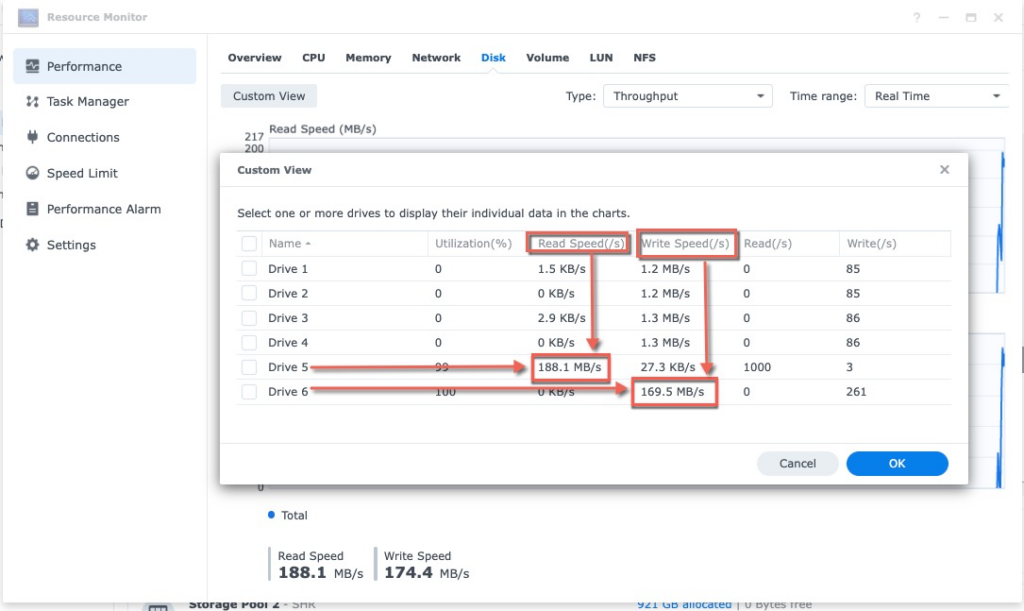
The command “dd” read Disk5 and write to Disk6


The average writing speed could be treated about 150MB/s.

Once the cloning press is done, ssh terminal will be like this:

root@one1618plus:~# 15261915+1 records in
15261915+1 records out
1000204886016 bytes (1.0 TB, 932 GiB) copied, 6887.13 s, 145 MB/s

Cloning 1TB disk to other device means to read 1TB data.

This will cost about 1.9hrs.


STEP3. Partition the bigger disk again to definite its max size #

The command dd clones the info of every sector of the source disk to target disk, including the partition table.

The target disk partition table has old resource disk size definition. To correct this, we will need to repartition the bigger target disk for its real size.

There are many version of Synology disk partition layout after years of development. Thus Synology has a command called synopartition to handle different layout.

There are 2 parts for this step.

Part1. Know the partition layout version of old smaller disk #

This part 1 is to examine the old smaller disk5, 1TB, /dev/sde. Here is how to examine the version for disk5, /dev/sde.

It is version 9 and its index number is 15.

root@one1618p:~# synopartition --check /dev/sde
/dev/sde: partition layout is version 9, list index is 15.
root@one1618p:~# synopartition --list
Index  Version  1-Bay  Size of Root/Swap/Reserved Partition
   1.        1    YES    273042/  787185/ 273042 sectors (  133/  384/ 133 MB)
   2.        2    YES   4980087/ 1044225/ 257040 sectors ( 2431/  509/ 125 MB)
   3.        3    YES    530082/  787185/  16002 sectors (  258/  384/   7 MB)
   4.        5    YES    722862/  594405/  16002 sectors (  352/  290/   7 MB)
   5.        6    YES   4980087/ 4192965/ 257040 sectors ( 2431/ 2047/ 125 MB)
   6.        7    YES   4980480/ 4194304/ 262144 sectors ( 2431/ 2048/ 128 MB)
   7.        8    YES   4980480/ 4194304/ 260352 sectors ( 2431/ 2048/ 127 MB)
   8.        9    YES  16777216/ 4194304/ 262144 sectors ( 8192/ 2048/ 128 MB)
  10.        1     NO   1574307/  787185/ 273105 sectors (  768/  384/ 133 MB)
  11.        2     NO   4980087/ 1044225/ 257040 sectors ( 2431/  509/ 125 MB)
  12.        6     NO   4980087/ 4192965/ 257040 sectors ( 2431/ 2047/ 125 MB)
  13.        7     NO   4980480/ 4194304/ 262144 sectors ( 2431/ 2048/ 128 MB)
  14.        8     NO   4980480/ 4194304/ 260352 sectors ( 2431/ 2048/ 127 MB)
  15.        9     NO  16777216/ 4194304/ 262144 sectors ( 8192/ 2048/ 128 MB)
  19.      100    YES  41943040/ 4194304/      0 sectors (20480/ 2048/   0 MB)
  20.      100     NO  41943040/ 4194304/      0 sectors (20480/ 2048/   0 MB)

Part2. Repartition the bigger new disk #

Part2 is to partition to the bigger disk, here it is 8TB disk6, /dev/sdf.

And we want to partition it to be verion 9, index 15. Syntax is:

root@one1618p:~# synopartition --part /dev/sdf 15

        Device   Sectors (Version9: SupportRaid)
     /dev/sdf1  16777216 (8192 MB)
     /dev/sdf2   4194304 (2048 MB)
Reserved size:    262144 ( 128 MB)
Primary data partition will be created.

WARNING: This action will erase all data on '/dev/sdf' and repart it, are you sure to continue? [y/N] y
Cleaning all partitions...
Creating sys partitions...
Creating primary data partition...
Please remember to mdadm and mkfs new partitions.

It will tell erase all data, but it will not as it does a quick partition only. This does not touch data in the existed volume in this disk.

To check more details about synopartition, you could google it or type ” synopartition –help ” under SSH terminal.

root@ad1618:~# synopartition --help
Copyright (c) 2003-2023 Synology Inc. All rights reserved.

Usage: synopartition (Version )
--help   Show this help.
--list   List the partition layout table.
--check disk_path(eg./dev/sda)
         Check the partition layout version.
--remove disk_path [part_no]
         Remove specific partition of disk. Remove all partitions if not specific.
--part [--force] disk_path index_of_list(1~20) [logical_size_GB ... 0]
         Partition the disk with specific layout.
--scan-syno-part
         Scan all disk partition which matches syno partition layout.
  If you select layout version less than 6, the logical size will be skip.
  Else you can assign max to 11 logical partitions size with unit GB and end with 0.
  If you don't assign logical size parameters, primary data partition will be created instead.

  Please note the index of list may modified in future.
--log disk_path
         Log start offset and size to file for every partition in the disk_path.


STEP4. Reboot Synology NAS with the bigger disk #

Here comes the final progress:

  • Power off Synology NAS
  • Remove the old, smaller disk ( Now it’s our backup ).
  • Power on Synology NAS with the new, bigger disk.

After booting up, the old, smaller size 1TB volume is still there.

There is a “ expand now ” link under Storage Manager > Storage Pool. Just click the link:
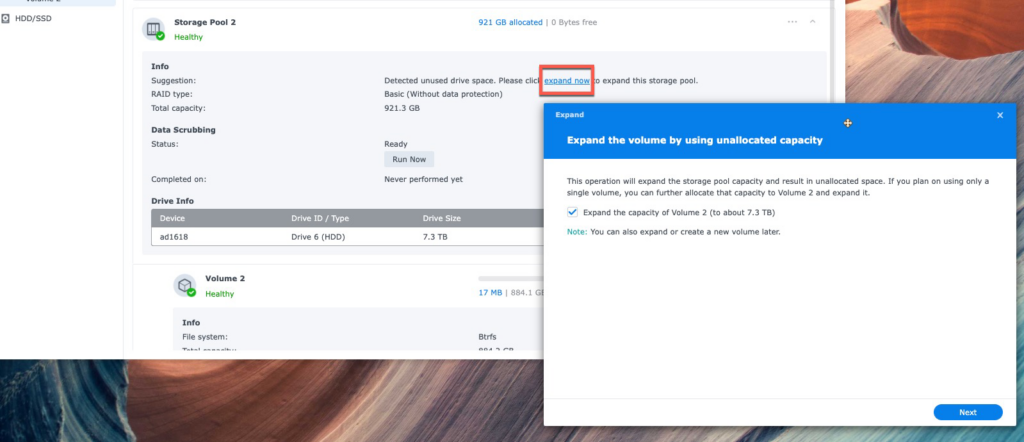
1TB volume 2 will be expanded to 8TB volume2.

The above is all.

From my personal opinion, it is best that Synology directly supports this function on Storage Manager to clone the disk. This feature is useful and convenient. The reasons could be seen in the following posts too:

  • Replace one drive with bigger basic 1 volume drive
  • Cloning a disk?


Have question? Just ask SynoPower Club.

🛠️ Repair Synology DiskStation Hard Drive Tray Door Latch💡 Can the slot order of the hard drives on Synology NAS be changed?
Table of Contents
  • STEP0. Stop all apps write data to the volume of the small disk.
  • STEP1. Know the device id under Synology terminal mode.
  • STEP2. Clone the source disk to target disk via Linux command dd
  • STEP3. Partition the bigger disk again to definite its max size
    • Part1. Know the partition layout version of old smaller disk
    • Part2. Repartition the bigger new disk
  • STEP4. Reboot Synology NAS with the bigger disk

Share This Article :

  • Facebook
  • X
  • LinkedIn
  • Pinterest

Was it helpful ?

  • Happy
  • Normal
  • Sad

SynoPower Club (Bitter821 LLC) - Registered Synology B2B Reseller


Quick Links

  • About Us
  • FAQ & KB
  • Contact Us
  • Privacy Policy
  • Terms of Service
  • Warranty & Return
  • License Installation
  • License Instant Display

Products

  • Camera License 1
  • Camera License 4
  • Camera License 8
  • MailPlus License 5
  • MailPlus License 20
  • VDSM 1 Pack (3 Yrs)
  • VMM Pro Pack (1, 3 Yrs)
  • SynoPower Club - Taipei, Taiwan TIN: 90247314 | Bitter821 LTD
  • Bitter821 LLC - Tokyo, Japan 法人番号: 7010003042164 | ビター821合同会社
  • [email protected]
  • (+886) 939288454
  • Mon–Fri · 9AM–4PM (GMT+8)

SynoPower Club © 2026 All rights reserved

5.0
Read our Reviews
google Rating
5.0
Read More
Alic Chou
google
Alic Chou
May 8, 2026

The physical card photo they send after purchase is actually genius. Now I have a real paper trail for my IT audit.

Biffa
google
Biffa
April 30, 2026

Convenient, fast and cost effective official Synology licenses. No drama, no fuss just what it says on the tin really.

Nils Gradert
google
Nils Gradert
April 27, 2026

Fast & Fair - Great service!

Bear Chu
google
Bear Chu
April 25, 2026

I have been burned by grey-market licenses before. Seeing they are a real Synology partner listed on the official site made me feel safe buying here.

Scott Lee
google
Scott Lee
April 23, 2026

Quick, simple, works. Exactly what I needed for my small business setup.

Steve Lou
google
Steve Lou
April 16, 2026

Price was better than Amazon and delivery was instant.

Elena Lo
google
Elena Lo
April 5, 2026

The checkout process was clean, the key arrived fast, and the follow-up email had actual useful setup tips. Good experience overall. Highly recommended!

許智超
google
許智超
April 5, 2026

Ordered on a Sunday morning. Key arrived in 45 seconds. Installed and cameras running by lunch.

Dog DieBremer
google
Dog DieBremer
March 29, 2026

SynoPower Club is a real authorized expert that helped me resolve my camra license issues way faster than expected. Their professionalism far exceeds other companies I’ve dealt with before. If you need quick and relible help with licenses, SynoPower Club is definitely the way to go!

Howard
google
Howard
March 29, 2026

"SynoPower Club delivers top‑notch technology and outstanding service. Every time I have a request, their team responds quickly and professionally. Highly recommended to everyone looking for reliable support and expertise!"

Michael Puggaard
google
Michael Puggaard
January 14, 2026

Alt var som lovet - Kun plusser her fra

Charlie Wang
google
Charlie Wang
January 9, 2026

Excellent NAS tech support! They helped me set up a secure VPN connection smoothly and efficiently. The technician was knowledgeable, patient, and explained the whole process clearly. Everything works perfectly now. Highly recommended!

YUNG CHUNG Chen
google
YUNG CHUNG Chen
October 10, 2025

這是真的,非常即時的服務與機制。

Iker Ondaro
google
Iker Ondaro
October 5, 2025

Precio competitivo y licencia oficial de Synology de por vida. Te llega al correo de forma instantánea. Sin gastos de envío. ¡Genial!

Lee Hericks
google
Lee Hericks
September 30, 2025

Kind and helpful staff and the lowest price I could find for Synology MailPlus licenses! Licenses were delivered by mail quickly and as a Synology registered partner they worked without issue. The website can be a little slow and quirky but it's worth it!

Christian Blackburn
google
Christian Blackburn
September 9, 2025

Ordered the Synology Camera licence 4 pack, received the key instantly

thomas da cunha
google
thomas da cunha
August 3, 2025

Achat d'une licence Synology, clé reçu en 30 secondes par mail, tarif correct je recommande vivement. Merci synoPowerClub.

Alessandro Magnapane
google
Alessandro Magnapane
July 18, 2025

Prezzi molto competitivi, supporto velocissimo e personale molto gentile! non esiste di meglio!! TOP!

Joey Jerome Smith
google
Joey Jerome Smith
July 16, 2025

Received my License Key via E-Mail right after payment, just what I was looking for.

Nathan Hopwood
google
Nathan Hopwood
June 18, 2025

Excellent purchasing experience, fast no-hassle transaction

zol ol
google
zol ol
May 28, 2025

Super partner

Abraham de Boer
google
Abraham de Boer
May 10, 2025

Professionele en snelle support

Jenő Dr. Rokonai
google
Jenő Dr. Rokonai
April 30, 2025

ConvenientA great site where Synology fans can get what they are looking for at a bargain price and quickly. fast shopping option.

János Szurovecz
google
János Szurovecz
April 7, 2025

The best prices. I got the license code instantly and it worked without any issues.

Marc Baumung
google
Marc Baumung
April 7, 2025

Der Lizenzschlüssel wurde innerhalb von Sekunden per Email versandt 👍

Davide Zenati
google
Davide Zenati
March 19, 2025

All Perfect - i buy more license and all ok

林寶絮
google
林寶絮
March 13, 2025

人間性を持つサポーターです、とってもいい経営方針だと思っています。

Christian Leue
google
Christian Leue
February 28, 2025

Vorbildlicher Service! Die Lizenz war in Minuten geliefert und ich konnte sie sofort auf der Synology aktivieren. Bei SynoPower Club bestelle ich zukünftig alle meine Synology Lizenzen für meine Kunden.

Marco Tomarelli
google
Marco Tomarelli
February 28, 2025

Acquistato online più volte, rapidi e affidabili.

Sonny Wilson
google
Sonny Wilson
February 26, 2025

Exactly what was advertised...quick turnaround and good experience.