

Attivazione della licenza Synology non riuscita? 4 cause e come risolverle

Aggiornato il 29 Ottobre 2026
When a camera license will not go in, the problem is almost never the key itself. Synology license activation is an online check between your NAS and Synology, and in practice it fails for four reasons. Work through them in order and you will find yours.
Una causa da escludere prima è: una chiave proveniente da un generatore o da un annuncio sospettosamente economico non si attiverà mai, perché Synology ha bloccato tali chiavi in DSM 7.1. Se la tua chiave proviene da lì, leggi Cosa fa una chiave di licenza Synology sul tuo NAS prima di provare qualsiasi altra cosa.
Punto SynoPower Club: Most of the failed activations that land in our inbox turn out to be one of two things: a firewall that quietly blocks the NAS from reaching Synology, or a key that is still sitting on the customer’s old NAS. Neither has anything to do with the key being bad, yet both produce an error that reads like it does. The rest are customers who once tried a cracked script and are now paying for it with a locked serial number. Every one of these is fixable, and the order below is the order we check them in, because it starts with the cheapest test.
Why Synology License Activation Fails #
Each cause leaves a different fingerprint, so start with what you actually see on screen.
| What you see | Most likely cause | Where to look |
|---|---|---|
| The wizard times out or reports a network error | The NAS cannot reach Synology | Cause 1 |
| already been installed on other Synology NAS/NVR devices | The key is still active on another server | Cause 2 |
| not registered under the authenticated Synology Account | Wrong Synology Account during migration | Cause 3 |
| The key adds, then Surveillance Station stops working later | Leftover cracked scripts on the NAS | Cause 4 |
Cause 1: Synology License Activation Cannot Reach Synology #
Synology license activation requires an active Internet connection. Either the NAS itself, or the computer or phone used for offline activation, has to reach Synology while the check runs. If your Surveillance Station sits on an isolated network, use our guida all'attivazione della licenza offline instead.
Otherwise, make sure the NAS has outbound HTTPS on port 443 to these addresses:
- licenza.synology.com
- account.synology.com
- pagamento.synology.com
To test the path from the NAS itself, sign in over SSH with root privileges and run:
curl -vL synosurveillance.synology.com 2> /dev/null | grep SynologyA working connection prints a line like this one:
/* Copyright (c) 2022 Synology Inc. Tutti i diritti riservati. */Anything else means the NAS cannot reach the validation server, usually because of a firewall, a proxy or network isolation.
Synology License Activation Network Check in 4 Steps #
If the test fails, these four steps fix the network side of Synology license activation in the order we use them.
Check the connection in DSM #
In DSM open Control Panel, then Network, and confirm the NAS has a default gateway and DNS server. A NAS that cannot resolve names will fail every license check.
Test the path from the NAS itself #
Sign in over SSH with root privileges and run the curl test shown above. A Synology copyright line means the validation path works. Anything else points at the network.
Open outbound HTTPS #
Allow outbound port 443 from the NAS to license.synology.com, account.synology.com and payment.synology.com on your firewall, proxy or router, then try adding the key again.
Use offline activation if the NAS must stay closed #
If policy keeps the NAS off the Internet, add the key from Surveillance Station Client or DS cam on a device that is online, then sign in to the NAS to sync it.
Cause 2: The Key Is Still Active on Another Server #
The most common Synology license activation error has nothing to do with the network. A license can only be active on one server at a time. If you moved to a new NAS without deleting the keys from the old one, the new NAS shows this message:
The following license keys have already been installed on other Synology NAS/NVR devices and cannot be added.
- Check every server you own for the same keys. If a key appears twice, delete it from one of them.
- If the old NAS still works, delete the keys there first, then add them on the new one.
- If the old NAS no longer starts, add the keys on the new NAS and accept the migration. Surveillance Station will ask for the Synology Account the old NAS was signed in to.
The full process, including MailPlus and the virtualization licenses, is in our Synology license transfer guide.
Cause 3: The Wrong Synology Account #
This Synology license activation failure only appears during migration. Synology checks ownership against the account of the original server, not the new one. If you have more than one Synology Account, this is where it goes wrong, and the message is:
The NAS/NVR devices where the licenses were activated previously are not registered under the authenticated Synology Account.
Try each account you have, and check in DSM Control Panel that the original NAS was actually signed in. A device appearing in your Synology Account list does not prove it was signed in. Synology explains both messages in its license migration troubleshooting article.
Cause 4: A Cracked Key Was Used on This NAS Before #
The hardest Synology license activation failures to diagnose come from the past. If a keygen script was ever installed, such as the Surveillance Station 9 generators passed around on GitHub, it may have worked for a while. Synology updates break these scripts, and we have seen them disable Surveillance Station on newer DSM versions and get the serial number of the NAS locked.
- Stop any running cracked scripts, then reset the NAS and reinstall DSM and Surveillance Station using Mode 2: reset and reinstall DSM.
- Add the genuine license again, following our license installation guide.
- If Synology license activation still fails, the serial number is probably locked. In the cases we have handled this lasted about two weeks. To unlock it sooner, open a Synology support ticket with a photo of the NAS serial number, the license card or digital key, and the invoice.
If you bought from SynoPower Club, we send the license photo or original files on request (request your license photo), and we open business level tickets with Synology HQ Support for our customers free of charge.
Case Studies From Our Synology Support Tickets #
Two real tickets show how a stuck Synology license activation gets resolved. To speed things up with Synology HQ in Taiwan, we write these tickets in Traditional Chinese and copy the customer on every update.
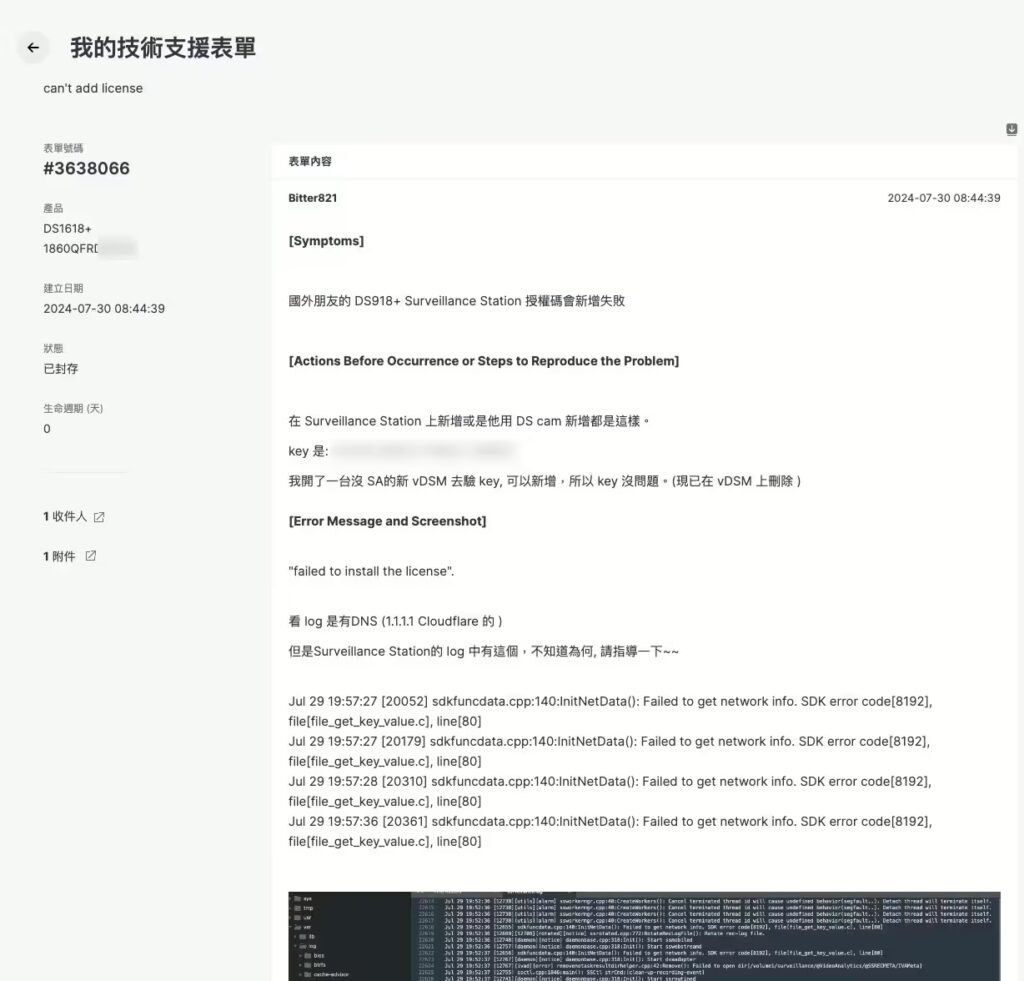
[#3638066] The customer could not add the license. We opened a business ticket with Synology HQ Support on the customer’s behalf. After we provided the photo of the license card and the invoice, Synology unlocked the serial number and the key activated.
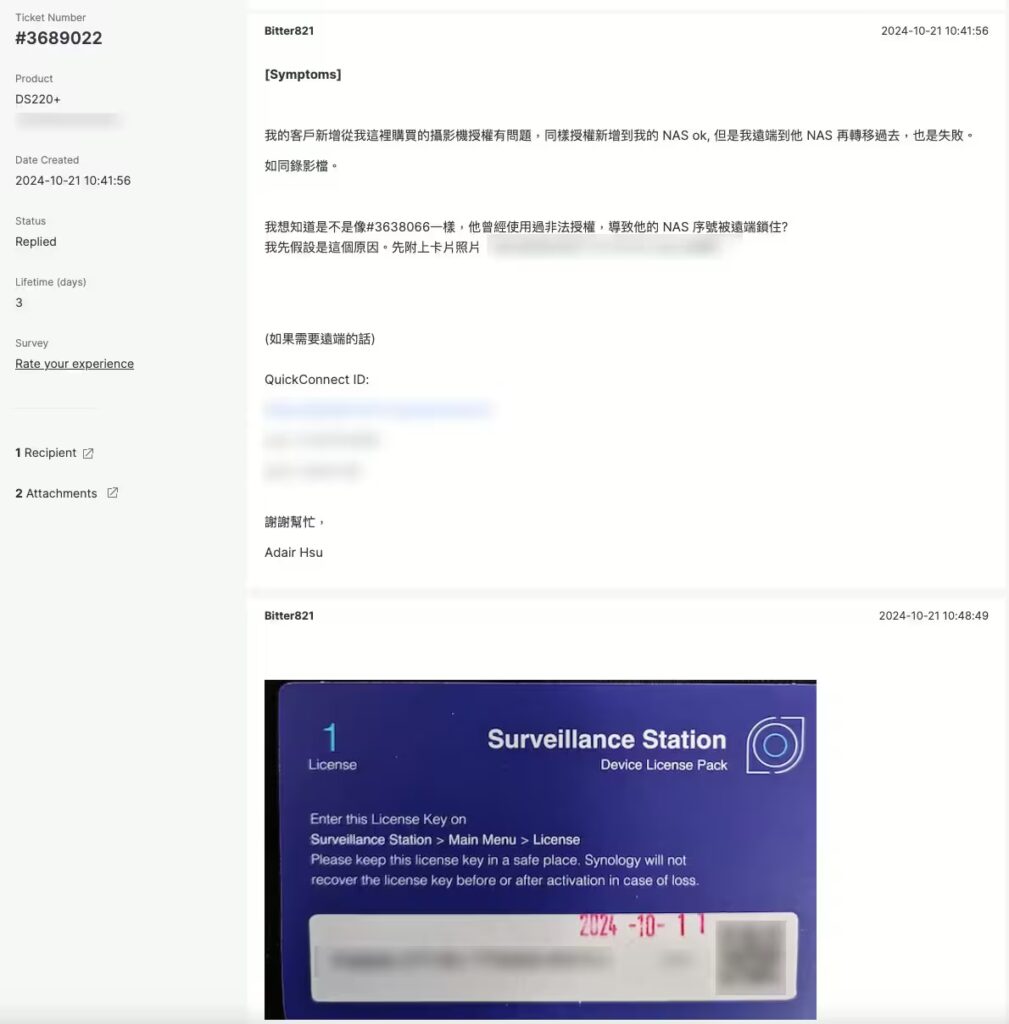
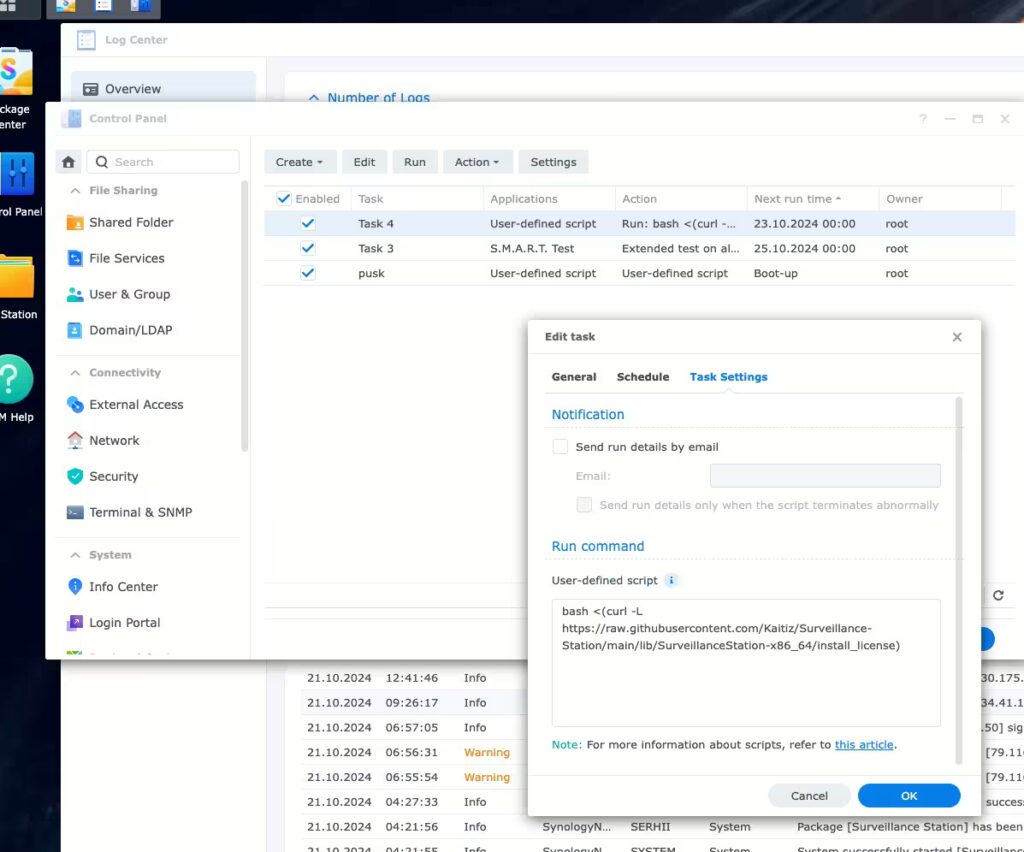
[#3689022] The license was added, but Surveillance Station was disabled again after 24 hours. We opened a ticket, then signed in to the customer’s DS220+ remotely and found two cracked keygen scripts running with root privileges. Resetting the NAS and adding the license again fixed it.
Vuoi le licenze ufficiali Synology con supporto completo? 👉 Cambialo Qui con Miglior valore
Synology License Activation Limits and Notes #
- The default licenses that ship with a NAS cannot be deleted or migrated, so they never cause an activation conflict.
- Up to 100 keys can be pasted at once in the Add License wizard.
- Deleted keys are not kept in Surveillance Station history. Keep your own copy before deleting anything.
- Stay signed in to your Synology Account in DSM. It is what lets you migrate keys later if the NAS fails.
- Retrying a rejected key many times does not help. Fix the cause first, then try once.
Utilizzo frequente #
Which addresses must the NAS reach for Synology license activation? #
Outbound HTTPS on port 443 to license.synology.com, account.synology.com and payment.synology.com. A quick way to prove the path works is to SSH into the NAS and run curl against synosurveillance.synology.com. A working connection returns a Synology copyright line.
What does already been installed on other Synology NAS/NVR devices mean? #
The key is still active on another server. Each license can only be added once, so delete it from the other server first, or migrate it by authenticating the Synology Account that server used.
Can I activate a license without Internet access on the NAS? #
Yes. Surveillance Station Client or DS cam can complete the check from a computer or phone that has Internet, which covers isolated camera networks. The procedure is in our offline activation guide.
Why does Synology license activation ask for a Synology Account? #
When a key was active on another server, Synology asks for the account of that server to prove you own it. Use the account the original NAS was signed in to, not the one on the new NAS.
Su questo NAS è stata precedentemente utilizzata una chiave di licenza crackata. È possibile recuperarla? #
Usually yes, but not always cleanly. Remove the scripts, reinstall DSM and Surveillance Station, then add the genuine key. If it still fails, the serial number may be locked and Synology Support can unlock it with your proof of purchase.
How long does a locked NAS stay locked? #
In the cases we have handled, a serial number locked after a cracked key stayed locked for about two weeks. A support ticket with proof of purchase is the faster way out.
What should I send Synology Support when Synology license activation fails? #
The license keys, the model and serial number of the NAS, your proof of purchase and a description of the error. A photo of the license card or the digital key helps.
Can SynoPower Club help with a failed activation? #
Yes. If you bought from us, we send the license photo and invoice on request and can open a business level ticket with Synology HQ Support on your behalf, free of charge.
Riferimenti e video dimostrativi #
Official sources for the causes and fixes above, plus three videos on the apps involved.
- Synology Knowledge Center: troubleshooting license migration issues, the source of both error messages above.
- Synology Knowledge Center: transferring surveillance device licenses for delete and add, and migration.
- Synology Knowledge Center: managing device licenses offline for servers without Internet access.
- Synology Knowledge Center: resetting a Synology NAS, including Mode 2 for reinstalling DSM.
- Pacchetto licenza dispositivo di sorveglianza, the official product page for camera licenses.